AI Workflow Analytics for Patent Teams
Intellectual Property Management
Mar 14, 2026
Streamline patent drafting, searches, and portfolio management with AI workflow analytics—cut hours and costs while improving examiner-aware decisions.

Managing patent workflows can be complex, but AI workflow analytics is transforming how patent teams operate. By automating repetitive tasks, integrating processes, and providing real-time insights, AI tools are saving time, reducing costs, and improving decision-making for patent professionals.
Key Takeaways:
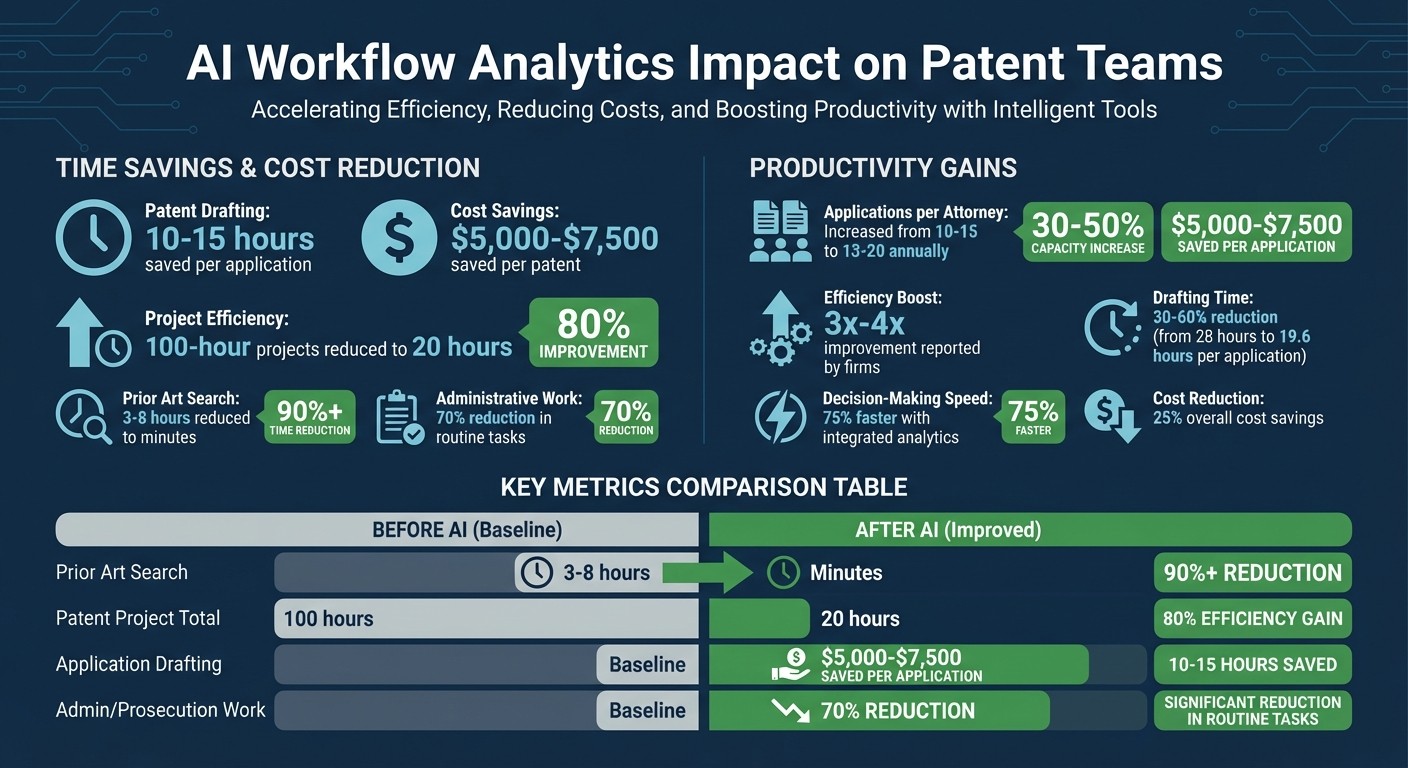
Time Savings: Drafting patent applications with AI can reduce time by 10–15 hours per application, saving $5,000–$7,500 per patent.
Efficiency Gains: 100-hour projects cut to 20 hours with AI tools - an 80% improvement.
Smarter Decisions: AI analyzes examiner behavior, predicts outcomes, and identifies weaknesses in claims.
Improved Collaboration: Centralized platforms eliminate data silos and streamline team communication.
Enhanced Portfolio Management: Features like heatmaps and auto-classification help identify high-value assets and risks.
Why it matters: Patent teams can now focus on strategic tasks instead of administrative burdens, ensuring deadlines are met and portfolios are optimized for success. This article explains how AI workflow analytics is reshaping patent management with actionable insights and measurable results.
AI Workflow Analytics Impact on Patent Teams: Time Savings and Efficiency Gains
Integrated AI Workflows for Patent Prosecution IPWatchdog Webinar
Main Benefits of AI Workflow Analytics
AI workflow analytics bring three key advantages to the table: faster task completion, smarter decisions, and better collaboration. These aren't just buzzwords - they're backed by measurable results from teams already using AI to transform their processes.
Better Task Efficiency and Time Management
AI eliminates the need for juggling multiple tools and manual processes. With integrated platforms, tasks like AI patent drafting, searching, and analysis are centralized, cutting down on time-consuming steps.
The time savings are impressive. For example, a biotechnology firm in February 2026 saved 10–15 hours and $5,000–$7,500 per patent by automating repetitive tasks. Another team managed to reduce a 100-hour project to just 20 hours - a whopping 80% efficiency boost. Tasks like OCR and claim chart copying, which traditionally eat up 70% of the workload, can now be handled seamlessly.
Take prior art searches as another example. These typically take 3 to 8 hours of attorney time per case when done manually. AI systems, however, can complete these searches in minutes, using semantic analysis to organize references into ready-to-review formats. Predictive examiner analytics go a step further by analyzing USPTO examiner patterns, helping teams draft claims that align with examiner preferences, which reduces office actions. Bulk management tools can tag up to 75 patents at once, speeding up tasks like infringement analysis or pruning decisions.
Task | Traditional Manual Time | AI‑Enhanced Time | Impact |
|---|---|---|---|
Prior Art Search | 3–8 hours | Minutes | 90%+ time reduction |
Patent Project (Total) | 100 hours | 20 hours | 80% efficiency gain |
Application Drafting | Baseline | 10–15 hours saved | $5,000–$7,500 savings |
Admin/Prosecution Work | Baseline | 70% reduction | Focus on legal strategy |
These time-saving improvements allow teams to focus on strategic decisions rather than getting bogged down in repetitive tasks.
Better Decision-Making with Data Insights
AI doesn't just save time - it also delivers actionable insights. By analyzing data throughout the patent lifecycle, AI helps teams make more informed decisions. For example, examiner behavior tracking reveals patterns in how specific USPTO examiners interpret patentability criteria, their preferred terminology, and how they handle Section 101 or Section 103 rejections.
"Examiner analytics helps you see those patterns in advance. It's like getting a cheat sheet before the test. Not to game the system - but to work smarter." - PowerPatent
AI-generated heatmaps make portfolio triage more precise, assessing infringement potential and validity exposure across hundreds of patents at once. In one case, Asahi Kasei used AI to automate infringement detection, cutting down on the time and inconsistency of manual searches for their mechanical and chemical patent portfolios.
Machine learning models also provide probability scores for outcomes, such as the likelihood of allowance or the success rate of a Request for Continued Examination (RCE). During drafting, AI tools offer phrase-level audits for Section 112 compliance and conduct dynamic validity searches against prior art. These capabilities can prevent external search costs, which often range from $20,000 to $50,000 per matter.
Easier Collaboration Across Teams
AI platforms simplify collaboration by integrating drafting, search, and analysis into a single workflow, eliminating data silos and ensuring everyone works from the same information. Real-time collaboration tools let multiple analysts work on the same dashboard, with changes visible immediately, avoiding version control issues.
"Shared Claim Construction" ensures that when a key term is refined in one module, it automatically updates across all related tools, like infringement heatmaps and drafting prompts. This consistency is crucial for managing complex portfolios. Structured project workspaces allow teams to focus on specific initiatives - like quarterly pruning or M&A analysis - while maintaining role-based access controls.
AI also bridges the gap between R&D and legal teams. For example, AI-guided intake modules can transform unstructured materials like PowerPoints or lab notebooks into structured Invention Disclosure Forms (IDFs), reducing back-and-forth between engineers and patent counsel. Automated dashboards provide a "shared source of truth", showing the status of every task and replacing status update meetings, which can take up over 10 hours per week.
One biotechnology company reported that by unifying invention harvesting, drafting, and portfolio management within an AI platform, they significantly reduced outside counsel fees while maintaining quality. Detailed audit trails also ensure compliance and provide a clear record of how strategies evolve over time.
Key Metrics and KPIs for Patent Workflows
Tracking metrics is the bridge between guessing and making informed decisions. Interestingly, while 77% of leaders view innovation as strategically critical, only 22% actively track metrics to measure it. For patent teams, pinpointing the right metrics can redefine workflows.
The most impactful metrics fall into three main areas: cycle time and task completion, resource allocation and utilization, and bottleneck identification. Each offers unique insights - whether it's the pace of work, how resources are used, or where delays occur. Using integrated patent analytics tools, teams have achieved 75% faster decision-making and cut costs by 25% when focusing on these KPIs. Let's dive into how these metrics can drive efficiency and improve patent workflows.
Cycle Time and Task Completion Rates
Cycle time metrics measure how quickly tasks move through the workflow. For example, Time-to-File tracks the period from invention disclosure to filing, while Ideation-to-Grant Duration captures the full journey from concept to patent grant. These metrics reveal whether your processes are keeping pace with competitors or if delays are hurting your market position.
One key area of friction is Office Action Response Turnaround - how long it takes to analyze feedback from examiners and draft responses. Identifying bottlenecks here can significantly improve efficiency. Alongside speed, Prosecution Success Rates - the ratio of granted patents to total filings - offer a quality check.
Automation plays a huge role in streamlining these processes. For instance, automated tools can parse Office Actions into structured data, categorizing rejections (§§ 101, 102, 103, 112) and objections automatically. This eliminates the need for manual sorting, speeding up response times. One team, in early 2026, replaced three weekly status meetings with a live AI dashboard that showed the status of each case, responsible parties, and deadlines. This change saved over 10 hours per week, adding up to more than 500 billable hours annually.
Resource Allocation and Utilization
Efficiency isn't just about speed; it's also about understanding how resources are used. Metrics like Personnel Hours per Disclosure track the time spent on each invention. Even more revealing is the balance between Administrative vs. Strategic Time - how much effort goes into routine tasks like OCR or formatting versus high-value legal strategy.
"We witness attorneys with two decades of experience blowing billable hours on unbillable administrative busywork... This is not only inefficient. It is also a misallocation of high-value intellectual capital." - IP Author
Metrics like Capacity and Caseload help teams gauge their workload limits without overextending staff or increasing costs. For example, between late 2025 and early 2026, one firm automated task routing and document control. This allowed them to increase their caseload by over 30% in just three months, all without hiring additional staff.
For firms operating on fixed fees, tracking the Effective Hourly Rate is essential. This metric ensures profitability by comparing the time spent on a case to the revenue it generates. For example, a §103 rejection that takes 10 hours instead of the planned 4 can severely impact profit margins. Monitoring communication time between legal and regulatory teams also helps avoid costly delays that reduce patent life.
Metric Category | Key KPI | Purpose |
|---|---|---|
Efficiency | Time-to-File | Tracks speed from R&D to IP protection |
Quality | Citation Impact | Highlights technical and litigation value |
Financial | Effective Hourly Rate | Ensures profitability for fixed-fee projects |
Regulatory | Accumulated Delay Days | Measures lost patent life for PTA/PTE recovery |
Examiner | Allowance Rate | Predicts success likelihood with specific examiners |
Finding and Fixing Bottlenecks
Bottleneck metrics identify where work slows down. For example, tracking Applicant-Caused vs. USPTO-Caused Delays is crucial for Patent Term Adjustment (PTA) and Patent Term Extension (PTE) calculations. A three-week delay in responding to the USPTO could reduce the adjusted patent term by 30 days.
Another common issue is Internal Review Cycle Lags, which measure how long drafts sit waiting for internal or client approval. In 2025, one firm automated client review follow-ups with branded notifications and polite reminders for unresponsive clients. This cut turnaround times in half and boosted referrals by enhancing professionalism.
Delays from Tool-Switching Friction - caused by disconnected platforms - are another challenge. Practitioners often waste time exporting data between systems for tasks like drafting and analysis. Real-time dashboards for PTA/PTE monitoring can address this by providing live updates on procedural delays, shifting away from static reports.
"Visibility isn't just about awareness - it's about foresight." - PowerPatent
Patently's AI Features for Workflow Optimization
Patently takes AI workflow analytics a step further with tools designed to simplify patent operations. Modern patent processes often struggle with inefficiencies like switching between tools, delays from bottlenecks, and repetitive tasks. Patently addresses these issues through three standout features: semantic search, customizable project management, and collaboration tools with SEP analytics.
Semantic Search with Vector AI
Traditional keyword-based searches often fall short when different terminology is used. Patently's Vector AI solves this by focusing on semantic meaning rather than exact wording. For example, searching for "Drone" would also surface patents describing "Unmanned Aerial Rotocraft", bridging the vocabulary gap.
This tool scans an extensive database of 82 million patent families (covering 135 million individual patents) and 250 million non-patent literature publications. Take Laurence Brown's October 2024 search for "In-ear headphones with noise isolating tips" as an example. Using a priority date filter set before 2000, the system returned 300 relevant results in under five minutes, enabling him to pinpoint the patents he needed.
"With Elastic, it's like having a patent attorney with decades of experience guiding every search." - Andrew Crothers, Creative Director, Patently
By 2026, a hybrid search approach became standard, combining Vector AI for broad conceptual results with Boolean filters for precise legal accuracy. Embedded directly into the drafting and analysis tools, semantic search saves time by allowing teams to test claim hypotheses and run validity checks without leaving the platform.
Customizable Project Management
Patently doesn't stop at search capabilities - it also brings order to patent workflows through its project management tools. A dashboard-based system allows teams to organize tasks, monitor progress, and tailor project categories to their needs. Features like "Spec Styles" ensure drafting remains consistent across team members and projects. Real-time collaborative editing lets multiple users work simultaneously while automatically resolving conflicts.
The platform also maintains a complete version history and audit trail, making it easy to track changes and revert if needed. Key tools include a Pin feature to lock sections of text during AI-assisted updates and a Rewrite feature for targeted improvements. Role-based permissions ensure appropriate access levels, while Patently's AI can generate full patent drafts - including specifications, claims, and drawings - in about 30 minutes.
Collaboration and SEP Analytics Tools
Patently's SEP analytics module simplifies the process of determining whether patent claims align with technical standards like 5G or Wi-Fi. It generates detailed claim charts with essentiality ratings such as Normative, Implied, Informative, and Contextual, helping teams identify core functionalities versus secondary references. This analysis typically takes 15 minutes or less.
Once charts are generated, users can interact with an AI Chat Agent to ask questions, clarify ratings, or delve into specific sections of the standards. Teams can also run SEP analyses on draft applications to refine claim scope and ensure compliance before filing.
For example, the law firm Young Basile used Patently's platform to cut their patent drafting workload by 20%. Similarly, Reichman Jorgensen Lehman & Feldberg LLP reduced standard research time by one to two days per case, and an Am Law 100 Practice Group Head reported an 80% reduction in IP counseling time. These tools highlight Patently's ability to streamline and optimize patent operations through data-driven solutions.
Measuring ROI with AI Workflow Analytics
Measuring ROI is a key step for patent teams when deciding to transition to AI-powered workflow analytics like Patently Create. It’s also essential to ensure these tools drive both operational improvements and strategic benefits. Start by documenting your current performance - track the hours spent on drafting, conducting searches, and responding to office actions, along with application volumes and quality issues. This baseline will help you make meaningful comparisons after implementation.
Comparing Before and After Implementation Metrics
Key metrics clearly show the financial impact of AI adoption. For instance, reducing the time to draft a patent application from 28 hours to 19.6 hours represents a 30%–60% improvement. In-house teams have reported saving $5,000 to $7,500 per application by trimming 10 to 15 hours of drafting time. These time savings extend to high-value projects as well.
In February 2026, Bob Hansen from The Marbury Law Group highlighted a 3x–4x efficiency boost, which allowed them to offer fixed-fee work at partner rates. More experienced teams have achieved 40%–60% reductions in drafting time. Attorneys who previously handled 10 to 15 applications annually can now manage 13 to 20 applications, thanks to these efficiency gains.
Metric | Pre-Implementation | Post-Implementation | Impact |
|---|---|---|---|
Drafting Time (per App) | 28 hours | 19.6 hours | 30%–60% reduction |
Cost Savings | Standard rates | $5,000–$7,500 saved | Lower per-application cost |
Applications per Attorney | 10–15 annually | 13–20 annually | 30%–50% capacity increase |
It’s important to monitor review times separately to ensure that drafting time savings don’t lead to longer downstream review cycles. Additionally, track realization rates (the difference between actual hours worked and fixed-fee budgets) to evaluate how AI minimizes write-offs on flat-fee matters. With 71% of legal clients preferring flat-fee arrangements, improving internal efficiency directly boosts profitability.
These short-term wins set the stage for long-term advantages.
Long-Term Value of AI Investments
AI tools don’t just deliver immediate efficiency gains - they also provide lasting value by improving portfolio quality and throughput. Teams that implement AI analytics can break free from the traditional constraint of needing proportional headcount increases to grow. Automation enables firms to handle double the client workload with the same team size. For life sciences teams, tracking Patent Term Adjustment (PTA) and Patent Term Extension (PTE) days saved through faster responses helps preserve market exclusivity and revenue.
Improved quality is another long-term benefit. Teams leveraging data-driven analytics achieve allowance rates that are 10+ percentage points higher than the USPTO average. Fewer Section 112 rejections and shorter review cycles reduce prosecution costs and speed up grants. Automated workflows also ease onboarding for new hires by incorporating standardized templates and built-in guardrails.
"At Potter Clarkson, our priority is delivering technically rigorous and strategically sound advice to our clients. We use Solve Intelligence as a tool in the hands of experienced patent attorneys... It allows our senior teams to concentrate on the aspects of drafting and prosecution where their judgement adds the greatest value." - Peter Finnie, Partner, Potter Clarkson
To maximize the value of AI tools, define clear success criteria during the pilot phase, such as achieving a 30% reduction in drafting time without increasing review cycles. Also, establish stop criteria, like recurring quality issues, to determine when adjustments are needed. After 30 days, use a "Start-Stop-Continue" framework to identify which AI-enabled workflows to scale based on time savings and output quality.
Best Practices for Adopting AI Workflow Analytics
Implementing AI effectively requires a thoughtful and strategic approach. Patent teams that rush into full-scale AI integration often end up amplifying existing inefficiencies rather than addressing core challenges. To avoid this, it's essential to map out current workflows - including handoffs and manual processes - before introducing AI tools [2,35]. The practices outlined here can help ensure that AI-driven workflow analytics lead to tangible improvements in efficiency for patent teams.
Start Small and Scale Up
The best way to begin is by focusing on a single, repetitive task - like handling Office Action responses or conducting semantic searches. This approach allows for a low-risk proof-of-concept with quick results [12,37]. For example, between 2021 and 2026, Roche's Basel patent department developed "Themis PatAI", an AI platform initially rolled out to 80 European patent attorneys. By concentrating on specific tasks like semantic searches of EPO cases and internal document queries, the department dramatically reduced the time to launch new AI projects - from months to just days - and saved up to $250,000 annually in attorney hours.
After completing the pilot phase, use a "Start-Stop-Continue" framework to evaluate outcomes. Identify processes that delivered measurable benefits (scale these), those that caused issues (stop them), and those that need further refinement (continue testing). A reasonable benchmark for success during the pilot phase is a 30% reduction in drafting time without increasing the review workload [31,40].
Train Teams to Use AI Tools Effectively
Proper training is key to unlocking the full potential of AI tools. Live onboarding sessions ensure that every team member gains hands-on experience and learns how to use AI effectively. Training should emphasize prompt engineering and contextual instruction, teaching users how to provide clear, step-by-step inputs along with relevant documents like invention disclosures and prior art.
Structured training programs can lead to transformative results. In November 2024, The Marbury Law Group, led by founding partner Bob Hansen, implemented an AI adoption strategy that included tracking drafting times and conducting live drafting sessions. By giving the AI complete context within a single workspace, the firm achieved efficiency gains of 3x–4x, making fixed-fee work viable even at partner-level rates [31,39,40]. Similarly, Potter Clarkson trained senior attorneys to fine-tune their AI systems, adapting them to reflect their firm's specific drafting styles and standards [31,39,40].
To sustain these gains, create a centralized knowledge base by recording training sessions for future reference. Provide team members with verification checklists to systematically review AI-assisted outputs for technical accuracy, claim support, and figure references. Regularly schedule quarterly drop-in sessions to introduce new features and revisit advanced workflows, reinforcing adoption over time.
Review and Adjust Workflow Strategies Regularly
AI integration isn't a one-and-done project - it requires continuous monitoring and adjustment. After the first 30 days, implement a 60- to 90-day review plan to track tool usage, collect feedback, and address any technical or quality concerns. It's also important to monitor both the time saved on drafting and the time spent on human review to ensure that efficiency gains aren't negated by increased oversight.
Maintain a log of defects and near-misses to identify areas where AI outputs require closer human supervision. This helps teams spot patterns in errors or inconsistencies and refine workflows accordingly. Standardize successful prompts and processes as team-wide templates to ensure consistent, high-quality results. Stephanie Curcio, CEO and Co-founder of NL Patent, emphasizes:
"AI adoption should be treated as an ongoing process rather than a one-time milestone".
Use a centralized spreadsheet to track time savings, quality issues, and review efforts for every case involving AI. This not only highlights patterns but also helps justify the business case to stakeholders. Design workflows with "invisible guardrails", such as automated notifications when a step is skipped, to support team members without imposing rigid structures. This ensures AI tools remain flexible and aligned with the evolving needs of your team and the changing landscape of patent laws and USPTO regulations.
Conclusion
AI workflow analytics brings together previously disjointed patent tasks, creating a streamlined process where drafting, searching, and analysis happen in real time. Teams using interconnected AI platforms have seen dramatic improvements: reducing 100-hour patent projects to just 20 hours, saving between $5,000 and $7,500 per application, and cutting drafting time by 10 to 15 hours per filing. This translates to an impressive 80% reduction in total project time.
Beyond saving time and money, moving from fragmented tools to AI-driven platforms eliminates export bottlenecks and consolidates data into a single, structured source. When drafting, freedom-to-operate analysis, and validity searches are all performed within one environment, patent teams gain a comprehensive view of their portfolios. This holistic perspective helps identify gaps, overlapping claims, and even monetization opportunities through actionable, data-backed insights.
"Efficiency is not about cutting corners. It is about reallocating expert time toward higher-value analysis and ensuring every patent dollar is spent with purpose", as Patlytics aptly states.
Adopting AI is not a one-and-done effort - it requires continuous refinement. Start with repetitive tasks, train teams to provide clear, context-rich inputs, and track metrics to fine-tune workflows. Using examiner analytics before filing and setting up classification-based infringement heatmaps ensures consistency throughout the prosecution process.
Tools like Patently’s semantic search powered by Vector AI, combined with customizable project management and collaboration features, make this transition from fragmented workflows to strategic innovation possible. By embracing AI workflow analytics with care and intention, patent teams can shorten project timelines, improve profit margins, and achieve outstanding IP results - all while safeguarding sensitive R&D data with enterprise-grade security.
FAQs
What workflows should we automate first with AI?
Automation can be a game-changer for handling repetitive and time-consuming tasks in the patent lifecycle. Start by focusing on workflows like transforming technical documents into structured Invention Disclosure Forms (IDFs). Another area ripe for automation is managing office actions, which includes analyzing examiner remarks and drafting responses efficiently.
Other high-priority tasks to automate include prior art searches, patent drafting, and invalidity analysis. These areas not only demand significant effort but also leave room for human error. By automating these processes, patent teams can save valuable time, minimize mistakes, and make more informed decisions.
How do we measure ROI from AI workflow analytics?
AI workflow analytics delivers measurable ROI through several key metrics. These include cost savings, enhanced efficiency, reduced cycle times, and more precise decision-making within patent operations. Together, these factors illustrate how AI boosts productivity and simplifies workflows effectively.
How do we keep confidential invention data secure?
To keep confidential invention data safe while using AI workflow analytics, it's crucial to build security into the process from the start. Focus on key practices like encrypting sensitive data, restricting access to authorized individuals, and performing regular security audits.
Additionally, enforce strict data handling policies, maintain continuous monitoring, and align with enterprise security standards by obtaining recognized certifications. These steps are essential for safeguarding sensitive intellectual property, such as patent drafts, invention disclosures, and litigation strategies, while preventing unauthorized access and ensuring data integrity.