How AI Creates Custom IP Workflow Templates
Intellectual Property Management
Mar 4, 2026
Cut patent drafting time and costs with AI-powered IP workflow templates that boost accuracy, ensure compliance, and streamline team collaboration.

AI is transforming patent workflows. By automating repetitive tasks like claim chart assembly and error checking, AI-driven templates save time, reduce costs, and improve accuracy. For example, one biotech company saved $5,000–$7,500 per patent and cut preparation time by 10–15 hours. These tools also enhance collaboration by integrating with platforms like Slack and GitHub, turning technical notes into structured drafts.
Key Takeaways:
Time & Cost Savings: Drafts are 80% complete instantly, saving up to $7,500 per patent.
Improved Accuracy: AI catches errors early, ensuring compliance with §112 standards.
Seamless Collaboration: Tools centralize disclosures, prior art, and feedback for better teamwork.
Proactive Workflows: AI anticipates next steps, avoiding missed deadlines.
By leveraging top patent tools like Patently, IP teams can focus on strategy rather than admin tasks, ensuring efficiency and precision in patent management.
Benefits of AI-Driven Workflow Customization
Time and Cost Savings
AI doesn't just automate tasks - it streamlines them to save both time and money in custom IP workflows. For example, smart templates can instantly generate an 80% complete draft by drawing from prior patents. This eliminates the tedious copy-pasting and repetitive legal phrasing that used to eat up attorneys' time.
To put it into perspective, drafting a utility patent traditionally costs anywhere from $10,000 to $15,000 per filing. One biotech company reported saving between $5,000 and $7,500 per patent application while cutting preparation time by 10 to 15 hours. This shift fundamentally changes the economics of patent work, turning what used to take weeks of back-and-forth into a process that can be completed in just a few hours.
Features like "Pin" also ensure that critical manual edits are preserved. However, despite these tools, 74% of companies struggle to fully leverage AI because they lack the frameworks needed to integrate it effectively into their workflows. Yet, when implemented strategically, AI has the potential to boost business productivity by as much as 40%, according to Accenture. These efficiencies not only save money but also improve accuracy and compliance.
Better Accuracy and Compliance
AI enhances accuracy by catching errors that might slip past human reviewers. For instance, automated disclosure auditing scans uploaded materials to identify features, process steps, and embodiment types before drafting even begins. This proactive approach helps avoid costly mistakes later on.
Another major advantage is real-time terminology consistency. AI can monitor for "language drift", ensuring that technical terms like "control unit" and "controller" are used consistently across abstracts, descriptions, and claims. Claim validation tools also analyze drafts for common §112 issues, such as clarity, enablement, and antecedent basis problems, ensuring compliance with legal standards.
On top of that, AI manages USPTO formatting requirements, handling details like paragraph numbering, headers, and margins. By automating these routine tasks, AI not only reduces errors but also eases the workload on legal teams, helping to combat the 41% burnout rate among legal professionals. These improvements naturally lead to better collaboration across teams.
Better Team Collaboration
AI fosters collaboration by creating a centralized hub where disclosures, prior art, and feedback are easily accessible. Tools like "Pin", "Rewrite", and in-line editing allow legal and engineering teams to work together seamlessly.
AI also integrates with engineering platforms like Slack, GitHub, and JIRA, converting technical notes into structured patent drafts almost instantly. This means engineers can focus on innovation without needing to learn legal jargon. Additionally, portfolio dashboards provide an overview of deadlines, dependencies, and ongoing tasks across R&D and legal departments, keeping everyone on the same page. This streamlined communication ensures teams stay aligned and productive.
Integrated AI Workflows for Patent Prosecution IPWatchdog Webinar

How to Create Custom IP Workflow Templates with AI
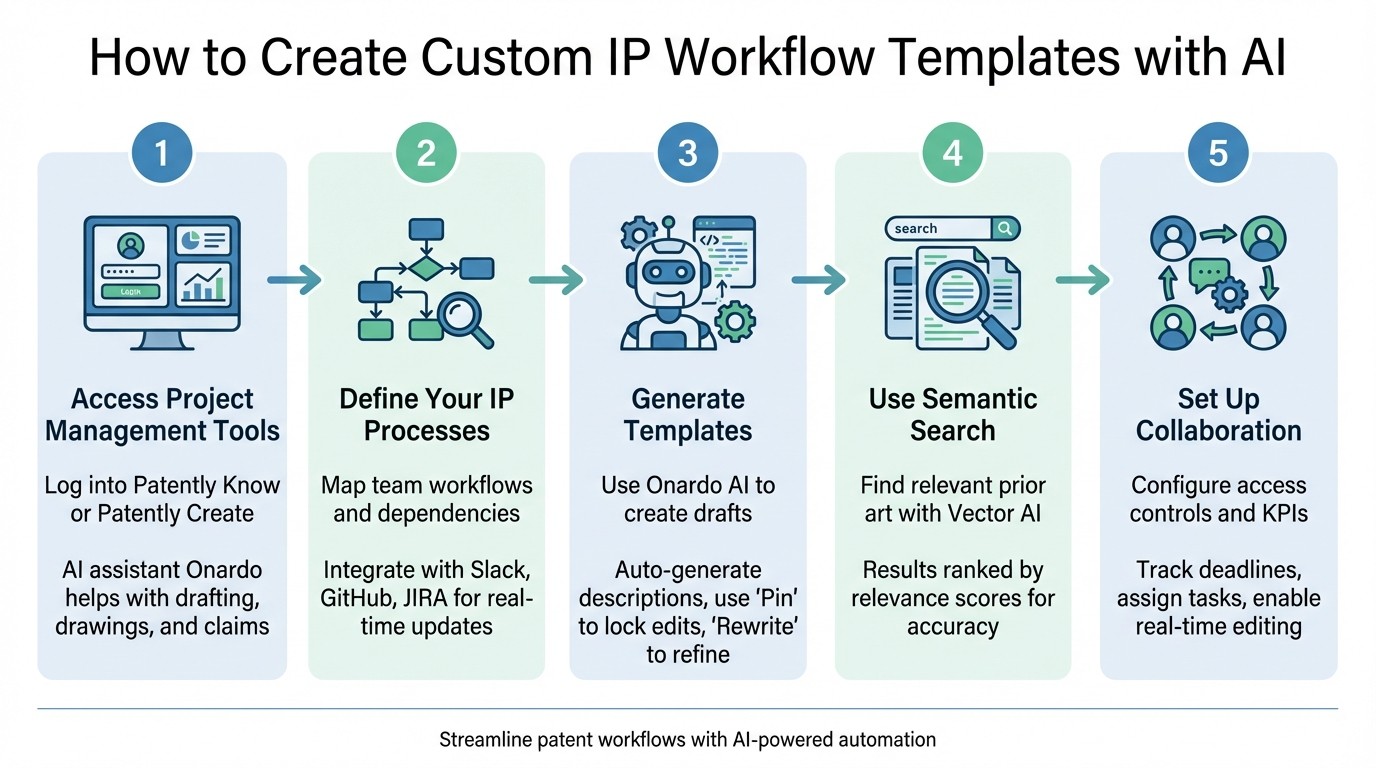
5-Step Process to Create Custom IP Workflow Templates with AI
Step 1: Access Patently's Project Management Tools
Start by logging into either Patently Know or Patently Create, depending on your needs. Patently Know is designed for streamlined patent analysis and navigation, while Patently Create provides a hybrid intelligence environment where you remain in control, supported by the AI assistant Onardo. This AI helps with tasks like drafting, creating drawings, and managing claims efficiently. The platform includes tools like a Figure editor and project management dashboards to help you organize tasks across multiple projects and teams. Before diving in, make sure to outline your specific IP processes to guide the creation of your custom workflow.
Step 2: Define Your Team's IP Processes
Take the time to map out your team’s workflow. Identify key elements like task dependencies, deadlines, and individual roles. Patently integrates seamlessly with tools like Slack, GitHub, and JIRA, allowing you to capture real-time innovation and updates. The AI can process unstructured materials - such as emails, forms, or drawings - to extract critical technical details, inventive ideas, and suggested embodiments. To keep your IP review aligned with your product development cycle, consider syncing review schedules. For instance, if your team operates on a biweekly shipping cycle, match your invention reviews to that same timeline.
Step 3: Generate Templates with Patently's AI Patent Drafting Assistant
Once your processes are clearly defined, use Onardo to create a draft. This AI tool can automatically generate figure descriptions and extract a parts list from claims using natural language processing (NLP). According to Martin Schweiger, Patently stands out as "the drafting robot with the best UI and Figure editor". While creating templates, you can manually edit important sections and use the "Pin" feature to lock them in place. Then, employ the "Rewrite" tool to update surrounding text without altering your locked content. This approach ensures your team’s unique style is preserved. Once the draft is complete, you can refine it further using advanced semantic search capabilities.
Step 4: Use Semantic Search with Vector AI
Semantic search is a powerful tool for finding relevant prior art and enhancing your workflow. With Vector AI, you’ll receive results ranked by relevance scores, making it easier to identify the patents or technical documents most applicable to your project. This step not only anchors your draft in critical IP data but also minimizes the risk of missing key references. By integrating semantic search into your workflow, you save time and improve the overall quality and accuracy of your drafts right from the start.
Step 5: Set Up Access Controls and Collaboration Features
Finally, configure access controls and collaboration settings to streamline teamwork. Patently’s project management tools allow you to set up hierarchical structures, assign tasks, and track deadlines effectively. Features like in-line editing with real-time saving make collaborative template refinement simple. Establish clear KPIs to measure success, such as reducing the time required for first-draft creation or lowering the number of Section 112-related Office Actions. These metrics ensure your custom workflow templates lead to tangible improvements in both efficiency and accuracy.
Advanced Customization Options for IP Workflows
Hierarchical Project Structures
Managing a growing patent portfolio can quickly become chaotic without a clear structure. Patently addresses this by offering a hierarchical framework that organizes IP tasks - from individual Projects to entire Portfolios. This setup not only clarifies roles but also minimizes duplicated efforts as your portfolio scales. It’s a system designed to streamline workflow management while leveraging top generative AI patent drafting tools.
For instance, you could designate a Project Manager to handle specific filings while a Program Manager supervises related patent families. To ensure accountability, you can implement a RACI matrix (Responsible, Accountable, Consulted, Informed) and set up defined escalation paths for resolving conflicts.
With structured management in place, advanced analytics can take your IP strategy to the next level.
SEP Analytics Integration
For teams working with standards-essential patents (SEPs), Patently's SEP Check module is a game-changer. It integrates directly into workflow templates to evaluate whether patent claims meet technical standards - like 5G or Wi-Fi - within just 15 minutes. The module also provides essentiality ratings, including Normative, Implied, Informative, and Contextual [32, 34]. This feature delivers strategic insights across various functions: R&D teams can align their innovations with standardized technologies, while licensing teams can pinpoint valuable patents and compare their portfolio against competitors [32, 33].
Another advantage is the ability to analyze unpublished drafts or pending applications. This helps refine claim scopes for continuations. Additionally, the "Configure Claim Chart" feature allows users to filter evidence by rating or type, making licensing presentations more compelling.
Once you've completed analytics and internal validations, exporting and deploying these workflow templates becomes a seamless process.
Export and Deployment Options
After finalizing your custom workflow templates, Patently offers flexible export and deployment options tailored to your team's needs. Templates can be exported in formats like CSV, PDF, or custom MIME types, ensuring compatibility with popular cloud storage platforms such as Microsoft SharePoint, OneDrive, Google Drive, Box, and Dropbox [36, 37, 38].
For automated deployment, workflows can be set up to save completed documents directly to external repositories, like a SharePoint Library or a Teams Channel. Security is enhanced through role-based customization: account admins can create workflows for the entire organization, while group admins can limit templates to specific teams, such as Biotech or Semiconductor groups. Additionally, by enabling the "Allow sharing of user-created workflows to any of their groups" option, experts can share optimized templates within their teams without needing full administrative rights.
Conclusion
Main Takeaways
Using AI to refine IP workflows brings a blend of speed and precision to patent management. AI-powered tools simplify labor-intensive tasks, like patent drafting, cutting down timelines from weeks to days and lowering costs by reducing billable hours. Beyond just saving time, these tools ensure terminological consistency in complex documents, which helps minimize risks during prosecution or litigation.
Collaboration and accuracy also see a boost with AI. Features such as "Pin and Rewrite" allow senior professionals to lock in critical content while the AI fine-tunes the rest, preserving human expertise while benefiting from automation. With 41% of legal professionals experiencing burnout, these tools help by offloading repetitive tasks, allowing teams to focus on strategic and high-value work instead of mundane formatting.
"We reduced routine drafting time, enabling a stronger focus on strategic legal work." - President, Leading IP Law Firm
These advancements pave the way for actionable next steps.
Next Steps for IP Professionals
To fully harness these benefits, start by auditing your current workflows to pinpoint bottlenecks, whether in disclosure, search, or docketing processes. Avoid diving into full-scale implementation right away. Instead, pilot AI tools like Patently within a specific technology area or with a small group of tech-savvy attorneys. This approach allows you to test and refine customizable templates while building confidence in the system.
Successful integration goes beyond mere installation. Link AI platforms directly to your R&D systems - such as Electronic Lab Notebooks, Slack, or GitHub - to capture innovations in real time rather than waiting for formal disclosures. Set measurable goals, like reducing first-draft creation time by 60% or cutting Section 112 office actions by 30%, and provide training programs to teach teams how to critically assess AI-generated outputs for quality and accuracy.
FAQs
What should we template first in our IP workflow?
The journey of building an IP workflow template begins with drafting the patent application. This step sets the stage for everything that follows. AI tools can play a key role here by transforming technical notes, diagrams, or disclosures into well-structured drafts. By starting with a clear and organized patent draft, you create a strong base that can be tailored later for tasks like prosecution, responding to office actions, or managing a portfolio. This approach ensures the process remains both clear and efficient from the outset.
How do we keep confidential invention data secure with AI?
To keep sensitive invention data safe within AI-assisted patent workflows, it's crucial to put strong protective measures in place. This includes using encryption, setting up strict access controls, and enforcing secure data handling policies. Make sure the AI system aligns with your organization’s security standards and offers features like user authentication and audit trails. By pairing advanced technology with well-defined policies, you can safeguard confidential information and reduce the risk of data breaches or unauthorized access.
How can we measure if AI templates are actually improving outcomes?
Measuring how AI templates perform means looking at both numbers and user experiences. On the numbers side, you can track time savings, reduced errors, task completion rates, and even ROI to see how much they boost efficiency and productivity. But it’s not just about the data - user satisfaction, process consistency, and adoption rates give insight into how well these templates fit into workflows.
For patent-related tasks, success might look like more accurate drafts and better compliance with guidelines. By combining both the hard data and user feedback, you’ll get a complete picture of how effective these templates really are.