Ultimate Guide to Patent Analytics Tool Integration
Intellectual Property Management
Mar 3, 2026
Step-by-step guide to integrate patent analytics tools: API setup, semantic search, team training, security checks, SEP analytics, and pricing to streamline IP workflows.

Patent analytics tools transform patent data into actionable insights, saving time and improving decision-making for IP professionals. With the market expected to grow to $3.03 billion by 2032, these tools are becoming increasingly important. AI-driven platforms, like Patently, streamline tasks such as patent drafting, semantic search, and analytics, cutting search and analysis time by up to 80%.
Here’s how to make the most of tools like Patently:
Identify Workflow Issues: Map your current processes to uncover inefficiencies like manual data entry or missed deadlines.
Choose Key Features: Look for semantic search, Non-Patent Literature (NPL) coverage, and jurisdictional data from at least 100+ regions.
Ensure Compatibility: Prioritize tools with API support, secure data handling, and seamless integration with existing systems.
Leverage AI Features: Use AI for claim drafting, semantic search, and SEP analytics to boost efficiency and accuracy.
Train Your Team: Provide training to maximize tool adoption and ensure human oversight for high-stakes decisions.
Patently offers plans ranging from a free tier to enterprise-level solutions, with features like AI-assisted drafting, analytics, and collaboration tools. Some firms report cutting project times by 80%, saving thousands in costs. Whether you're a small team or a large organization, integrating a tool like Patently can improve your patent strategy and operational efficiency.
How Enterprises Uses Generative AI for Patent Search, Drafting & Classification | IP Author Webinar
Determining Your Integration Requirements
Before diving into a patent analytics tool integration, it’s crucial to pinpoint the specific problems you’re aiming to solve. With global patent filings exceeding 3.5 million in 2023, the sheer volume alone demands a tool that simplifies the complexities. This clarity helps you validate your workflow challenges, identify essential features, and assess system compatibility.
Finding Workflow Problems
Start by mapping your process from concept to filing. Traditional methods often eat up hundreds of hours, largely due to fragmented communication and manual data entry.
Here are some common pain points to look out for:
Scattered email threads that stall progress.
Manual data transfer between search platforms and docketing systems.
Gaps in deadline tracking, risking critical rights loss.
Consider this: Non-Patent Literature (NPL) appears in about 40% of USPTO office actions, yet many teams struggle to search it effectively. Engineering teams often face challenges with complex Boolean queries and dense legal jargon, creating a disconnect between R&D efforts and IP intelligence.
One effective strategy is setting a 72-hour response goal for office actions to keep projects moving. Assign clear ownership for each major filing instead of assuming someone else will handle it. These steps not only streamline your process but also highlight where automation and better tools can make the biggest difference.
Choosing Required Features
Once you’ve identified your workflow needs, focus on the features that align with your goals. Compatibility with your current systems is key. While IP professionals may excel with Boolean queries, engineers often benefit from natural language semantic search, which can reduce search time by up to 50%.
Think about your primary use cases - whether it’s prior art search, freedom-to-operate analysis, competitive intelligence, portfolio management, or using top patent tools for patent drafting. If your work relies heavily on academic or technical disclosures, ensure the tool provides robust Non-Patent Literature (NPL) coverage. For teams needing to present insights to non-IP stakeholders, visualization tools like 3D landscape mapping can be a game-changer , especially when using AI-enabled patent analysis to shorten cycle times.
Don’t overlook jurisdiction coverage. A solid tool should include data from at least 100+ jurisdictions, with full-text data from key regions like China (CNIPA), Japan (JPO), and Korea (KIPO) to avoid critical blind spots. Before committing to an annual contract, request a proof-of-concept using real-world tasks to evaluate recall, precision, and time-to-insight.
Checking System Compatibility
The success of your integration heavily depends on how well the tool connects with your current systems. Look for API availability that supports integration with internal databases, document management systems, and docketing software. Tools that sync directly with docketing systems can reduce administrative burdens by an estimated 30%.
"Your tools should follow your workflow - not the other way around." - PowerPatent
If you’re planning to integrate via API, confirm the tool supports your programming environment (e.g., Python, NodeJS). Also, check for data export options to formats like Excel or PDF for seamless use in other analysis tools. For enterprise-level organizations, prioritize tools with SOC 2 Type II or ISO 27001 certifications, 256-bit AES encryption, and multi-factor authentication (MFA) to ensure security.
During trials, use real disclosures to test the integration and uncover any compatibility issues before full deployment. This will help you avoid surprises and ensure a smooth transition.
How to Integrate Patently: 5 Steps
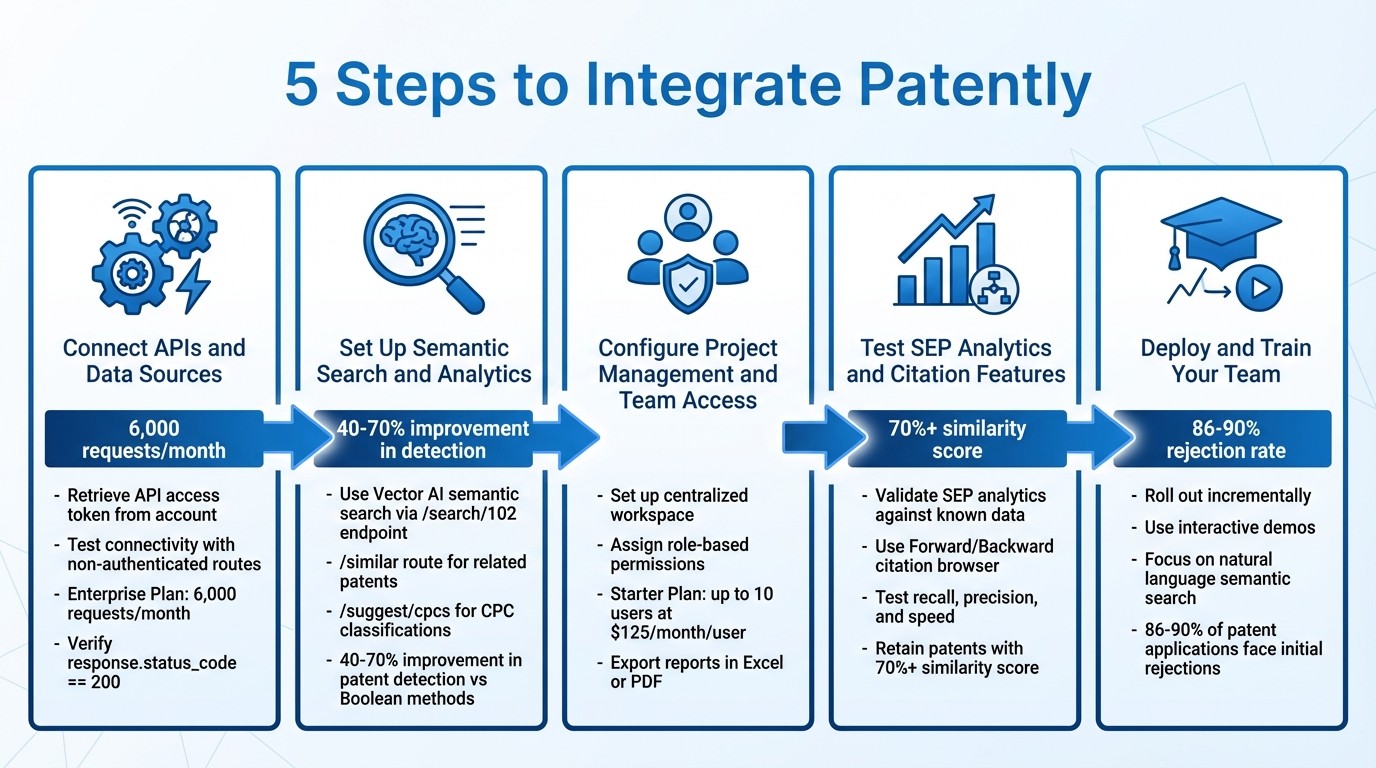
5-Step Patent Analytics Tool Integration Process
Once you've confirmed compatibility and outlined your requirements, it's time to integrate Patently step by step. From connecting APIs to training your team, here's how to get started.
Step 1: Connect APIs and Data Sources
Begin by retrieving your API access token from your Patently account page. This token, required for authenticated requests, is included with Patently subscriptions. If you're an academic user, you can request a free token for research purposes via email.
Before diving into your token quota, test connectivity using non-authenticated routes like /patents/:pn/drawings/:n to ensure your setup is functioning properly. Patently's RESTful architecture works seamlessly with any programming language that supports HTTP requests - whether you're using Python's requests library or JavaScript's axios.
API responses are typically in structured JSON format, making them easy to integrate with internal systems or dashboards. For image-based data, such as patent drawings, responses come as PNG files. If you're on the Enterprise Plan, you can make up to 6,000 requests per month, with faster response times and guaranteed uptime via SLA.
Set up your development environment and test API calls using your preferred HTTP client. Always include error handling by verifying the response.status_code == 200, which ensures smooth handling of invalid tokens or incorrect queries.
With the APIs connected, you're ready to enhance your data exploration with semantic search.
Step 2: Set Up Semantic Search and Analytics
Leverage Patently's Vector AI semantic search by submitting full technical descriptions to the /search/102 endpoint, avoiding the need for complex Boolean queries. This feature uses conceptual understanding to deliver more accurate results.
The /similar route identifies patents closely related to a specific patent number, while /suggest/cpcs recommends CPC classifications based on text excerpts. For machine learning workflows, endpoints like /patents/{pn}/vectors provide vector representations of abstracts or CPCs, which can be used for clustering or semantic analysis.
Before rolling out semantic search, test it against known prior art to measure recall and precision. AI-driven semantic tools have been shown to improve patent detection rates by 40–70% compared to Boolean-only methods. However, these results should always be reviewed and validated by human experts.
Step 3: Configure Project Management and Team Access
Set up a centralized workspace within Patently to organize and timestamp key assets like product diagrams, architecture sketches, and AI model notes. This ensures that no innovation gets lost in scattered communication.
Structure your projects hierarchically to reflect your team's organization and assign user permissions based on roles - whether full editing or view-only access is needed. Treat patent projects like product sprints by assigning clear ownership and accountability for each filing.
Export reports in formats like Excel or PDF for easy sharing with stakeholders. The Starter Plan, supporting up to 10 users at $125 per month per user, includes collaboration features, while the Business+ plan offers unlimited users, custom fields, and fee tracking.
Once your team is set up, move on to testing analytical tools.
Step 4: Test SEP Analytics and Citation Features
For standards-essential patents (SEPs), validate Patently's analytics against known data to refine your IP strategy. Use the Forward and Backward citation browser to identify key connections in patent networks and confirm that the system accurately links subsidiaries and acquired entities through assignee normalization.
Run real-world tasks to test recall, precision, and speed. For instance, manually review high-scoring patent families flagged by the AI to catch false positives early. Establish clear decision rules, such as retaining patents with a similarity score of 70% or higher, to ensure consistent judgment when presenting findings to legal or finance teams.
The patent analytics market is projected to grow at a CAGR of 13.3%, reaching $1.13 billion in 2024. Leading platforms typically update databases within 24–48 hours of publication. Ensure your citation tools provide detailed claim-level analysis and snippets showing how documents align with query text.
Step 5: Deploy and Train Your Team
Roll out Patently incrementally, starting with a limited set of competitors or a core technology area to validate results. Use interactive demos to guide your team through workflows like "Search and Analyze Prior Art" or "AI Claims Composer" before applying them to live projects.
"Integration is what turns a static patent into an active asset. It's what makes your IP work for you, not just sit in a filing cabinet." - PowerPatent
When training engineers, focus on Patently’s natural language semantic search, which allows them to describe inventions conversationally instead of using complex Boolean queries. Given that 86–90% of patent applications face initial rejections, emphasize using analytics to strengthen applications before filing and responding effectively to Office Actions. Proper training ensures your team can fully leverage AI tools to improve IP outcomes.
Getting the Most from Patently
After bringing Patently into your workflow, the next step is making the most of its features to redefine how your team approaches patent-related tasks. Here's how you can tap into its AI drafting, analytics, and system maintenance tools for optimal results.
Using AI-Assisted Patent Drafting
Patently's AI drafting assistant, Onardo, simplifies the process of creating claims, specifications, and abstracts directly from invention disclosures. It analyzes emails, documents, and drawings to generate structured independent and dependent claims.
Take this example: In July 2025, an Am Law 100 firm slashed project time from 100 hours to just 20 hours using Patently. This 80% efficiency boost cut internal costs from $47,500 to $9,500, increasing margins by $38,000. Another IP law firm focusing on AI saw a 15–20% reduction in routine drafting time, enabling their team to concentrate on more strategic tasks.
"Right off the bat, we're saving at least 10 to 15 hours by generating high-quality claim sets, and that translates directly into financial savings." – Chief IP Counsel, Publicly traded biotech company
Patently’s tools come with features like the "Pin" function, which safeguards user-edited text from being overwritten during AI updates. The "Rewrite" feature allows for targeted improvements, while in-line editing enables real-time adjustments. For patent drawings, the system generates consistent figure descriptions based on labels, ensuring proper referencing for all numbered elements.
While the AI is powerful, human review is a must before submission. Start small by testing the tools on specific sections, like dependent claims, to understand their strengths and limitations before rolling them out across your workflow.
Once your drafts are polished, Patently's robust reporting tools can turn raw data into actionable insights.
Creating Reports and Using Analytics
Effective analytics involves several steps: scoping the search, visualizing data, cleaning it, performing core analysis, and finalizing reports. For instance, raw data from patent databases often needs cleaning - splitting fields with multiple inventors, harmonizing assignee names (like merging "Google Inc." and "Google"), and removing duplicate patent families.
"One very common error is to imagine that data downloaded from a search of a patent database is ready to present to an audience. It is merely the start of the patent analytics process." – WIPO Manual
Go beyond basic patent counts by incorporating advanced metrics like patent quality scores, citation velocity, originality, and generality. These metrics help identify valuable assets. Tools like co-occurrence matrices can reveal hidden links between assignees and technologies, while 2D spatial maps can illustrate competitive positioning. Tracking filing velocity also uncovers competitors' strategies or new market entries.
Before diving into reports, define clear business goals. For example: "Identify all patents with a quality score >70 for potential licensing". Develop templates tailored to your audience - executive summaries for leadership and detailed claim-comparison tables for legal teams. Always save an unedited version of your dataset (marked _raw) before making changes for reproducibility.
The payoff can be substantial. Companies with the largest patent portfolios generate, on average, 2.2 times more revenue and 1.9 times more profit than competitors. In 2025 alone, patent litigation damages exceeded $4.3 billion across more than 90 cases, emphasizing the value of informed, data-driven IP strategies.
Maintaining and Updating the System
Regular reviews are key to keeping your system in top shape. Schedule monthly 15-minute syncs to track pending filings, risks, and deadlines. Periodic audits of international maintenance costs can help optimize ROI. Assign ownership for major filings and treat patent docketing as project sprints to ensure accountability. A 72-hour response window for Office Actions can keep things moving without rushed decisions.
Use analytics to regularly prune your portfolio, identifying patents for abandonment or licensing to focus on high-impact assets. Set renewal criteria based on citation frequency, market relevance, and revenue generation to manage maintenance budgets effectively.
"AI tools augment, not replace, the patent professional. Human judgment, legal interpretation, and strategic insight are required to validate results, make contextual decisions, and develop recommendations." – Lexology
Keep the system running smoothly by monitoring API connections and ensuring data sources stay aligned with internal product roadmaps and workflows. Since AI evolves quickly, ongoing team training is essential to stay updated on new features and limitations. With legal professionals facing a 41% burnout rate, automation can reduce repetitive tasks, but human oversight remains critical for high-stakes decisions like litigation or licensing.
Patently's built-in history management ensures document integrity by tracking edits and allowing users to revert changes when needed. Real-time collaboration minimizes data loss during multi-user sessions. However, users should remain cautious of AI limitations, especially in emerging technology areas with sparse patent histories.
Patently Pricing Plans
When you integrate Patently, you’ll find a range of pricing options designed to fit organizations of all sizes, from solo users to large enterprises.
Patently offers five pricing tiers, each tailored to specific needs. The Starter plan is priced at $125 per month per user, with straightforward, flat-rate pricing. For organizations requiring more advanced features, the Business+, Law Firm+, and Enterprise plans offer custom pricing based on your unique requirements. The table below provides a detailed comparison of costs, user limits, and included features.
The Free plan ($0/month) is a great way to test the platform. It supports one user and includes basic features like search, family browsing, and Onardo chat. However, it doesn’t include semantic search or advanced analytics, which are essential for deeper integration. The Starter plan ($125/month per user, up to 10 users) adds powerful tools like Vector AI semantic search, analytics, a forward and backward citation browser, and team collaboration features - perfect for small IP teams. Plus, it comes with a 14-day free trial.
For larger teams or more complex needs, the Business+, Law Firm+, and Enterprise plans are fully customizable. These tiers support unlimited users and include progressively advanced tools:
Business+ introduces AI-assisted patent drafting through Onardo, custom fields for both individual assets and families, fee tracking, and a challenges view.
Law Firm+ builds on Business+ by adding matter-centric management and external client access, ideal for law firms managing multiple clients.
Enterprise offers bespoke solutions, such as API connections and custom data source configurations, tailored to your organization’s specific workflows.
For those needing Advanced Standard Essential Patent (SEP) Analytics, this feature requires a separate "Patently License" and isn’t included in the standard pricing tiers. Choose the plan that aligns best with your goals to get the most out of Patently.
Plan Comparison Table
Here’s a breakdown of the key features across all plans:
Plan | Monthly Cost (USD) | User Limit | Semantic Search | AI Drafting | Custom Fields | Integration Features |
|---|---|---|---|---|---|---|
Free | $0 | 1 | No | No | No | Search filters, Onardo chat, Family sorting, Share links |
Starter | $125 /user | Up to 10 | Yes (Vector AI) | No | 100 (families only) | Analytics, FAB browser, Team collaboration, Export (100 families) |
Business+ | Custom | Unlimited | Yes | Yes | 2,000 (families & assets) | Fee tracking, Challenges view, Unlimited exports |
Law Firm+ | Custom | Unlimited | Yes | Yes | 2,000 (families & assets) | Matter-centric management, Client access |
Enterprise | Custom | Unlimited | Yes | Yes | Custom | Bespoke solutions, API/Data source connections |
Conclusion
Incorporating Patently into your patent workflow is a game-changer, offering both immediate efficiency boosts and long-term advantages. This platform streamlines the entire patent lifecycle - covering everything from invention disclosures and AI-assisted drafting to infringement detection and portfolio management. By consolidating these processes, it eliminates the hassle of juggling multiple tools.
The efficiency improvements are hard to ignore. Some firms have reported cutting project times by up to 80%, along with noticeable margin gains, showcasing how Patently enhances operational performance.
But it’s not just about saving time. Patently equips IP professionals with tools to make smarter decisions. Its semantic search and analytics features reveal insights like technology trends, competitor R&D activity, and untapped opportunities that traditional keyword-based tools might overlook. Considering that patent litigation damages exceeded $4.3 billion across more than 90 cases in 2025, having comprehensive prior art coverage and consistent checks is critical for reducing risk. These capabilities provide a solid foundation for strategic planning across all patent-related operations.
By shifting from manual tasks to intelligent automation, your team can focus on the bigger picture - like crafting high-value legal strategies - instead of getting bogged down with routine administrative work. A President of a leading IP law firm noted:
"We saw a notable decrease in the time spent on routine drafting tasks. That meant we could focus more on strategy and high-value legal work instead of repetitive writing".
Whether you're managing a small portfolio with the Starter plan or require enterprise-level customization, Patently adapts to meet your needs - all while maintaining SOC 2-certified security standards.
FAQs
What should I integrate first to get quick ROI?
To see a faster return on investment (ROI) in patent analytics, focus on tools that automate essential tasks such as semantic search, data ingestion, and analytics. These features simplify patent searches, identify trends, and assess portfolios, helping you save both time and money. By integrating analytics with patent filing and management systems, you can transform static data into actionable insights. Tools like Patently, which offer AI-driven capabilities, are excellent for speeding up decision-making and improving portfolio management.
How do I validate semantic search accuracy for my technology?
To ensure a semantic search engine delivers accurate results, it's essential to manually review the top search outcomes for relevance and correctness. Cross-check these results against original invention descriptions or known prior art to confirm their validity. Using test queries or established datasets can also help you gauge precision and recall effectively. Regular testing with a diverse range of inputs, combined with feedback from experts, plays a key role in fine-tuning the system. This ongoing process ensures the search engine aligns closely with the specific requirements of your technology.
What security and compliance should I require before connecting patent data?
Before working with patent data, it's crucial to prioritize security and compliance. This means implementing measures like encryption to protect data, enforcing strict access controls, and maintaining continuous monitoring systems. It's also important to follow established standards such as SOC 2. Check for relevant industry certifications and carefully review data handling policies to ensure sensitive intellectual property remains protected and safe from breaches or unauthorized access.