Step-by-Step Guide to Automating Prior Art Searches
Intellectual Property Management
Mar 18, 2026
Follow a practical four-step workflow to automate semantic prior art searches, analyze high-similarity results, and produce audit-ready reports with AI.

Automating prior art searches can save time, reduce costs, and improve accuracy compared to manual methods. Traditional searches rely on keywords, which often miss relevant results due to language variations or technical jargon. AI-powered patent tools, like Patently, overcome these limitations by using semantic search to understand concepts, process millions of documents quickly, and deliver consistent results.
Key Takeaways:
Manual searches cost $5,000–$10,000 and take 2–4 weeks. AI reduces this time by up to 80%.
AI tools use Natural Language Processing (NLP) to focus on meaning rather than exact keywords.
Platforms like Patently offer features like semantic search, similarity scoring, and collaboration tools to streamline the process.
How to Get Started:
Prepare Inputs: Clearly describe your invention as a technical problem and solution, avoiding proprietary jargon.
Run AI Searches: Use tools like Patently's Vector AI for semantic searches across global patent databases.
Review Results: Focus on high-similarity documents, refine your search, and analyze claims and technical details.
Export Findings: Generate detailed reports with citations and similarity scores for documentation and analysis.
Patently Plans:
Free plan offers basic features, while paid plans (starting at $125/month) include semantic search, collaboration, and advanced tools like AI drafting. Custom plans are available for larger teams.
AI tools like Patently simplify prior art searches, enabling professionals to focus on analysis rather than manual searching, ensuring thorough and efficient results.
Getting Started with AI Automation for Prior Art Searches
Prerequisites for Automation
Before diving into automating prior art searches, it's crucial to prepare your inputs carefully. The effectiveness of your results hinges on this preparation. Instead of framing your invention as a simple list of claims, describe it as a technical problem and its solution. As Patent AI Lab points out, it's important to separate the problem being solved from the method used to solve it. This distinction is key because patents often address similar problems with different approaches.
Focus on identifying the core claims and stick to a single embodiment to make your search more precise. Avoid using internal project names like "Project Phoenix v2.1" in your descriptions. Instead, translate these into universally understood technical terms, such as "a convolutional neural network for real-time defect detection in manufacturing".
"AI does not eliminate effort. It reallocates it to analysis instead of hunting." - Golam Rabiul Alam, PhD, Professor and AI Expert
A basic understanding of patent law, particularly sections 35 USC 101, 102, and 103, is also important for validating the AI's results effectively. If you're planning to use the USPTO's Automated Search Pilot Program (ASAP!), make sure your application is in DOCX format and that you're enrolled in the Electronic Office Action Program. Petition fees vary, starting at $90 for micro entities and going up to $450 for large entities.
Once you've completed these steps, you're ready to set up your Patently account and take advantage of AI-powered search tools.
Setting Up a Patently Account
Creating a Patently account is straightforward. Start by clicking the "Start Free" option on the platform to receive 100 credits. These credits allow you to test features like semantic search and similarity scoring before committing to a paid plan. Use this trial period to run a calibration search, which helps you refine your invention description and terminology based on the AI's interpretation.
After registration, you'll access the Dashboard, where you can create new projects. Assign a project name and configure your workflow settings. For prior art searches, input detailed invention descriptions, claims, or keywords that define your search scope. The platform also supports real-time collaboration, enabling team members to review and refine results together.
When choosing a plan, the Starter plan costs $125 per month per user and includes features like semantic search, analytics, and team collaboration for up to 10 users. For larger teams or additional tools like AI drafting support, the Business+ plan offers customized pricing. If drafting claims is new to you, the platform's block-based AI Claims Composer can help generate the input needed for your searches.
How Is AI Improving Patent Prior Art Searches? - Trademark and Patent Law Experts
Step-by-Step Process for Automating Prior Art Searches
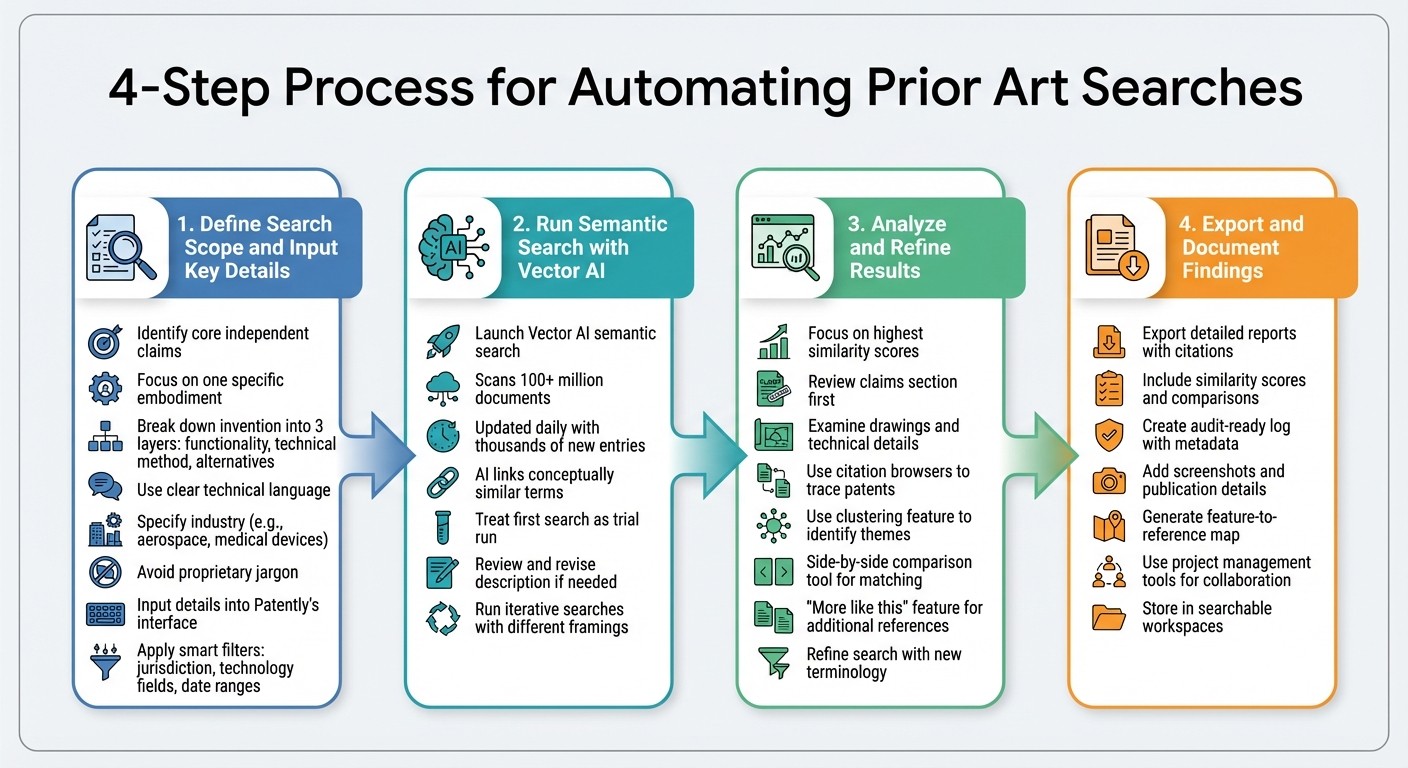
4-Step Process for Automating Prior Art Searches with AI
Step 1: Define Search Scope and Input Key Details
Start by identifying the core independent claims of your invention and focusing on one specific embodiment. Break down your invention into three layers: its overall functionality, the current technical method it uses, and any alternative approaches. Use clear, technical language and specify the industry it applies to (e.g., aerospace, medical devices).
"The quality of your invention description directly impacts results." - Zainab Imran
Avoid using internal project code names or proprietary jargon. Instead, translate them into widely recognized technical terms. Clearly stating the industry or use-case helps the AI focus on relevant areas and filter out unrelated content.
Next, input your detailed description and key terms into Patently's interface. Use the platform's smart filters to narrow your search by jurisdiction, technology fields, and date ranges. Don’t overlook non-patent literature, such as academic papers or technical manuals, as these often predate formal patents and can provide valuable insights.
Once your search scope is clearly defined, you’re ready to initiate the AI-driven semantic search.
Step 2: Run a Semantic Search with Patently's Vector AI
Launch the search using Patently's Vector AI, which focuses on understanding the meaning and context behind your technical descriptions rather than just matching keywords. This system scans international patent databases with over 100 million documents, updated daily with thousands of new entries.
The AI uses large language models to link conceptually similar terms, often uncovering connections that traditional keyword searches might miss. Treat your first search as a trial run - review the results to see if they align with your expectations. If needed, revise your description and run additional searches with different technical framings. This iterative process helps minimize the chances of overlooking relevant prior art.
Once your semantic search is complete, move on to analyzing and refining the results.
Step 3: Analyze and Refine Results
Focus on documents with the highest similarity scores. Start your review with the claims section, as it contains the legal protections, and then examine the drawings and technical details. Use citation browsers to trace foundational patents and track subsequent developments.
Patently's clustering feature organizes patents by themes or technical concepts, making it easier to identify technology groups and potential "white spaces." For particularly relevant documents, the side-by-side comparison tool allows you to directly match prior art passages with your invention’s claims or specifications.
The "more like this" feature is useful for finding additional references, and you can refine your search descriptions as you uncover new terminology.
Step 4: Export and Document Findings
Export your results into detailed reports, including citations, similarity scores, and comparisons. Keep an audit-ready log of your search process, complete with metadata, screenshots, and publication details for non-patent literature.
Modern AI tools can also create a feature-to-reference map, linking specific parts of your claims to corresponding passages in prior art. This is especially helpful for invalidity analyses. Patently’s integrated project management tools let you and your team collaborate on reviewing and refining findings efficiently.
Key Features of Patently for Prior Art Automation
Once you've streamlined your search workflow, Patently offers a suite of advanced tools to refine your analysis and reporting.
Semantic Search and Vector AI
Patently's Vector AI takes search capabilities to the next level by understanding the conceptual context of patent documents, bridging the gap between different terminologies. For instance, it recognizes that terms like "Drone" and "Unmanned Aerial Rotocraft" are contextually connected, even if the wording differs.
"Our AI analyzes the conceptual meaning of patent documents, going beyond simple keyword matching to find contextually relevant results." - Patently.ai
The platform assigns similarity scores to each document, giving you a clear, objective measure of its relevance. Plus, with access to major international patent databases, your search extends across a global landscape, ensuring nothing important slips through the cracks.
Collaboration and Project Management
Patently leverages Yjs technology for real-time, conflict-free collaboration. It also includes AI-assisted draft refinement tools designed to mimic the guidance of a seasoned legal mentor.
Key features like the Pin function allow you to lock critical sections of your analysis, ensuring they remain untouched by the AI during future updates. Additionally, tag classifications help organize search results into categories, making it easier for team members to focus on high-priority references during collaborative reviews. Every project is managed via a centralized dashboard, where you can initiate new searches, tailor workflows, and manage access permissions to keep sensitive findings secure.
These tools blend seamlessly with your workflow, enabling smooth collaboration and efficient teamwork throughout your patent strategy.
Export and Reporting Options
Patently simplifies reporting by automatically generating prior art reports that include citations, similarity scores, and analysis in formats you can customize. Its strategic curation workflow guides you through every phase, from initial search and filtering to detailed analysis, tagging, and final report creation.
Completed reports, along with their citations and similarity scores, are stored in searchable workspaces. This ensures that your documentation stays organized, audit-ready, and adaptable as your invention evolves.
Comparing Patently Plans for Automating Prior Art Searches
Now that you've seen what Patently offers, let’s break down the plans to help you decide which one aligns with your team's needs and workflow.
Patently provides five plan tiers - Free, Starter, Business+, Law Firm+, and Enterprise - each catering to different team sizes and levels of automation.
The Free plan is a no-cost option that includes basic browsing and filtering. However, it lacks the Vector AI semantic search, which is key for automating prior art discovery. If automation is a priority, the Starter plan, priced at $125 per month per user, unlocks advanced features like semantic search, collaboration for up to 10 users, and the ability to export up to 100 patent families. It also comes with a 14-day free trial, giving you a chance to test it out before committing.
For those requiring AI patent drafting, the Business+ plan (custom pricing) includes this feature and increases export limits to 2,000 families. The Law Firm+ plan is specifically tailored for legal teams, offering matter-centric management and direct client access - ideal for handling multiple client matters efficiently.
Plan Comparison Table
Feature | Free | Starter | Business+ | Law Firm+ | Enterprise |
|---|---|---|---|---|---|
Price | Free | $125/mo/user | Custom | Custom | Custom |
Users | 1 | Up to 10 | Unlimited | Unlimited | Bespoke |
Semantic Search (Vector AI) | No | Yes | Yes | Yes | Yes |
AI Patent Drafting | No | No | Yes | Yes | Bespoke |
Team Collaboration | No | Yes | Yes | Yes | Yes |
Export Limit (Families) | N/A | 100 | 2,000 | 2,000 | Unlimited |
Matter-Centric Management | No | No | No | Yes | Bespoke |
Custom Fields | No | For Families | For Assets & Families | For Assets & Families | Bespoke |
Use the table above to compare features and decide which plan fits your automation goals and team requirements best. Whether you're a solo user or part of a larger organization, there's a plan designed to meet your needs.
Conclusion
Patently revolutionizes prior art searches by turning what used to take weeks and cost $5,000–$10,000 into tasks that can be wrapped up in just a few hours. Its use of Vector AI's semantic search goes beyond simple keyword matching, diving into the conceptual meaning of inventions to uncover relevant prior art across different jurisdictions and technical fields.
The time savings are striking. Manual searches that traditionally required 20–40 hours of effort now take just 2–3 hours with AI, all while achieving recall rates as high as 98%. This shift allows patent professionals to focus their energy on tasks that matter most, like strategic analysis and legal interpretation. As Patlytics Inc explains:
AI collapses that cost structure. Instead of spending hours to get a baseline dataset, attorneys start with a near-final set of references and spend their time where it matters: evaluating, interpreting, and strategizing.
Patently also boosts teamwork and consistency. Features like shared workspaces, standardized reporting, and audit-ready documentation ensure high-quality results across projects. These tools make it easier to scale up filing capacity without adding more staff. Whether you're validating an idea in its early stages or preparing for a USPTO filing, Patently provides the global reach needed for thorough prior art discovery.
FAQs
What should I include in my invention description for the best AI results?
For the most accurate AI-driven prior art searches, focus on crafting a clear, detailed description of your invention. Use domain-specific language and relevant technical terms to ensure precision. Describe your invention in layers - start with the core concept and then expand to include broader or earlier iterations. This layered approach helps the AI uncover less obvious prior art. A well-organized and thorough description plays a key role in improving the relevance and accuracy of the search results.
How do I validate AI search results for novelty and obviousness?
To ensure AI search results are reliable, examine the prior art it identifies for technical details and compare these to your invention’s claims. This helps determine both novelty and whether the invention might be considered obvious. While AI tools provide semantic analysis and relevance scoring, it's crucial to manually verify their accuracy. Additionally, cross-reference the findings with patentability standards specific to your jurisdiction, focusing on requirements for novelty and non-obviousness. Blend AI-generated insights with professional expertise to achieve dependable validation.
How can I document an audit-ready prior art search report?
To prepare a prior art search report that's ready for audit, focus on detailed evidence tracking, relevance scoring, and annotations. Leverage AI-powered tools to streamline the organization and analysis of your findings. The report should clearly outline search parameters, relevance scores, and sources for all identified prior art. Features such as tagging, highlighting, and export options can help ensure the report is both thorough and reliable.