How AI Improves Task Tracking in Patent Projects
Intellectual Property Management
Feb 15, 2026
AI automates USPTO deadline extraction, cuts errors, and speeds patent workflows with real-time tracking, predictive alerts, and measurable ROI.

Managing patent projects has always been a challenge, especially with the risks tied to manual processes. Errors in data entry or missed deadlines can lead to costly consequences, like the $90 million malpractice lawsuit in the 2024 Robinson v. CPA Global case. But AI-powered task tracking is changing the game. Here's how:
Automates repetitive tasks: AI extracts deadlines from USPTO documents and updates workflows instantly.
Reduces errors: Real-time monitoring flags issues like conflicting deadlines before they escalate.
Saves time: Tasks that took hours can now be completed in minutes, freeing up attorneys for higher-value work.
Improves efficiency: AI dynamically adjusts timelines and prioritizes tasks based on complexity and risk.
The result? Fewer errors, faster workflows, and better resource allocation. By integrating top patent tools, patent teams can handle larger portfolios while minimizing risks and costs. This article breaks down how AI transforms patent workflows and provides actionable steps for implementation.
How AI Changes Task Tracking in Patent Workflows
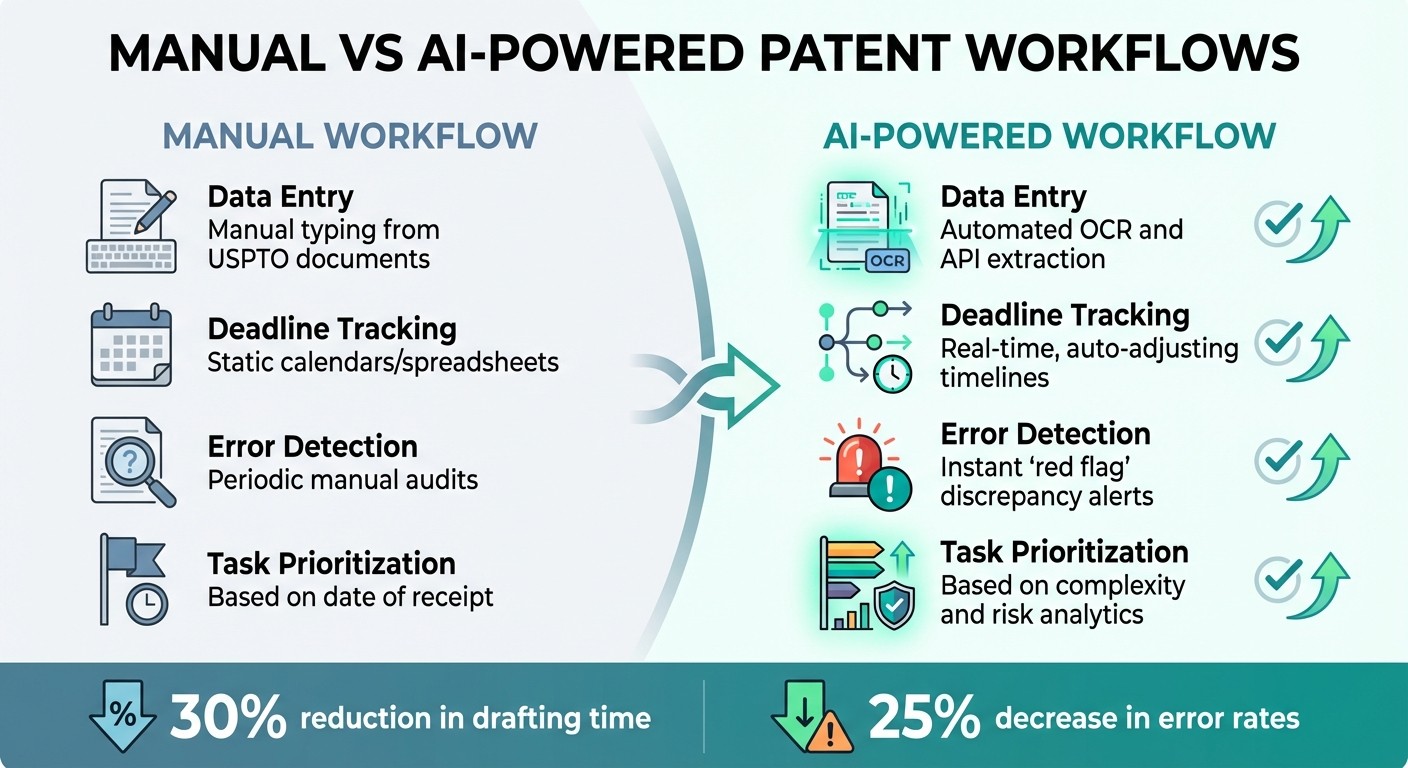
Manual vs AI-Powered Patent Workflow Comparison
AI is reshaping task tracking in patent workflows, addressing the challenges of manual data entry and scattered information. By automating updates, it introduces a level of precision that traditional methods struggle to achieve.
From Manual to Automated Tracking
In traditional workflows, tracking deadlines often involves manually transferring data from USPTO documents into spreadsheets or calendars. This process is prone to errors, especially when information is spread across emails, calendars, and separate docketing systems. Besides increasing the risk of mistakes, this fragmented approach makes managing task dependencies a headache.
AI changes the game by automating these updates. Using tools like APIs and OCR, AI systems can extract deadlines directly from USPTO communications and update timelines instantly when an Office Action or status change occurs. For instance, when an Office Action is received, AI parses the document, identifies key dates, and updates the workflow without human input.
This move from static to dynamic tracking transforms dependency management. Instead of manually adjusting every related task when a filing is delayed, AI recalculates all affected deadlines in real-time, ensuring the entire project stays on track. This automation frees up attorneys to focus on strategy rather than routine updates.
These capabilities pave the way for even more advanced features, which are explored below.
Core Features of AI Task Tracking Systems
AI-based tracking platforms act as intelligent assistants, categorizing documents and calculating response timelines according to jurisdictional rules. By automating classification, they minimize the risk of misidentification that could jeopardize a filing.
Real-time monitoring is another standout feature. These systems trigger instant alerts when they detect issues like conflicting deadlines or missing due dates. Such "red flag" mechanisms help catch problems early, avoiding missed deadlines or lost rights.
Task prioritization is also enhanced. AI analyzes historical data to rank tasks by complexity and risk, ensuring that the right level of expertise is assigned. For example, straightforward tasks can be delegated to junior staff, while complex matters are routed to senior attorneys. This ensures resources are allocated efficiently.
Feature | Manual Workflow | AI-Powered Workflow |
|---|---|---|
Data Entry | Manual typing from USPTO documents | Automated OCR and API extraction |
Deadline Tracking | Static calendars/spreadsheets | Real-time, auto-adjusting timelines |
Error Detection | Periodic manual audits | Instant "red flag" discrepancy alerts |
Task Prioritization | Based on date of receipt | Based on complexity and risk analytics |
AI doesn't just streamline tasks - it introduces specialized applications that elevate patent workflows to a new level.
AI Applications in Patent Workflows
AI tools simplify invention disclosure intake by using guided forms to ensure all technical details are captured before reaching the legal team. This standardized process reduces delays caused by incomplete disclosures.
Once a disclosure enters the system, AI automates timeline creation. It maps out every milestone - from prior art searches to filing and prosecution - adjusting dates dynamically as tasks are completed early or fall behind. Rolling review windows highlight dependencies due in the next 30 to 60 days, helping teams shift from reactive to proactive planning.
For ongoing prosecutions, AI provides centralized dashboards that monitor the entire patent lifecycle, tracking statuses like Intake, Drafted (using AI patent drafting tools), Ready, and Processed. Collaborative tools with real-time editing and version control replace the confusion of email chains and conflicting document versions. Additionally, predictive analytics scan portfolios to flag expiring patents, identify redundant filings, and suggest optimized strategies before problems arise.
Steps to Implement AI-Powered Task Tracking
Switching from manual tracking to AI-powered systems isn’t something you can rush. Instead of trying to overhaul everything at once, focus on areas in your workflow that consistently cause delays or errors. These high-friction points are where AI can make the biggest difference.
Evaluate Your Current Workflows
Start by mapping out the actual workflow your team follows - formal and informal. This includes the unspoken steps: handoffs, delays, and workarounds that aren’t officially documented but are part of the daily routine. For instance, tasks like manually updating trackers, chasing down draft reviews, or setting up folders for new cases may seem minor but can add up to significant inefficiencies over time.
Pay close attention to manual entry points where errors have occurred in the past, as these can lead to serious legal or financial consequences. Also, identify where work tends to stall - whether it’s documents stuck in inboxes or tasks delayed due to missing information. If your team relies on manual updates instead of real-time tracking, it’s a clear sign that AI-powered task tracking could help. Recognizing these weak spots is the first step toward improving your process.
Integrate AI Tools with Existing Systems
Once you’ve pinpointed inefficiencies, the next step is to integrate AI tools into your workflow. The key here is API-driven connectivity - linking AI tools with your existing docketing or patent management systems. This eliminates the need for manual data transfers, streamlining the entire process.
A good approach is to implement a hybrid workflow where AI handles tasks like processing documents and extracting deadlines, but human professionals review the outputs before finalizing them. Set up red flag protocols to alert your team when AI detects inconsistencies, such as conflicting deadlines or missing information in USPTO correspondence.
Security is non-negotiable. Ensure that AI tools use end-to-end encryption, multi-factor authentication, and private cloud networks to protect sensitive data. Tools like Patently Create offer collaborative features with strict access controls, making it easier to adopt AI task tracking without compromising confidentiality.
Here’s an example: One firm integrated their AI task tracker with their CRM and document management system. This automation improved their internal task routing and draft version control, allowing them to increase their caseload by over 30% in just three months - without hiring additional staff.
Set Baseline Metrics for Success
After integrating AI tools, it’s crucial to measure their impact. Start by defining key performance indicators (KPIs) that align with your goals. These metrics can help you track efficiency, quality, and financial performance:
Efficiency metrics: Monitor drafting turnaround times, administrative hours saved, and the duration of review cycles.
Quality metrics: Keep an eye on docketing error rates, the number of revisions needed for AI-assisted drafts, and the speed of office action responses.
Financial metrics: Calculate capacity per headcount (e.g., how many applications or clients each attorney manages) and cost per filing.
For context, by 2025, 58% of IP professionals were actively using AI tools for IP management, with nearly half relying on them daily. Early adopters reported a 30% reduction in drafting time during pilot programs.
Also, consider tracking how AI reduces the need for status update meetings. For example, replacing three weekly meetings with an automated dashboard could save over 500 billable hours annually. Ron Embry of Hauptman Ham highlighted this benefit in 2025, saying:
"The Patent Copilot system allows practitioners at Hauptman Ham to use more creative strategies in pursuit of broad, defensible patent claims for our clients."
Finally, establish a 30- to 60-day review cycle. This helps your team move from reacting to problems as they arise to proactively planning for success.
Real-Time Monitoring and Issue Prevention
Integrating AI into your workflow transforms how you manage tasks, replacing reactive problem-solving with proactive monitoring. With AI continuously scanning your workflows, potential issues are flagged early - long before they lead to missed deadlines or costly mistakes. This shift sets modern patent practices apart from those still relying on manual processes.
Automated Alerts and Notifications
AI takes task management to the next level with real-time monitoring, ensuring that emerging problems are addressed as soon as they arise.
These systems actively notify your team when something requires attention. For instance, AI tools can extract deadlines directly from USPTO communications and automatically populate your docketing system. This eliminates the need for manual data entry - a common source of errors that contributes to nearly 20% of malpractice claims in legal practices. If the system detects inconsistencies, such as conflicting deadlines or misclassified Office Actions, it promptly alerts your team.
The efficiency gains are hard to ignore. Using an AI assistant for real-time project tracking can cut the time spent consolidating updates by up to 90%. By pulling updates from tools like JIRA, Slack, Google Drive, and email into a single dashboard, AI simplifies project management. As Power Patent puts it:
"The system works as a quiet project manager, keeping everyone on the same page without needing constant check-ins."
You can also configure AI to highlight tasks and deadlines due within the next 30 to 60 days. This rolling review window helps your team shift from a reactive “firefighting” mindset to one focused on planning. Platforms like Patently enhance this process with collaborative project management tools, automated alerts, and strict access controls, ensuring secure handling of sensitive patent information while keeping your team informed.
These instant notifications also pave the way for predictive analytics, which can identify risks before they escalate.
Predictive Analytics for Risk Management
AI doesn’t just alert you to immediate concerns - it also uses predictive analytics to foresee potential disruptions. By analyzing historical data, current workloads, and legal standards, AI can identify risks such as resource conflicts, bottlenecks, or missed filing windows before they become critical. This allows your team to address issues while they’re still manageable.
Consider this: a manual-entry error in the past caused significant losses. With AI systems running automated checks for inconsistencies, such errors would have been flagged and corrected immediately, avoiding disastrous outcomes.
Modern AI tools also evaluate patent drafts in real time using generative AI patent drafting tools, using data-driven insights from language patterns and historical outcomes to pinpoint high-risk areas. Additionally, they monitor competitor filings to predict trends and innovation cycles, helping your team anticipate potential overlaps in the next quarter. This level of foresight ensures that you’re solving problems before they escalate, rather than scrambling to fix them after the damage is done.
Measuring the Impact of AI on Patent Projects
AI has reshaped workflows in patent projects, but its true value lies in measurable results. Clear metrics not only justify the investment but also refine how AI tools are used. Patent professionals now have reliable ways to gauge both efficiency and financial benefits.
Key Efficiency Metrics
The first metric to track is time savings per application. Drafting a standard patent application typically takes about 28 hours, with an average billable value of $500 per hour. AI-powered tools can cut that down to 19.6 hours - a 30% reduction - saving 8.4 hours per application. For skilled users, efficiency can improve by as much as 40–60%.
Another important measure is attorney capacity. By automating repetitive tasks and reducing manual tracking, attorneys can take on more cases. For example, annual output can increase from 10–15 applications to 13–20 applications with AI.
Error reduction is also critical. AI tools can flag issues like claim-description mismatches or deadline conflicts before filing, minimizing risks caused by human error. For firms offering fixed-fee services, tracking the realization rate - the ratio of billed hours to actual hours worked - is essential. AI can significantly improve this rate, often moving it from around 70% closer to 100%.
Lastly, monitor administrative overhead. Automating routine tasks like deadline tracking and document routing can save over 10 hours a week, equating to more than 500 billable hours annually. Surveys show that 45% of IP professionals report at least 25% time savings, while 33% see budget savings of a similar scale.
These metrics provide a solid foundation for calculating ROI and demonstrating the tangible benefits of AI.
Calculating ROI for AI Investments
Once efficiency metrics are in place, you can calculate ROI to further validate AI’s impact. Start by documenting your current workload, attorney costs, and fixed fees to establish a baseline for comparison.
Next, quantify productivity gains. If AI saves 8.4 hours per application at a billable rate of $500 per hour, that’s $4,200 saved per matter. Multiply this by the number of cases handled annually - for instance, 15 applications per attorney equates to $63,000 in yearly savings, even before accounting for increased capacity.
Use the formula (Productivity Gains + Cost Savings – AI Investment) / AI Investment × 100 to calculate ROI. Keep in mind that not all saved time converts directly into billable hours, so apply a productivity coefficient of 60–80%. Modeling different scenarios - such as 30%, 40%, or 50% efficiency gains - can help set realistic expectations for stakeholders.
For example, a 3,000-person B2B SaaS company invested $2.1 million annually in AI tools. By saving 2.3 hours per week per employee, they achieved $23.5 million in annual productivity gains, with a payback period of just nine months. While patent firms operate on a smaller scale, the principle is the same: precise measurement transforms AI from an expense into a profit driver.
Don’t overlook the strategic advantages. With 71% of legal clients favoring flat-fee arrangements, efficiency directly boosts profitability. Faster turnaround times, enabled by AI, also allow firms to handle larger portfolios - a competitive edge recognized by 76% of IP professionals.
Conclusion
In today's fast-paced IP landscape, AI-powered task tracking has become a crucial tool for managing complex patent workflows. The numbers speak volumes: error rates have dropped by over 25% between 2020 and 2025, decreasing from 8.9 to 6.55 errors per patent - a direct result of AI implementation. Considering that administrative mistakes account for one in five malpractice claims, automation not only safeguards your practice but also protects your clients' intellectual property rights.
The industry is clearly moving toward a more AI-driven future. By 2025, 58% of IP professionals are leveraging AI solutions for managing intellectual property, and 76% believe these tools provide a competitive edge. However, only 8% are utilizing tools specifically designed for the IP industry, presenting a unique opportunity for firms to stand out. Adopting AI to streamline bottlenecks allows professionals to manage larger portfolios without increasing overhead or risk.
Rather than a complete overhaul, the key is to target inefficiencies, automate repetitive tasks, and enable senior attorneys to focus on high-value work. As John Monocello, Principal at GTC Law Group, emphasizes:
"We require our people to use Patent Bots. It is not an optional tool. Quality is not just a philosophy. It's a methodology".
FAQs
How does AI pull USPTO deadlines automatically?
AI systems can pull USPTO deadlines directly from official documents, like Office Actions, and sync them with docketing systems. This streamlines the process of tracking due dates, ensuring tasks are managed promptly and minimizing the chance of missing critical deadlines.
What should humans still review in an AI workflow?
In patent workflows powered by AI, human involvement is essential for tasks that require judgment, subtlety, and specialized expertise. This means reviewing AI-generated outputs like patent drafts and prior art searches, closely examining technical details, and making critical decisions about scope and filing strategies. Human oversight plays a key role in ensuring compliance with legal standards, assessing novelty, and maintaining high levels of quality, accuracy, and strategic focus. By combining human expertise with AI's efficiency, the process becomes more reliable while minimizing potential errors.
How do you measure ROI from AI task tracking?
The return on investment (ROI) from AI-driven task tracking can be evaluated by looking at cost savings, efficiency improvements, time reductions, and revenue growth. To put it simply, it's about understanding how much value this technology brings compared to what you spend on it.
Key metrics to focus on include:
Hours Saved: How much time teams save on repetitive or manual tasks.
Productivity Gains: The increase in output or efficiency thanks to streamlined workflows.
Process Improvements: Enhancements in how tasks are managed, tracked, and completed.
By analyzing these indicators, businesses can clearly see the measurable benefits of using AI for task management.