Best Practices for AI Patent Database Integration
Intellectual Property Management
May 27, 2026
Practical guide to integrating AI with patent databases: data cleaning, API connections, embeddings, security, visualization, and monitoring.

Integrating AI into patent databases has transformed how patent professionals manage data, saving time and improving accuracy. With over 3.7 million global patent filings in 2024 alone, manual tracking is no longer feasible. Top AI patent tools streamline workflows by consolidating tasks like searches, claim analysis, and legal status checks into a single interface. This reduces time spent on tasks like Freedom-to-Operate (FTO) searches by up to 75%.
Key Takeaways:
AI eliminates inefficiencies like context switching, saving 6–10 hours weekly.
Real-time database connections ensure up-to-date and reliable results.
Goals include semantic search, patent landscape visualization, and workflow integration.
Data preparation involves cleaning, normalizing, and addressing issues like name variations and outdated statuses.
Integration relies on APIs like USPTO and EPO, with secure pipelines for data flow.
Security measures include Role-Based Access Control (RBAC), encryption, and compliance with GDPR/CCPA.
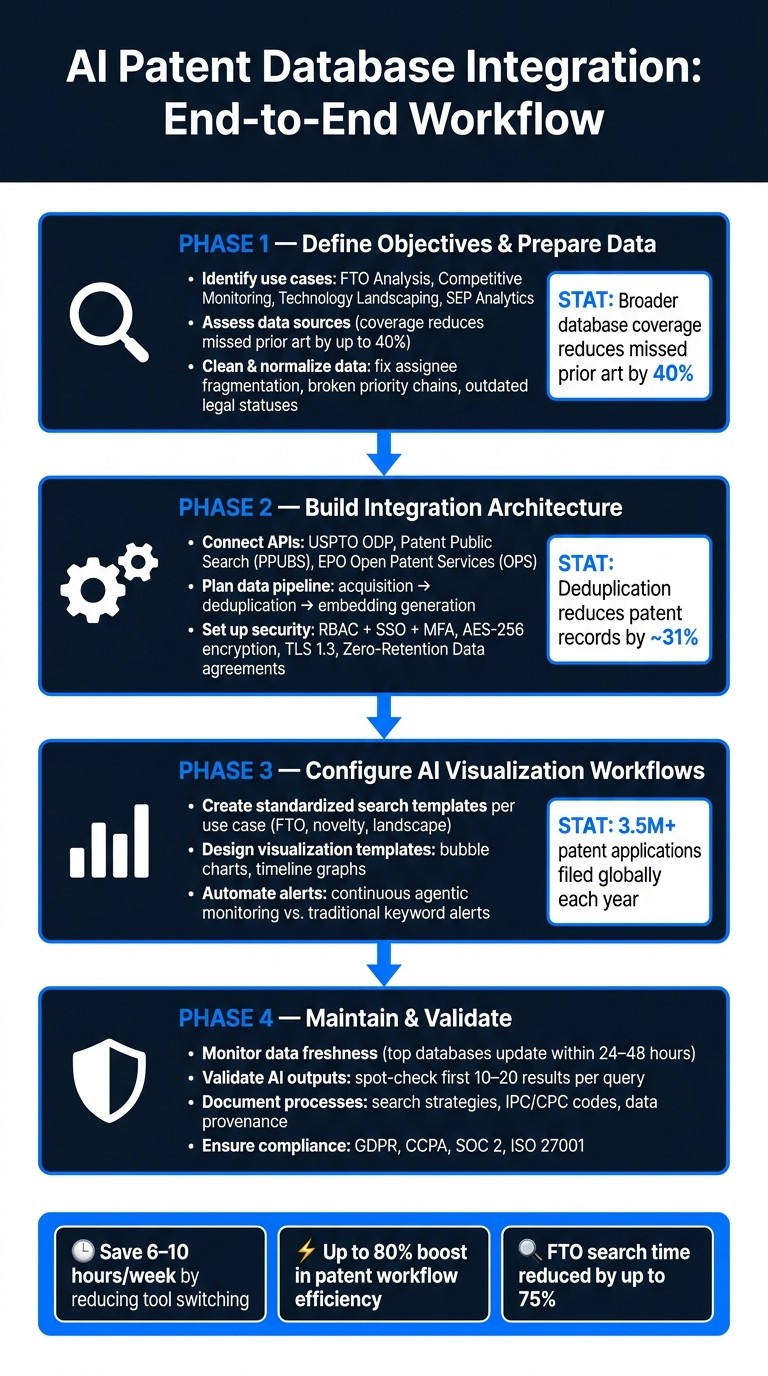
AI Patent Database Integration: End-to-End Workflow
Integrated AI Workflows for Patent Prosecution IPWatchdog Webinar
Defining Objectives and Preparing Data
Before diving into API modifications or adjusting settings, it's essential to set clear integration objectives and define the expected results. Skipping this foundational step can lead to an integration that works technically but fails to deliver meaningful outcomes.
Define Use Cases and Desired Outputs
Start by identifying the primary use cases your integration will address. Common examples include Freedom-to-Operate (FTO) or novelty analysis, competitive monitoring, technology landscaping, and Standard Essential Patent (SEP) analytics. Each use case requires a specific type of output:
FTO analysis often relies on claim charts - two-column documents that compare product features to patent claim elements.
Competitive monitoring benefits from visual outputs like timelines that reveal filing strategies or geographic heatmaps showing where competitors are focusing their patent protection efforts.
It's important to establish criteria for each use case. For example, FTO analysis might require filters to exclude inactive or obsolete patents. On the other hand, competitive intelligence efforts may need patent family mapping to track how assignees manage their portfolios and filing trends.
Assess Data Sources and Coverage
The quality and coverage of your data sources are critical. Patent databases vary significantly in their breadth, and broader coverage can reduce missed prior art by up to 40%. Beyond coverage, consider how frequently the database updates. Top platforms can surface new documents within 24–48 hours of publication. In contrast, databases with slower update cycles could leave your FTO analysis relying on outdated information.
Another factor to consider is publication lag, a structural limitation in patent systems. Stakeholders should be informed about this delay to avoid confusion when recent competitor filings don’t appear immediately. These evaluations provide a solid foundation for the essential data cleaning process that follows.
Clean and Normalize Patent Data
Once your outputs are defined and your data sources verified, the next step is ensuring data quality through thorough cleaning. Poorly managed data can lead to significant errors. Common issues include:
Assignee name fragmentation: Variations like "IBM" and "International Business Machines" might appear as separate entities.
Broken priority chains: These can result in incorrect patent expiry calculations.
Outdated legal statuses: Lapsed patents may still appear active, skewing results.
To address these issues, implement entity resolution algorithms. Start with strict clustering techniques like Fingerprinting, which standardizes punctuation and spacing. Then, use methods like the Levenshtein Distance to catch subtle spelling variations. After normalization, manually review a sample of 10–20 records to ensure the process has captured all relevant name variants. This extra step can prevent errors from snowballing into larger inaccuracies later. As highlighted in the WIPO Manual on Open Source Patent Analytics, even small inconsistencies in data can lead to significant downstream errors.
Building the Integration Architecture
With your data normalized, the next step is connecting it to your AI tools through a well-structured integration architecture. This setup ensures your data flows efficiently, supporting the goals established earlier and enabling AI-enabled patent analysis processes to function effectively.
Choose APIs and Integration Interfaces
Selecting the right APIs depends on the specific patent offices and data types your workflows rely on. For U.S. patent data, the USPTO Open Data Portal (ODP) API is a key resource for metadata, assignments, and prosecution history. Accessing it requires a free ODP API key. For full-text searches of granted patents and published applications, the Patent Public Search (PPUBS) API is your go-to. It offers daily updates and typically doesn't require authentication for basic data retrieval.
For European patent data, the EPO Open Patent Services (OPS) API provides access to INPADOC family data and legal status updates, using OAuth 2.0 for authentication.
Keep in mind, the USPTO PatentsView API was discontinued on March 20, 2026, with its data now available in ODP bulk datasets. If your current system still references PatentsView endpoints, updating those connections should be a priority.
If your operations require global patent data, you'll likely need additional connectors for regions like Japan (JPO), South Korea (KIPO), and Australia (IP Australia), alongside the primary USPTO and EPO interfaces. To simplify managing these diverse connections, consider implementing a unified REST API layer. This approach consolidates data from multiple sources into a single interface, reducing the complexity of handling each API separately.
Plan Embedding and Data Flow Processes
Once your API connections are in place, it’s time to structure the flow of patent data into your AI tools. A well-designed pipeline - handling acquisition, deduplication, and embedding generation - can catch errors early, preventing issues later in the process.
Deduplication is a critical step. By canonicalizing records, you can reduce the total number of patents by about 31%, which helps lower both compute time and storage costs. When creating vector embeddings, prioritize independent claims over dependent ones for more precise semantic analysis. For optimal results in retrieval and clustering tasks, use a Title + Abstract + Claims (TAC) text representation. Additionally, organizing vector indices by year range rather than creating a single large index allows for easier management and incremental updates without the need to rebuild everything.
"Deduplication before embedding is essential - audit your data to avoid costly errors."
After defining your data pipeline, don’t overlook security. Protect your workflows with strong access controls and encryption.
Set Up Access Controls and Security
Security isn’t just about safeguarding business data - it’s also about protecting your clients’ intellectual property. For instance, sharing an unpublished patent application with an unsecured tool can result in the loss of patent rights, creating far more than just a compliance issue.
To secure your workflows, implement Role-Based Access Control (RBAC) with Single Sign-On (SSO) and Multi-Factor Authentication (MFA). Use AES-256 encryption for data at rest and TLS 1.3 for data in transit. Additionally, establish Zero-Retention Data (ZDR) agreements with AI model providers to ensure sensitive inputs, like unpublished applications, aren’t stored or used for model training.
Your choice of deployment model depends on the sensitivity of your data. Here’s a quick comparison:
Deployment Model | Best Use Case | Security Posture |
|---|---|---|
Public / Consumer AI | Public-only research | Weak governance; data may be retained for training |
Enterprise (Vendor-hosted) | Standard patent workflows | Business-grade controls; verify "no training" clauses |
Private / On-Premises | Unpublished or highly sensitive data | Maximum privacy; requires dedicated IT resources |
Finally, use scoped API keys and OAuth 2.0 to restrict each tool’s access to only the datasets it needs. Broad, unrestricted API access introduces unnecessary risks, particularly when handling confidential client portfolios.
Configuring AI Visualization Workflows
Once your data flows are secure, the next step is to transform your infrastructure into workflows that produce actionable visual insights. This involves creating standardized templates, ensuring consistent data presentation, and automating repetitive tasks to free up your team for strategic decision-making rather than spending time sorting through raw data.
Create Standardized Search Templates
Every query should start with a clear objective. Whether you're conducting novelty assessments, FTO (freedom-to-operate) analysis, or monitoring competitors, each goal requires its own tailored search scope and filters. For example, an FTO template isn't suitable for a landscape survey - mixing these purposes can lead to inconsistencies in the datasets used across projects.
To capture a broader range of disclosures, try multi-path searching. This means querying both invention texts and specific claims, which is especially helpful when claim language differs between jurisdictions. Use a standardized approach to project labeling by referencing a table of technology terms and IPC/CPC mappings.
If you're working with an AI-powered platform like Patently, its semantic search capabilities, powered by Vector AI, can take these templates further. It can identify patents that are conceptually similar but use different terminology, something simple keyword searches might overlook.
Design Visualization Templates and Outputs
By standardizing visualization formats, you avoid the inefficiency of creating new chart designs for every project. Choose visualization types that align with your analysis goals. For instance:
Bubble charts: Ideal for comparing patent volumes across assignees or technology domains.
Timeline graphs: Useful for tracking filing trends or identifying strategic shifts.
When summarizing classification data, stick to the IPC/CPC subclass level (e.g., C12Q). This avoids cluttering charts with overly detailed subgroup information. Including forward citation counts in your visuals can also help highlight high-impact patents that deserve closer examination.
Start with an exploratory analysis to validate your search terms and refine your visual outputs before presenting them to clients. However, even with high-level AI-generated insights, it's essential to manually review the underlying patent claims before making any strategic decisions.
Once you've standardized your templates, the next logical step is to automate updates and notifications for a seamless workflow.
Automate Updates and Notifications
Traditional keyword alerts are no longer enough. Instead, opt for continuous agentic monitoring, where an AI agent evaluates each filing against a predefined research thesis. This approach ensures only new and actionable insights are flagged.
Given the sheer volume - over 3.5 million patent applications filed globally each year - manually reviewing weekly publications is impractical. A structured research thesis, detailing the technical scope, competitor focus, and explicit exclusions, is far more effective than simple keyword-based queries. Start with high escalation thresholds to minimize notification fatigue, then adjust if important filings are being overlooked. Route these alerts directly into your R&D workflows or Stage-Gate review processes for seamless integration.
Here’s a quick comparison of traditional patent alerts versus continuous agentic monitoring:
Feature | Traditional Patent Alerts | Continuous Agentic Monitoring |
|---|---|---|
Trigger | Keyword/Boolean match | Research thesis & interpretive reasoning |
Output | List of matching documents | Interpreted intelligence with written rationale |
Frequency | Periodic (weekly/monthly) | Continuous (daily/real-time) |
Relevance | High noise (false positives) | High signal (filtered for substance) |
Integration | Standalone notification | Integrated into R&D decision workflows |
Maintaining and Validating the Integration
Once your automated workflows are up and running, keeping a close eye on them becomes essential. With the sheer volume of patent filings and updates, passive monitoring just won’t cut it.
Monitor Data Quality and Freshness
Patent data can become outdated in no time. Legal status changes - like lapses in maintenance fees, ownership transfers, or post-grant proceedings - can alter a patent's risk profile almost instantly. Top-tier databases typically update daily, ensuring new documents are available within 24–48 hours. But staying current isn’t enough. Entity resolution, where variations of names like "IBM" and "International Business Machines" are linked to a single entity, is another critical aspect. Regular checks should verify the integrity of normalized patent family trees. Without this, IP professionals often spend 6–8 hours each week fixing database errors manually. Adding automated validation alongside periodic human reviews can drastically cut down this wasted time. With up-to-date and accurate data in place, the next step is ensuring that AI-driven outputs are reliable.
Validate AI Outputs and Clustering Accuracy
After confirming data quality, it's time to focus on validating AI outputs. A simple yet effective approach is to spot-check the first 10–20 results from any AI query. This helps catch issues like inconsistent assignee names before they affect your analysis. For technology classification, consider using an "Auto-Classify" system. This allows domain experts to review, edit, or remove AI-generated subject-matter tags before finalizing them. As Samuel W. Apicelli of Duane Morris LLP puts it:
"AI searches are only as good as the databases they access and the algorithms that power them. While a skilled human searcher knows to look in unexpected places, AI may not."
It's critical to base AI outputs on live database records rather than static training data. Errors like a fabricated patent number or an incorrect grant date in an opinion letter don’t just damage credibility - they can lead to serious legal consequences.
Document Integration Processes and Compliance
Every decision made during the integration process should be carefully documented. This includes logging search strategies (semantic, keyword-based, or structured filters), defining the time ranges and IPC/CPC codes used, and explaining the reasoning behind each parameter choice. If a legal team or capital committee questions why a specific patent was excluded from an analysis, your documentation should provide a clear answer.
Data provenance is equally important. Every technical claim in a competitive analysis should be tied to a verified source, complete with details like title, assignee, and publication year. For regulatory compliance, make sure your processes align with standards like GDPR and CCPA, and that your platform holds certifications such as SOC 2 or ISO 27001. Finally, post-migration testing - such as User Acceptance Testing (UAT) - is vital. This ensures features like search functions and automated alerts work as intended, and the process should be documented thoroughly to make it repeatable rather than a one-time exercise.
Conclusion
Integrating AI into patent databases requires careful planning and continuous effort. It involves defining clear use cases, normalizing data, validating AI outputs, and maintaining compliance documentation to establish a smooth and reliable workflow.
The benefits are hard to ignore. Modern AI platforms can boost patent workflow efficiency by as much as 80%, while reducing tool switching can save patent professionals 6–10 hours every week. As Alex G. Lee, PhD, Esq., Founder of AI-Native Patent Practice Academy, aptly states:
"The value of any AI tool isn't in what it can do in isolation - it's in how it connects to the rest of the workflow."
This highlights the importance of integration quality. Advanced systems, such as Agentic AI, demonstrate this by enabling live queries through protocols like MCP, making integration a key competitive edge. Platforms like Patently take this concept further by merging features like semantic search, AI-assisted drafting, and portfolio analytics into one cohesive environment. This interconnected approach ensures insights build upon one another throughout the patent lifecycle.
FAQs
What should I integrate first in an AI patent workflow?
The first step to bringing AI into your patent workflow is shifting to a critique-before-creation mindset. By using AI to analyze prior art early in the process, you can pinpoint potential challenges before drafting formal documents.
Patently simplifies this process by integrating AI tools directly into your workflow. These tools allow for early intellectual property (IP) analysis and real-time risk evaluation. This forward-thinking approach helps fine-tune claim language during product development, reducing the risk of delays caused by last-minute revisions.
How do I keep patent legal status and assignee data accurate?
To maintain precise patent legal status and assignee data, prioritize data harmonization and real-time updates. Leverage AI-powered string-matching tools to consolidate variations in corporate names - like abbreviations or misspellings - into unified entries. Incorporate API-based synchronization with global patent office registers to ensure legal statuses are updated automatically. Conduct regular database audits to identify and resolve inconsistencies early, avoiding potential errors during data migration.
How can I use AI with patent data without risking confidentiality?
To maintain confidentiality when working with AI and patent data, focus on local processing and data isolation. Use private or on-premises hardware to ensure that sensitive information stays secure. Select tools that support air-gapped setups and avoid storing data or sending telemetry to vendor servers. For prior art searches, rely on semantic queries with broad terms rather than detailed claims. Additionally, keep data separated by project and verify strict tenant isolation to boost security.