Best Practices for AI Patent Drafting
Intellectual Property Management
Jun 17, 2026
AI-assisted patent workflow: use verified inputs, define claim scope, draft claims/spec in passes, check §112 support, and document tool use.

AI can draft patent text fast, but I still have to control the record, the prompt, the review, and the filing decision. In U.S. practice, that is the core point. The article shows a simple workflow: use verified invention materials, set claim scope before prompting, draft claims and specification in separate passes, and review every line for § 112 support, technical accuracy, and confidentiality risk.
Here’s the short version I’d take away:
AI helps with first drafts, including claims, specifications, abstracts, and fallback positions
Attorney review stays mandatory because AI can add facts, stretch claim scope, or miss support
Public tools can create disclosure risk under 35 U.S.C. § 102
Written description problems can appear when AI inserts features not in the inventor record under 35 U.S.C. § 112
Structured prompts work better when they set role, source material, and hard limits
Section-by-section drafting beats one-shot drafting for claims and support
Governance matters: approved tools, logs, templates, access limits, and review checkpoints
A few data points stand out. The article says top tools in 2026 reach 85%–92% attorney approval rates for generated claims and 82%–88% usability for first-draft specifications. But it also notes that about 90% of USPTO applications get a non-final rejection. So output speed does not remove legal risk.
What I like about this framework is that it stays simple: prepare clean inputs, prompt with limits, verify support, and document what happened. That is the part worth keeping.
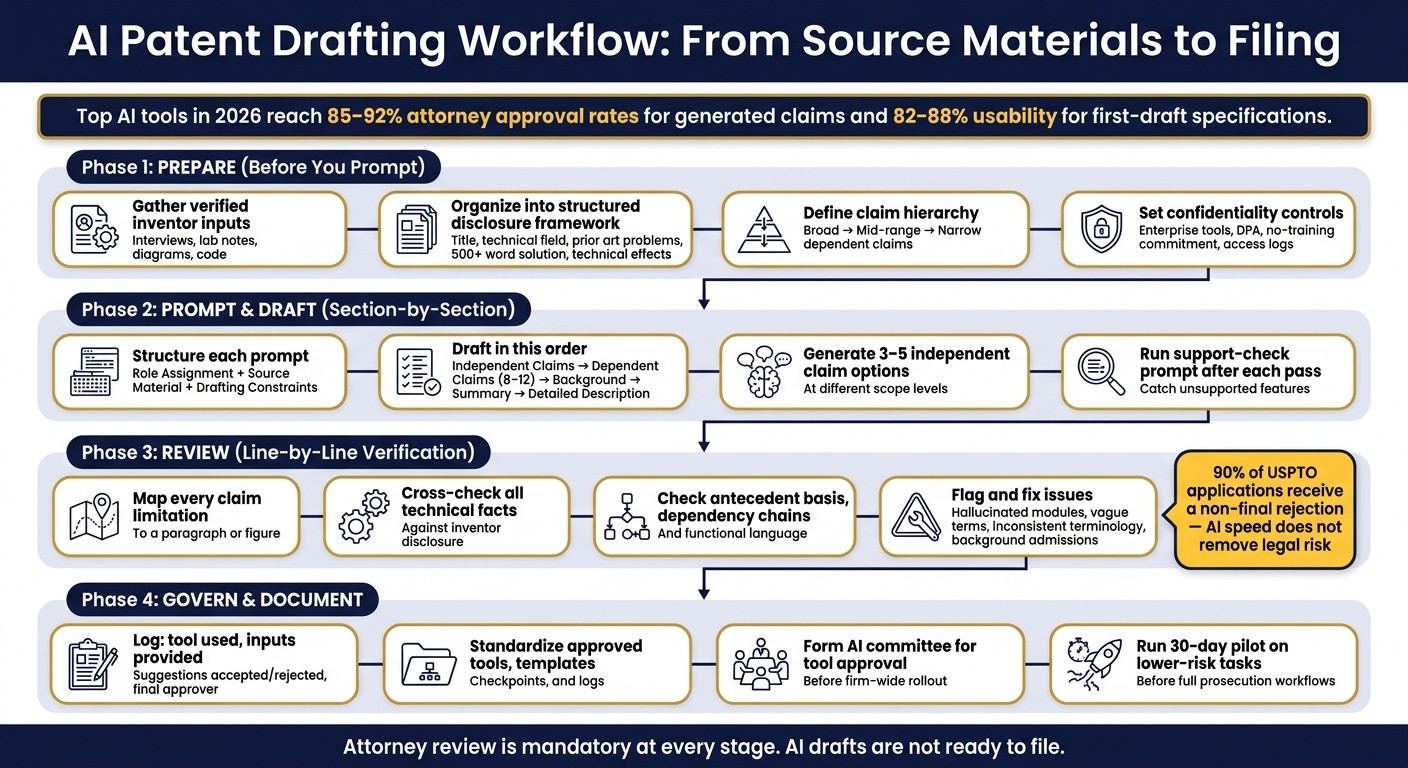
AI Patent Drafting Workflow: From Source Materials to Filing
AI-Powered Patent Claim Drafting. My New Workflow.
Prepare source materials, objectives, and safeguards before drafting
Start with verified inputs, a clear claim plan, and tight access controls. AI drafting is only as good as the record behind it. So the first job is simple: collect the source material, check it, and make sure it’s solid.
Gather and organize invention inputs
Build the draft on verified inventor input and technical records you can trust. Inventor interviews help pin down the original intent, the problem the invention addresses, and how the inventors describe it in their own words. Technical specifications add precision. Lab notes and diagrams help show conception and the steps behind the work. Code excerpts matter a lot for software and AI patents. And a curated prior art set helps define the novelty boundaries. Together, these materials become the factual base for every later prompt and draft.
After that, organize everything into a structured disclosure framework. That usually includes:
invention title
technical field
problems in the prior art
a detailed solution description of 500+ words
technical effects
implementation scenarios
One useful step before drafting is to run that disclosure through AI as a triage check. The goal isn’t to have the system write the application yet. It’s to spot holes, flag weak spots, and suggest follow-up questions for the inventor. That can save time later, especially when a missing detail would otherwise show up in claims or support problems.
Once the record is complete, define the claim ladder and fallback positions.
Define U.S. drafting goals and claim constraints
Before you prompt anything, decide what the application needs to do. Set a clear claim hierarchy with broad, mid-range, and narrow claims so the AI can produce claims that balance business value with grant risk. Broad independent claims should cover the core concept. Mid-range claims should add key structure or function. Narrow dependent claims should cover things like parameter ranges, material variants, structural details, and optional features. Those narrower claims matter because they give you fallback positions if broader claims are rejected.
AI can also help produce 8–12 dependent claims that cover material variants, structural details, parameter ranges, and optional features, but the attorney still has to define the target scope first.
Then lock down access and reuse rules before sending a single prompt.
Set confidentiality controls and reusable drafting assets
Use top patent tools with enterprise-grade features with contractual confidentiality protections, a DPA, and a no-training commitment. Keep approved claim language, boilerplate sections, and terminology in a firm-controlled template library. Limit access by matter, and log usage.
"Understanding the security model of the tools your firm uses for client work is not optional; it is an obligation." - Tabrez Alam, Founder, eety.ai
These controls tie security and reuse into one drafting discipline, not two separate admin chores.
With inputs, scope, and safeguards set, the next move is to turn them into structured prompts for each application section.
Design prompts and drafting workflows for each application section
Once your source materials and claim goals are set, the next step is to turn them into prompts for each section of the application.
A good prompt does three jobs at once: it sets the role, gives the source material, and sets hard limits. That’s what keeps the output tied to the facts and fit for legal use.
Structure prompts with clear roles, outputs, and limits
Good prompts turn verified disclosure into controlled patent language.
Start each prompt with a role assignment, like: "You are a senior patent attorney specializing in semiconductor fabrication, familiar with U.S. written-description and claim-support requirements."
Then split the prompt into clear labeled parts. Instructions, Source Material, and Drafting Constraints are a solid setup. This helps stop the model from mixing up technical facts with formatting directions, or the other way around.
Under Drafting Constraints, spell things out. For example:
Maintain antecedent basis
Do not add any feature not found in the source material
Flag relative terms like "large" or "fast" for attorney review
For more complex inventions, add a short analysis step before drafting starts. Ask the system to summarize the core invention and point out the key technical means before writing anything. That extra step matters. It pushes the model to assess novelty first, which can cut down on invented limitations.
Draft claims and specification in separate passes
Don’t try to generate the full application in one shot. Draft it section by section, in a set order: independent claims first, then dependent claims, then Background, Summary, and Detailed Description.
Locking down the independent claims before drafting the specification helps the written description give direct support for each limitation. That matters under §112, and it’s easy to miss if you draft from top to bottom.
For independent claims, generate 3–5 options at different scope levels: broad, mid-range, and narrow. After the attorney approves the claim plan, run a second pass for 8–12 dependent claims that cover parameter ranges, material variants, structural details, and technical variants. Each pass should use the same structured disclosure so the wording stays steady across the application.
Use role assignment, section-by-section drafting, support check, and firm examples only when each one adds control or keeps language steady.
After each pass, run a support-check prompt. Ask the AI to identify any generated features that do not appear in the original disclosure. That’s a simple way to catch new matter before it turns into a prosecution issue.
Use semantic search and portfolio context to improve consistency
Terminology drift across a patent family is a real prosecution risk. One way to cut that risk is to give the AI controlled context from your own portfolio, not just the current disclosure. Granted patents and published applications in the same technical area can act as structural references. They help guide claim wording and the way embodiments are organized.
Patently's Vector AI semantic search makes this easier. It helps you find related patents, earlier claim language, and technical descriptions from your own filings, then use that material as controlled context inside drafting prompts.
Use portfolio filings and semantic search to keep claim language and embodiment structure aligned across the draft. You can also place 1–2 high-quality claim examples from the same technical field directly in the prompt. Just make sure any borrowed wording actually fits the invention in front of you.
Once the draft matches portfolio language, the next step is a line-by-line support and accuracy review.
Review AI-generated drafts for legal support, technical accuracy, and consistency
After drafting, shift from generation to verification. An AI draft is not ready to file. You need a structured review to catch issues in the claims, specification, and figures before anything goes out the door.
Check claim support, claim form, and U.S. drafting compliance
Start by mapping each claim limitation to a paragraph or figure. If support is missing, add it to the specification or remove the limitation. Every claim term needs explicit support in the specification.
Use the same source materials and the same portfolio context you used during drafting as your review baseline.
Then check antecedent basis across all claims. Look for any instance of "the [term]" that does not follow an earlier "a [term]." Review each dependency chain to make sure every dependent claim points to the right parent. And read the AI-generated Background section with care. AI can describe prior technology as "conventional" or "well-known", which may narrow your novelty position.
Flag functional language and swap it for structural language unless means-plus-function treatment is intentional.
Once claim support is mapped, move to the technical details that are supposed to support those claims.
Verify technical facts, units, and generated details
AI models can invent technical details that were never in the record: modules that do not exist, materials no one disclosed, or performance metrics with no source. Cross-check every technical point against the inventor disclosure and supporting notes. Review all numbers, ranges, and units across the application.
After each section, ask AI to identify any inference or assumption that is not grounded in the disclosure.
Once the facts are cleaned up, use AI only for wording alignment across the corrected draft.
Refine drafts through controlled human-AI iteration
Make the substantive edits yourself first. After that, use AI for cleanup, like harmonizing terminology and producing alternate phrasing from the corrected draft, not from the first output.
"The AI generates a first draft. You are the drafter of record. Your name goes on the filing. Your professional responsibility obligations are completely unchanged by what tools you used." - Tabrez Alam, Founder, eety.ai
That point matters for professional responsibility too. AI output is not a substitute for independent verification.
The table below shows the most common AI drafting errors, where they tend to appear, and what to do about them:
Common AI Drafting Error | How to Detect | How to Fix | Typical Location |
|---|---|---|---|
Antecedent Basis | Scan for "the [term]" without a prior "a [term]" | Introduce the term with an indefinite article in a preceding limitation | Claims |
Technical Hallucination | Cross-check against the original invention disclosure and technical notes | Remove non-existent modules; replace with actual data | Detailed Description |
Inconsistent Terminology | Keyword scan of the revised draft for synonym drift | Harmonize to the primary term used in independent claims | Entire Application |
Unsupported Claim Scope | Compare each claim limitation against the finalized specification and remove any unsupported expansion | Add specification language or narrow the claim to match the disclosure | Claims / Specification |
Vague Functional Language | Search for "computer-implemented" or generic "processing" | Replace with specific algorithmic or structural descriptions | Independent Claims |
Reference Numerals | Compare numerals in text against drawing labels | Update text or drawings to ensure 1:1 correspondence | Figures / Detailed Description |
Background Admissions | Read for "conventional" or "well-known" phrasing | Rewrite to describe the technical context without conceding novelty | Background Section |
Integrate AI into patent practice with governance and clear workflow rules
Fixing mistakes in a draft is only part of the work. The other part is making sure everyone on your team uses AI in a consistent way across every matter.
Document AI use, approvals, and version history
After you correct the draft, set up a workflow your team can repeat on the next matter and the one after that. Log the prompts, source materials, major revisions, and attorney approvals in the matter file. That log should work as an audit trail for review and accountability, tied to drafting quality, not just box-checking.
A 2026 decision also treated AI-assisted materials as protected work product when prepared for litigation.
At a minimum, record:
The tool used
The inputs provided
Which suggestions were accepted or rejected
The final approver
Build policy-driven workflows instead of ad hoc use
Documentation helps, but only if the firm follows the same process every time. The biggest risk is inconsistency. If each attorney uses different prompts, different tools, and different review habits, quality gets uneven fast. And when that happens, the practice becomes hard to manage at scale.
Treat AI as a drafting tool, not a source of facts and not a stand-in for lawyer judgment. Keep its role limited to defined tasks, such as first-pass drafting, claim hierarchies, and antecedent-basis checks. Then require human review at each stage.
For invention disclosures, ban consumer AI tools. Use approved enterprise tools with no-training terms. The approved platform should also have a signed enterprise DPA in place, not just a privacy policy link.
To keep the process steady, standardize:
Tools
Templates
Checkpoints
Logs
A practical place to start is a small AI committee made up of attorneys and staff. Give that group the job of reviewing and approving specific tools before a firm-wide rollout. Then run a 30-day pilot on lower-risk tasks like first-pass drafting before moving into full prosecution workflows.
Conclusion: The best practices that matter most
The steps that make the biggest difference are also pretty simple: start with complete, organized source materials; define your claim strategy before prompting; draft section by section in passes; and review every AI output against the actual disclosure before it goes anywhere. Add confidentiality controls and documentation rules on top, and you get a workflow that is defensible and repeatable.
Patently supports AI drafting, semantic search, and matter management in one workspace.
FAQs
What should I prepare before using AI to draft a patent application?
This section asks for a high-quality invention disclosure that can support patent drafting and internal review. The goal is simple: explain the invention clearly, show what problem it solves, describe how it works, and document the people and review steps behind it.
A strong disclosure usually includes:
a plain-English summary of the invention
the technical problem being addressed
the proposed solution
the main parts, modules, or process steps
prior art and the closest known references
a side-by-side comparison against the closest art
sketches, figures, or block diagrams
a glossary of preferred technical terms
a review plan with human oversight
records showing who contributed what, and who checked the output for legal and USPTO fit
Technical Explanation
The technical explanation should describe what the invention is, how it works, and what makes it different.
Start with the invention at a high level. Then move into the working details:
What system, method, device, model, or process is being claimed?
What inputs does it receive?
What operations does it perform?
What outputs does it produce?
What parts are required, and which are optional?
How do the parts interact?
Write this in a way that an engineer, patent attorney, or examiner could follow without guessing. If there are multiple versions, include them. If the invention can be built in software, hardware, firmware, or a mix, say that directly.
Use terms consistently. If one part is called a controller, don’t switch later and call it an engine unless those are different things.
Problem
The problem section should explain the gap in current systems or methods.
That means spelling out:
what people do now
where current tools fall short
what cost, delay, error, or limitation exists
why those limits matter in practice
This part should stay factual. Don’t oversell it. A clean problem statement is often stronger than hype.
For example, if current systems need manual review at several stages, say that. If known methods miss edge cases, need too much memory, create latency, or produce poor traceability, state that in concrete terms.
Solution
The solution section explains how the invention addresses the problem.
This is where you connect the dots:
Existing systems do X, which leads to Y. The disclosed invention instead does A, B, and C, which reduces or avoids Y.
Be specific about the mechanism. If the invention improves routing, classification, synchronization, data validation, security checks, or model control, explain the actual steps.
If the solution depends on a new arrangement of known parts, describe that arrangement. If the solution comes from a new sequence of operations, document the sequence. If the gain comes from a rules engine, learned model, hardware layout, signal path, or data structure, spell that out.
Core Components
List and define the main components in a stable way. This helps later when claims and figures are prepared.
A simple component breakdown might include:
Input layer: receives source data, user input, sensor data, or upstream signals
Processing module: applies logic, transforms data, runs models, or executes rules
Storage layer: stores state, configurations, logs, or output artifacts
Decision module: selects actions, ranks options, flags exceptions, or triggers events
Output interface: presents results to users, downstream systems, or physical devices
Audit and control layer: records changes, permissions, review actions, and exceptions
If the invention is mechanical or electro-mechanical, this section should name each part, its position, and its function. If it is chemical or biotech, identify materials, compositions, reaction steps, and process conditions.
Prior Art Research
The prior art section should gather references that are close enough to matter. That usually includes:
issued patents
published patent applications
academic papers
technical standards
product manuals
public demos or white papers
known market systems in public use
The search should focus on the invention’s key features, not just broad topic words. Good prior art work often uses several angles:
feature-based searching
synonym-based searching
assignee and inventor searching
CPC/IPC class searching
backward and forward citation review
For each reference, capture at least:
Reference | Type | Key Teachings | Relevance |
|---|---|---|---|
Patent/Application 1 | Patent | Describes part of the workflow or structure | Close on feature X |
Patent/Application 2 | Published application | Shows related control logic or architecture | Close on feature Y |
Non-patent literature 1 | Article/standard/manual | Explains known implementation pattern | Background or secondary reference |
If the user wants, I can also help turn this into a prior art search matrix with search strings, classes, and feature mapping.
Comparison to the Closest Existing Art
This part matters a lot. It shows where the invention departs from the closest known reference.
Use a direct comparison table:
Feature | Invention | Closest Existing Art | Difference |
|---|---|---|---|
Input handling | Uses the disclosed intake method | Uses known intake approach | Different preprocessing path |
Decision logic | Applies the disclosed rules/model flow | Uses a fixed or simpler rule set | Different control path |
Exception handling | Includes review gates and logging | Limited or no structured review path | Better traceability |
Output generation | Produces the disclosed output package | Produces standard result only | Different output scope |
Focus on specific differences, not general praise. The question is not “Is this better?” The question is “What is structurally or functionally different?”
Supporting Sketches or Diagrams
Sketches do not need to look polished. They just need to be clear.
Useful figures often include:
system block diagram
process flowchart
user interaction flow
network or device architecture
state transition diagram
data pipeline view
exploded component view for physical systems
A simple example:
Each figure should have a short caption and figure number, such as FIG. 1 - System Architecture or FIG. 2 - Method Flow.
Glossary of Preferred Technical Terms
A glossary helps keep the disclosure, claims, and later prosecution materials consistent.
Use one preferred term for each concept and define it once. For example:
Preferred Term | Meaning | Notes |
|---|---|---|
Invention | The disclosed system, method, device, or process | Use consistently in summary sections |
Module | A functional unit implemented in software, hardware, firmware, or a mix | Good broad term |
Processor | One or more computing elements that execute instructions | Avoid switching terms unless needed |
Memory | Non-transitory storage used by the system | Match patent drafting practice |
User device | Client-side device used for access or interaction | Covers phone, laptop, tablet |
Review record | Stored evidence of a human check, edit, approval, or rejection | Good for oversight trail |
Prior art reference | Any public source that may bear on patentability | Includes patents and non-patent literature |
If your team already uses internal product names, code names, or labels, map them to clean patent-style terms here.
Plan for Human Oversight
Because this workflow includes AI-assisted drafting or research, the review process should make human responsibility plain and documented.
The oversight plan should include:
a named human inventor or subject-matter lead who confirms the technical facts
a human reviewer who checks prior art summaries against source documents
a patent attorney or patent agent who reviews for legal fit
a final compliance check for USPTO rules, inventorship, and claim support
a record of edits made after AI-generated output
A practical review flow might look like this:
Stage | Human Role | Review Task | Output |
|---|---|---|---|
Invention intake | Inventor / engineer | Confirm facts, features, and use cases | Approved invention notes |
Draft disclosure review | Technical lead | Check technical accuracy and missing details | Marked draft |
Prior art review | Researcher / attorney | Verify references and distinctions | Prior art memo |
Legal review | Patent counsel | Check patentability framing and USPTO fit | Legal comments |
Final sign-off | Authorized human reviewer | Approve final version and records | Final disclosure package |
Human Contributor Documentation
Documenting contributors is not just housekeeping. It helps with inventorship analysis, internal ownership records, and later prosecution support.
Track at least:
full name
job title or role
date of contribution
type of contribution
whether the contribution was technical, editorial, legal, or administrative
whether the person may qualify as an inventor
reviewer name and approval date
A simple contributor log works well:
Name | Role | Contribution | Date | Inventorship Review Needed |
|---|---|---|---|---|
[Name] | Engineer | Described architecture and core flow | [MM/DD/YYYY] | Yes/No |
[Name] | Product lead | Supplied use cases and constraints | [MM/DD/YYYY] | Yes/No |
[Name] | Patent counsel | Reviewed legal framing and compliance | [MM/DD/YYYY] | Yes/No |
AI Output Review for Legal Accuracy and USPTO Compliance
AI output should never be treated as final legal work product without human review. That review should check at least four things
How can I reduce confidentiality and disclosure risks when using AI?
Use enterprise AI platforms that come with firm contract terms around data isolation, limits on model training, and no data retention. Skip consumer tools that may send prompts outside your control or feed them back into training systems.
Set clear internal rules for how teams can use these tools. That should include usage logs, input controls, and role-based access controls for sensitive data.
You’ll also want to review each provider’s DPA, security practices, subprocessor controls, audit rights, and breach notification terms. Those details matter. A polished sales page is one thing; the contract is where you find out how your data is actually handled.
What should I review before filing an AI-assisted patent draft?
Before filing an AI-assisted patent draft, review a few core points.
Claim scope against known prior art
Support for every claim element in the specification and figures
Functional language to avoid unintended means-plus-function issues
Inventorship and records of human contributions
Also make sure the invention is clearly described, shows possession, and enables a person skilled in the art to make and use it.