AI Patent Search APIs vs Integrated Platforms
Intellectual Property Management
Jun 16, 2026
Compare API-first vs integrated patent search platforms—tradeoffs in workflow, cost, security, and maintenance.

If you need custom system integration, choose an API. If you need search, review, drafting, and team work in one place, choose a platform.
That’s the short answer. From what I see in the article, the choice comes down to who will use the tool, who will maintain it, and whether search results need to stay connected to later patent work.
Here’s the article in plain English:
APIs fit engineering-led teams
Best for internal tools, BI dashboards, R&D systems, and AI agents
Return structured data like JSON or XML
Give more control, but your team owns setup, monitoring, and security work
Integrated platforms fit legal and IP teams
Best for top patent tools for search, review, drafting, and matter-based work
Use a ready-made interface with reports, collaboration, and workflow tools
Keep search context attached as work moves forward
Time and cost are very different
Full API buildouts can take 6–12 months
Some in-house builds may need 4 engineers
Platform pricing is often easier to plan than usage-based API pricing
One example in the article lists a starter plan at $125/month
The biggest split is workflow
APIs are better when you want to plug patent search into your own stack
Platforms are better when attorneys and IP teams need one record from search through drafting and prosecution
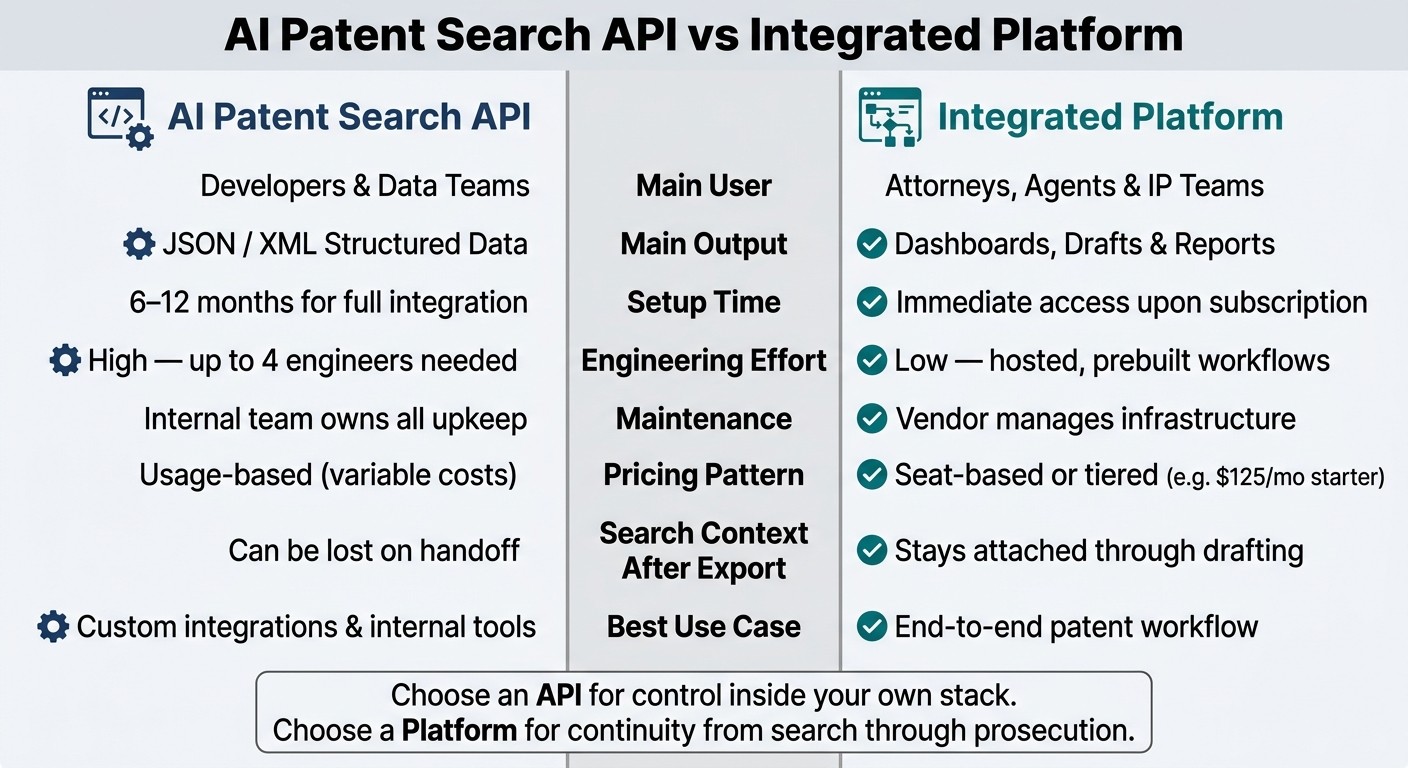
AI Patent Search API vs Integrated Platform: Side-by-Side Comparison
Quick Comparison
Criteria | AI Patent Search API | Integrated Platform |
|---|---|---|
Main user | Developers, data teams | Attorneys, agents, IP teams |
Main output | JSON/XML data | Dashboards, drafts, reports |
Setup time | Longer | Immediate after signup |
Internal build work | High | Low |
Maintenance | Your team | Vendor |
Best use | Custom integrations | End-to-end patent workflow |
Search context after export | Can get lost | Stays in the workspace |
Pricing pattern | Often usage-based | Often seat-based or tiered |
My takeaway: this is not just a feature comparison. It’s a workflow choice. If you want control inside your own software, an API makes sense. If you want fewer handoffs and less context loss, an integrated patent platform is usually the better fit.
Core Capabilities: Search, Analytics, and Workflow Support
The main gap shows up in prior art work. Search results don't just need to be found - they need to move cleanly into review and claim drafting. APIs return search data. Integrated platforms keep that same context moving into review, drafting, and team collaboration.
Capability | AI Patent Search APIs | Integrated Platforms |
|---|---|---|
Semantic Search | Vector outputs and ranked results | Natural language search built into the workflow |
Citation Analysis | Citation data for custom analysis | Interactive Forward and Backward citation browsers |
Tagging & Review | Build your own | Built-in tagging, voting, and comments |
Reporting | Built from API data | One-click Word, Excel, or PDF exports |
Workflow Support | Flexible, but split across tools | Continuous handoff from search through drafting |
Context Preservation | Context can break on export | Context stays attached through review and drafting |
Where APIs Offer Precision and Build Flexibility
APIs work well when a technical team wants tight control over how patent data moves through its own systems. You can write custom ranking logic, run batch queries, and send structured JSON to internal databases, BI dashboards, or invention disclosure software. Some APIs also support MCP for agentic workflows.
That control comes with extra work. Your team has to handle authentication, data normalization across global patent offices, error monitoring, and the application layer that turns raw API output into something people can review. That's a lot to own. The freedom to build things your way also puts setup, upkeep, and compliance work on your side.
Where Integrated Platforms Cover End-to-End Work
Integrated platforms take a different path. They keep search results tied to what comes next in the workflow. Results move straight into review, drafting, and collaboration. Patently combines Vector AI semantic search, citation browsing, AI-assisted drafting tools via Onardo, and project management in one workspace. A patent attorney can run a prior art search, review cited references, comment, and move into claim drafting without leaving the record.
That matters because context often gets lost the moment results are exported or passed into another tool. The logic behind why a reference matched a claim can vanish in the handoff. Integrated platforms keep that context attached through review and drafting.
That tradeoff leads straight into infrastructure, security, and cost.
Implementation Tradeoffs: Infrastructure, Security, and Cost
Once prior art search becomes part of a repeatable workflow, the math changes. It’s not just about search quality anymore. You also have to look at setup work, who owns security, and how easy it is to keep spending under control.
Those tradeoffs show up most clearly in three places: implementation time, security ownership, and budget planning.
Technical Overhead and Internal Resource Needs
Building an in-house patent search API usually takes a lot more work than teams expect. In many cases, it calls for a dedicated team of four engineers and 6–12 months of development time. And that’s just to get the system live. It doesn’t include the day-to-day work that comes after, like data ingestion, accuracy checks, and scaling.
Integrated platforms take most of that burden off your team. The provider handles the infrastructure, updates, and scale, while your team gets access as soon as the subscription starts.
Factor | AI Patent Search API | Integrated Platform |
|---|---|---|
Engineering Effort | High - integration, UI development, and maintenance | Low - hosted, prebuilt workflows |
Implementation Speed | 6–12 months for full integration | Immediate access upon subscription |
Maintenance | Internal team handles updates and monitoring | Provider manages all infrastructure |
Security and governance | Custom-built token management, encryption, and audit logs | Built-in compliance controls (SOC 2 Type II, ISO 27001, MFA) with centralized audit trails and granular UI roles |
Budget Predictability, Compliance, and Access Control
For teams that run prior art searches again and again across many matters, pricing structure matters just as much as feature set. Usage-based API pricing can swing up or down with search volume, which makes planning harder. An integrated platform usually uses seat-based or tiered pricing, so monthly costs are easier to forecast.
Patently uses that model. It offers a Free plan, a $125/month Starter plan, and custom higher-tier plans for larger teams.
That difference in setup effort, security handling, and pricing model often decides which option works better for a given workflow.
Best-Fit Use Cases: When to Choose Each Approach
Once cost and setup are clear, the next step is workflow. Put simply: which option fits how your team already works?
When an API-First Approach Makes Sense
An API-first approach is a good match when your company has in-house engineers and a clear integration target. If you need to pull patent data into a private R&D database, send prior art results into BI tools like Power BI or Tableau, or build a custom AI agent that sharpens search strategies, an API gives you the direct access to do that. It also makes sense for teams building their own LegalTech products or for companies that need patent data tied into invention disclosure or CRM systems.
In those cases, the main draw is control. You can shape the workflow around your own systems instead of working inside someone else’s interface.
That’s where APIs tend to shine: when customization matters more than a shared team workflow.
When an Integrated Platform Is the Better Choice
For many patent attorneys, in-house IP teams, and law firms, the main goal isn’t just getting search results. It’s keeping those results usable during drafting and prosecution. Integrated platforms help by keeping search intelligence connected across the full lifecycle - search, review, draft, and prosecution - without losing context as work moves from one step to the next.
You see the split most clearly in day-to-day patent work:
Scenario | API-First | Integrated Platform |
|---|---|---|
Custom internal tools (R&D or CRM integration) | Best fit | Limited flexibility |
Law firm collaboration (shared workspaces, client access) | Requires custom build | Best fit |
Matter-based patent operations (search → draft → prosecution) | Fragmented across tools | Best fit - context persists across the lifecycle |
Patently supports that search-to-prosecution workflow with matter-centric management, client access, AI drafting, semantic search, and project management.
Conclusion: Match the Tool Model to the Patent Workflow
APIs give you control. Integrated platforms give you continuity.
That choice also shapes build time and upkeep. If your organization has the engineering team to build and support a custom system, an API-first setup can place patent intelligence exactly where you want it - inside an invention disclosure system, an R&D dashboard, or an AI agent. But that freedom comes with a clear implementation load.
For legal teams, the bigger issue is workflow continuity. When search results need to carry over into drafting and prosecution, the main risk is losing context. And that risk gets bigger when work is spread across separate tools.
Patently deals with that by keeping semantic search tied to drafting, project management, and collaboration in one place. Bottom line: Use an API for internal legal-tech infrastructure. Use an integrated platform for prosecution, matter management, and cross-team collaboration.
FAQs
How do I choose between an API and a platform?
It comes down to what matters more to your team: workflow continuity or custom development flexibility.
Choose an integrated platform like Patently if you want prior art search, drafting, and project management in one place. It keeps the work moving without making your team jump between tools.
Choose an API if you need raw data and AI access for internal tools you plan to build yourself. That route gives you more room to shape the product around your needs, but it also means taking on the engineering work, maintenance, and data normalization that come with it.
When does an API become too costly to maintain?
An API gets too expensive to maintain when the day-to-day in-house costs - like server hosting, data normalization, and periodic model retraining - start to outweigh the upside.
This tends to hit harder at high volume. As query loads grow, compute and storage costs climb. At the same time, engineering teams can end up spending a lot of time building and watching pipelines to keep accuracy from drifting.
Why does search context matter after prior art review?
Search context matters because it turns prior art retrieval into a steady source of intelligence, not a one-time task.
Without that context, teams can end up doing the same work twice, repeating manual review, and reading references in different ways across drafting, prosecution, and portfolio strategy. Keeping the context in place preserves the reasoning behind each reference and helps decisions stay tied to the original search.