Pretrained Models for Patent Search: Overview
Intellectual Property Management
Jun 15, 2026
Pretrained patent models make prior-art search semantic—use TAC inputs and hybrid BM25+dense retrieval to boost recall, ranking, and drafting support.

Patent search works better when you combine semantic models with keyword search. In plain terms: pretrained models help find patents that use different wording for the same idea, while keyword tools still help with exact phrase matching.
If I had to boil the article down fast, I’d say this:
PLMs learn language first, then handle patent tasks like retrieval, ranking, classification, and drafting support.
Patent-trained models usually beat general models on patent text because claims use dense, formal wording.
Dual-encoder models are often the best fit for search because they turn queries and patents into vectors for large-scale retrieval.
Title + Abstract + Claims (TAC) is often the best input mix for search pipelines.
For prior-art work, I’d track Recall@k, nDCG@10, MAP, and MRR - not just one score.
Patent search systems can hit very high recall, including reported results up to 94.29%, but out-of-domain performance can drop by 55% to 65%.
The main trade-off is simple: semantic reach vs. easy explainability.
In practice, a hybrid setup with BM25 + dense retrieval is often the safest choice.
Here’s the short version of how the model types line up:
Model type | Main use in patent work | Common examples |
|---|---|---|
Encoder-only | Ranking, classification, similarity | |
Dual-encoder | Vector search, semantic retrieval | |
Encoder-decoder | Summaries, reformulation, drafting help | |
Decoder-only | Query rewriting, claim wording help | |
Multimodal | Figure and text matching | CNN + transformer systems |
What matters most is not model size by itself. Fit, latency, patent data coverage, and how well the system handles missed prior art matter more.
If you want the plain answer: use patent-focused encoders for search, generative AI patent drafting tools for drafting help, and test everything on patent benchmarks before trusting it in a live workflow.
How Pretrained Patent Models Work
Core Concepts: Tokenization, Embeddings, Transformers, and Attention
Before a model can search patents, it has to process a huge amount of technical language. The first step is tokenization: splitting text into smaller parts the model can read. General models usually rely on tokenizers built for everyday web language, so they may break technical terms into awkward fragments. Patent-focused models often use Byte-Pair Encoding (BPE) tokenizers trained on patent corpora, which do a better job of keeping domain terms and word parts intact.
After that, the model turns each token into a contextual vector. This is a numeric representation of meaning that changes based on the surrounding words. So if the same word appears in two different sentences but means two different things, the model can assign it different vectors. In patent claims, that matters a lot. One short phrase can carry very specific legal and technical meaning.
The transformer architecture manages this with an attention mechanism. Attention helps the model decide how strongly each word relates to the others in the same sequence. For long patent documents, Rotary Positional Embeddings (RoPE) and FlashAttention help the model keep track of distant relationships in the text without slowing everything down too much.
That’s a big deal for patent search, because these systems need to hold onto technical meaning across very long documents.
Pretraining Objectives and Patent Training Data
Most patent PLMs use masked language modeling. In plain English, the model learns by trying to predict hidden tokens from the words around them. Many patent models use a higher masking rate than general models, and some also add multi-view alignment so abstracts and claims end up close together in vector space.
Training data usually includes titles, abstracts, claims, citations, IPC labels, and DWPI summaries.
General PLMs, Patent-Specific PLMs, and Key Benchmarks
General models like BERT were trained on Wikipedia and web crawls. They’re good at language overall, but patent vocabulary is its own beast. Patent-specific PLMs are trained on patent corpora, use patent-aware tokenizers, and apply patent-focused training objectives, which helps them deal with claim language more effectively.
What matters most isn’t whether a model looks good on generic NLP tests. It’s whether it can find the right prior art using the top patent tools.
Benchmark | Focus | Key Metrics |
|---|---|---|
PatenTEB | 15 tasks, 2.06 million examples, asymmetric retrieval | nDCG@10, V-measure, F1 |
Sophia-bench | 12 query types, including AI-generated summaries | MRR, MAP, InScope* |
DAPFAM | Cross-domain patent retrieval | nDCG@100 |
WIPO Assistive Tech | Retrieval, classification, and clustering on 113,000 patents | nDCG@10, ARI, V-measure |
InScope measures shared patent-class relevance, not just surface wording.
A good example is QaECTER, a 344M-parameter patent-specific model. It beat the top-ranked general model on the RTEB leaderboard, Octen-Embed-8B, by 3.6% in NDCG@10 on Sophia-bench, even though it was 23× smaller by parameter count.
At the same time, even strong models can see performance fall by 55%–65% on out-of-domain queries.
Those gaps also affect which architecture makes sense for retrieval, generation, or multimodal analysis. Specialized platforms like Know™ bridge these gaps by integrating these models into enterprise-grade patent analysis workflows.
Model Types Used for Patent Search
Not every model is good at every patent task. Retrieval, classification, drafting, and figure analysis each lean on different model types. Put simply: the best setup depends on whether you need retrieval, generation, or figure analysis.
Encoder and Dual-Encoder Models for Retrieval, Similarity, and Classification
BERT-style encoders are the go-to option for discriminative tasks like CPC/IPC classification, document ranking, and phrase similarity.
For large-scale retrieval, dual-encoder (Siamese) models are usually the better fit. They map queries and documents into the same embedding space, which makes semantic retrieval fast even at scale. PatentSBERTa, trained on nearly 1,492,294 patents, is a well-known example of this setup applied to patent classification. For classification in particular, XLNet and RoBERTa have shown higher accuracy than standard BERT in multi-label patent categorization.
These encoder models do the heavy lifting for ranking and retrieval. Generative models, on the other hand, are used when the job is to produce text.
Encoder-Decoder and Generative Models for Drafting and Query Reformulation
Encoder-decoder models such as T5 and BART, along with decoder-only generative models like GPT-4, handle input-to-output tasks. That includes summarization, claim rewriting, and query reformulation. In practice, they can turn long technical disclosures into search-ready summaries.
That said, generative output still needs close review. Patent drafting calls for a high level of technical precision, and small wording shifts can matter a lot.
Patent search isn't only about text, either. Drawings and design features can matter just as much in some cases.
Multimodal Models for Text and Figure Patent Analysis
Multimodal models combine transformer-based text processing with convolutional neural networks (CNNs) so they can work across both text and images. They're used for tasks like finding patents from a figure or matching a written description to a related diagram.
The table below shows where each model family tends to fit across core patent tasks.
Model Family | Best-Suited Tasks | Key Examples |
|---|---|---|
Encoder-only | CPC/IPC classification, ranking, phrase similarity | BERT, RoBERTa, XLNet |
Dual-encoder | Semantic similarity, vector search | SBERT, PatentSBERTa |
Encoder-decoder | Summarization, translation, drafting support | T5, BART |
Generative (decoder) | Query expansion, claim rewriting | GPT-4 |
Multimodal | Figure-driven search, design patent analysis | CNN + Transformer hybrids |
How Pretrained Models Improve Search Quality and Performance
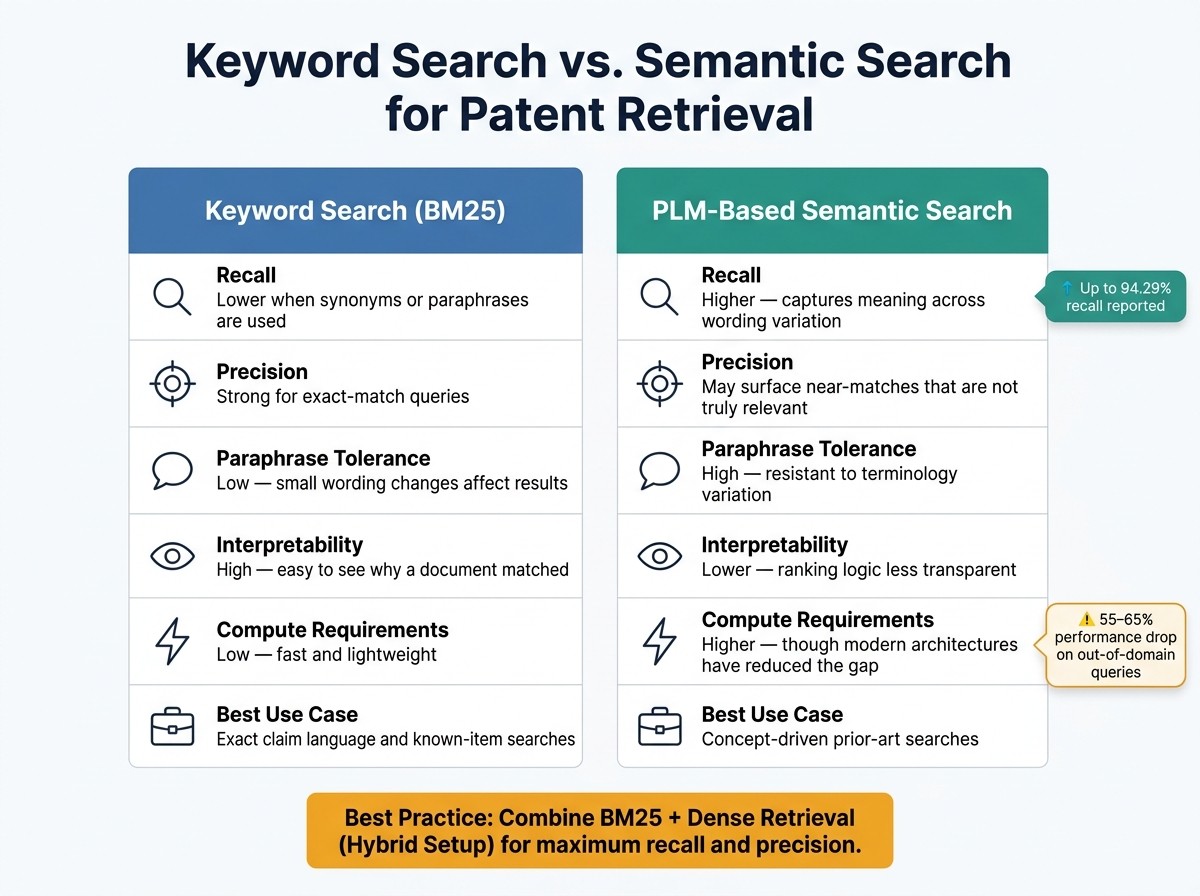
Keyword Search vs. Semantic Search for Patent Retrieval
Yes - PLMs improve recall, ranking, and query handling in patent search. You see the gains first in recall and ranking quality, especially when the source material is long and dense.
Semantic Search for Long, Technical, and Wording-Variant Patent Text
Patent documents are long, technical, and often written very differently from one applicant, industry, or jurisdiction to another. That creates a basic search problem: the same invention can show up under different terms.
Research keeps pointing to Title + Abstract + Claims (TAC) as a strong default input for retrieval tasks. It gives the model enough context to grasp the invention without drowning it in the full specification.
Modern models also handle longer context windows, which means fewer claim details get cut off. In practice, that matters when you want the right prior art to surface near the top instead of getting buried.
Recall, Precision, and Query Understanding in Prior-Art Retrieval
For prior-art search, Recall@k should be a primary metric because it checks whether relevant documents show up in the top k results. In patent work, missing even one novelty-destroying reference can cause real problems. nDCG (Normalized Discounted Cumulative Gain) adds another layer by measuring whether the most relevant documents rank near the top, which can cut analyst review time.
PLMs also handle natural-language invention disclosures and claim-style queries much better than purely lexical methods, reaching an F1 score of 0.94 on patent testing data. But there are trade-offs.
PLMs can return near matches that look close but are not actually relevant. They also do not offer the same plain-English explainability as keyword search. With BM25, you can usually point to the matching terms right away. With PLMs, it is harder to explain why one document ranked highly during review.
Compute cost still matters too, although modern architectures have narrowed that gap a lot.
One weak spot to watch is domain shift. Performance can drop by 55% to 65% when models move from in-domain to out-of-domain queries. That is a big hit. A hybrid setup that combines BM25 + dense retrieval can help recover missed results.
Keyword Search vs. PLM-Based Semantic Search: A Comparison
The trade-off is simple: more semantic reach, less interpretability.
Feature | Keyword Search (BM25) | PLM-Based Semantic Search |
|---|---|---|
Recall | Lower when relevant documents use synonyms or paraphrases | Higher because it captures meaning across wording variation |
Precision | Strong for exact-match queries | Can surface near matches that are not actually relevant |
Tolerance for paraphrase | Low - small wording changes can affect results | High - more resistant to terminology variation |
Interpretability | High - easy to see why a document matched | Lower - ranking logic is less transparent without additional tooling |
Compute requirements | Low - fast and lightweight | Higher - though modern architectures have reduced the gap |
Best-fit use case | Exact claim language and known-item searches | Concept-driven prior-art searches |
A simple rule of thumb works well here:
Use keyword search for exact-phrase lookups.
Use PLMs for concept-driven prior-art searches.
Selecting, Evaluating, and Applying Pretrained Models in Patent Workflows
After you understand how pretrained models work, the next step is picking the right architecture and putting it to work in search.
Model Selection and Evaluation for Patent Use Cases
Start by matching the model to the job. Patent-focused encoders fit prior-art retrieval. General LLMs fit drafting and claim summarization.
Accuracy matters, but it isn't the whole story. Two other factors can make or break a setup: latency and coverage. U.S. patent teams that work mostly with USPTO filings should lean toward models tested on USPTO data. If your search runs across jurisdictions, you need models that can deal with translation issues and differences in drafting style.
For evaluation, use patent-focused benchmarks and track nDCG@10, Recall@100, MAP, and MRR. Then look past the scorecard. Error analysis should zero in on missed prior art and false positives.
System Integration: Embeddings, Vector Indexes, and Workflow Connections
Once you've picked a model, the next move is to connect it to a vector index and retrieval pipeline.
A common setup starts with embeddings built from Title, Abstract, and Claims (TAC). Those embeddings then flow into a vector index for similarity search. At query time, dense embeddings can be fused with BM25 through RRF. Bigger models may lift retrieval quality, but they also add inference latency.
How Patently Applies Pretrained Models in Practice

Patently puts these ideas to work through its Vector AI semantic search engine and its Onardo AI drafting assistant, which supports AI patent drafting and patent creation. Patently uses this mainly in search and drafting workflows.
Conclusion: Key Takeaways on Pretrained Models for Patent Search
Pretrained language models turn patent search into a semantic task, not just a lexical one. They match ideas, not only exact terms. That changes how you pick a model: this isn't only a technical choice. It's a workflow choice too.
Patent-specific training tends to improve speed and alignment with patent language, especially in U.S. patent workflows.
After training, the next step is simple: pick the model based on the job. Use encoders for retrieval and classification. Use generative models for drafting and claim-focused work. Use multimodal models when figures and structures matter.
Then comes the part that many teams skip: proving the model works on patent tasks, not just on general NLP benchmarks. Test with nDCG@10, Recall@100, and MRR. You should also check out-of-domain performance, where models often show a 55–65% degradation. For retrieval, index Title + Abstract + Claims (TAC).
Smaller optimized models can offer a strong speed-quality trade-off when compute is limited. In patent search, fit and latency matter more than parameter count.
FAQs
Why is TAC better than full-text input?
TAC works better for patent search because it zeroes in on the main technical terms, features, and concepts instead of scanning whole documents.
That matters a lot. Patent documents are often long, dense, and full of extra language that can muddy the search. By narrowing the focus to TAC, you cut down on noise and get results that are more precise and more relevant.
It also makes the search process more efficient and easier to scale. For patent professionals, that means finding relevant prior art or related patents faster, with more consistency.
When should I use hybrid search instead of dense retrieval alone?
Use hybrid search when you need both high recall and high precision in patent search. Dense retrieval does a good job finding conceptually similar results, but it can also pull in noise and false positives.
That’s where BM25 and other keyword-based methods help. They add exact term matching, which balances the broader semantic reach of dense retrieval with tighter lexical control.
This matters a lot in patent search. Technical wording can shift from one document to another, and missing relevant prior art can be costly. A hybrid approach helps you cast a wider net without losing too much precision.
How do I test a patent model before using it live?
Test it with a pilot program or benchmarking before you use it live.
A simple way to do that is to run the model on known patent data, compare the output with established prior art, and then review how well it handles relevance and accuracy. That gives you a clear read on whether the tool is helping or just adding noise.
This can also include:
Benchmarking against datasets
Fine-tuning on patent corpora
Iterative relevance checks
Platforms like Patently also get better through ongoing validation and feedback.