Top 7 AI Patent Drafting Tools 2026
Intellectual Property Management
May 20, 2026
Compare the top AI patent drafting tools of 2026 — features, pricing, and best use cases for firms and solo practitioners.

Drafting patents is time-intensive, often taking 40–100+ hours, and 90% of USPTO filings face non-final rejections due to avoidable errors. AI tools in 2026 have transformed this process by cutting drafting times by up to 73%, offering real-time compliance checks, and integrating with patent databases like USPTO and EPO. These platforms are tailored for patent professionals, addressing issues like claim consistency, jurisdiction-specific formatting, and §112 compliance.
Here are the 7 leading AI patent tools in 2026:
Patently: Features Onardo, an AI assistant for synchronized drafting, figure labeling, and team collaboration. Plans start at $125/user/month.
Specifio: Focuses on claims, generating full specifications automatically. Ideal for software and high-tech patents.
PatentPal: Simplifies drafting with templates and ensures compliance with USPTO formatting. Premium plans cost $50/month.
Qatent: Offers one-click PCT-ready drafts, novelty diagnostics, and examiner-style replication. Priced at $200/user/month.
PowerClaim: Starts with AI-driven planning to refine disclosures and draft compliant claims. Offers local deployment for data security.
General-Purpose LLMs: Tools like ChatGPT assist in drafting sections but lack precision for complete applications.
Custom Enterprise Platforms: Comprehensive solutions for patent lifecycle management with advanced compliance checks and examiner analytics.
Quick Comparison
Tool | Key Features | Best For | Pricing |
|---|---|---|---|
Patently | Synchronized drafting, team tools | Full drafting control | $125/user/month+ |
Specifio | Auto-generates specs from claims | Software/high-tech patents | Custom |
PatentPal | Templates, USPTO compliance | Software patent attorneys | $50/month |
Qatent | Novelty diagnostics, PCT drafts | Streamlined team workflows | $200/user/month |
PowerClaim | AI planning, local deployment | Data-sensitive firms | Custom |
LLMs | Sectional drafting support | Basic drafting tasks | $350–$420/month |
Enterprise AI | All-in-one patent management | Large firms, corporate IP | ~$775/user/month |
These tools cater to diverse needs, from solo practitioners to enterprise-level IP teams, reducing workload while improving drafting accuracy and compliance.
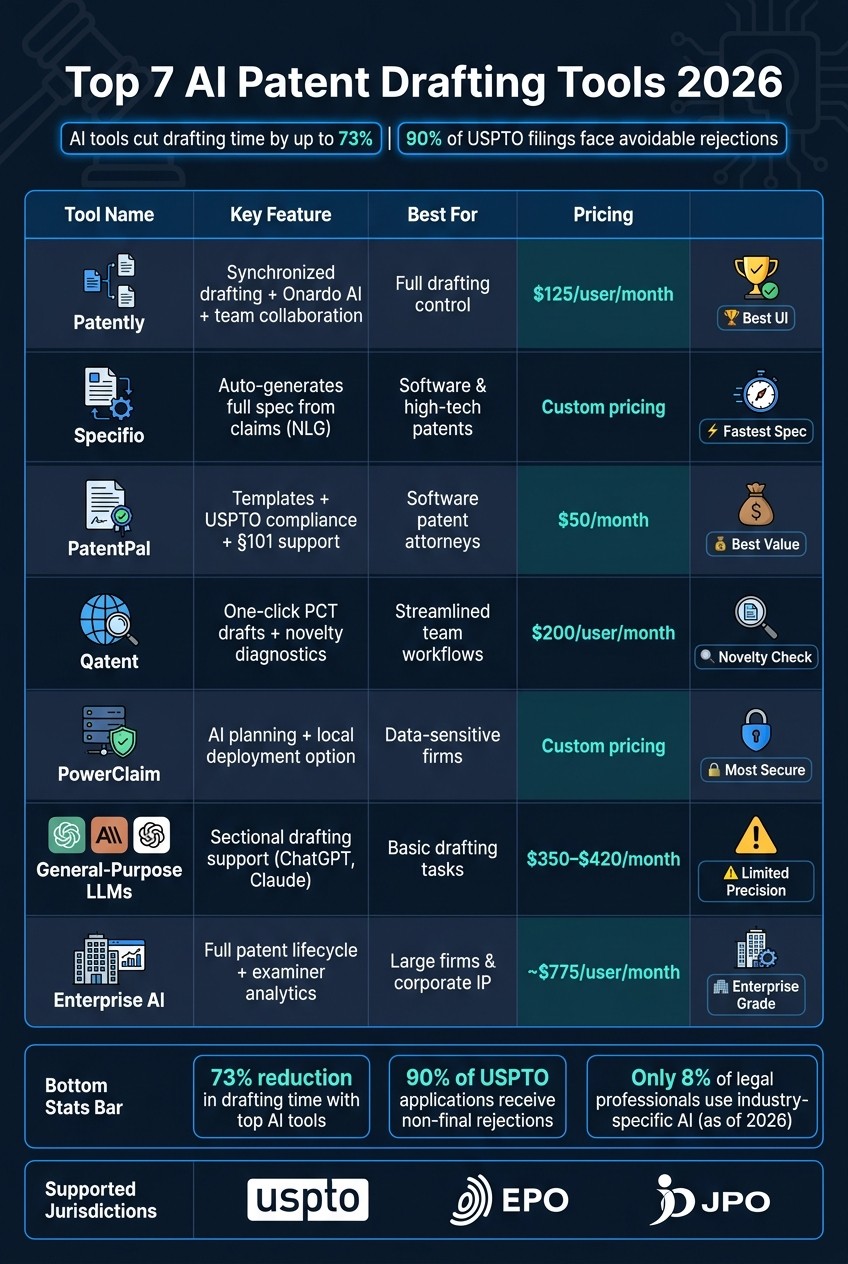
Top 7 AI Patent Drafting Tools 2026: Features, Pricing & Best Use Cases
How AI Tools Are Revolutionizing Patent Drafting!
1. Patently
Patently is a browser-based AI drafting platform tailored for patent professionals. At its core is Onardo, an AI assistant that helps streamline the drafting of claims, specifications, and abstracts - all while keeping you firmly in control.
"Onardo accelerates the entire patent drafting process without taking you out of the driver's seat." - Patently
One standout feature is Patently's synchronized drafting environment, which automatically labels figures and aligns descriptions with text to meet MPEP 608.01(g) requirements. The interface, designed to feel like Google Docs, ensures documents are formatted correctly and adhere to USPTO, EPO, and JPO standards - saving you from tedious manual adjustments.
On the collaboration front, Patently Rate enhances teamwork with shared comments, ratings, and insights organized by patent family or asset. Its project hierarchy can mirror your existing firm structure - whether by client, department, or profit center - and includes detailed access controls to maintain ethical boundaries. Plus, the platform meets ISO 27001:2022 and SOC 2 compliance standards for data security.
Pricing Plans and Features
Plan | Price | Key Capabilities |
|---|---|---|
Free | $0 | Search, full patent details, link sharing |
Starter | $125/user/month | Semantic search, analytics, team collaboration |
Business+ | Custom | AI patent drafting, custom fields, fee tracking |
Law Firm+ | Custom | Matter-centric management, client access |
Enterprise | Custom | Fully bespoke solutions |
With its advanced tools and expert praise, Patently continues to stand out as a top-notch drafting solution for the ever-evolving patent industry.
"Patently is the drafting robot with the best UI and best Figure editor."
2. Specifio
Specifio simplifies patent drafting by focusing on claims. Once you draft the claims, it automatically generates the rest of the patent application - background, summary, detailed description, and abstract - using natural language generation (NLG) technology. This process allows for a quick turnaround, making specification drafting much faster.
The tool's NLP algorithms carefully examine the structure of your claims to ensure the generated content is legally sound and provides proper support for the invention. It also ensures compliance with USPTO DOCX standards and follows U.S. single-sentence, consecutively numbered claim formatting. With Specifio, attorneys can email their drafted claims and receive a fully formatted specification within minutes. There's no need for additional software or platforms. Plus, its Retrieval-Augmented Generation (RAG) feature customizes the output to align with a firm's preferred formatting, ensuring consistency across projects without extra effort.
Specifio is particularly effective for software and high-tech patents, though it’s less suited for complex biotech or chemical applications. The tool's output quality depends heavily on the quality of the claims provided - well-structured claims result in stronger specifications, while weaker claims lead to less effective results.
The efficiency gains are impressive. Specifio and similar AI patent drafting tools have been shown to cut initial drafting time by up to 73%, with some users reporting savings ranging from 50% to 80% on drafting specifications and backgrounds alone.
3. PatentPal
PatentPal simplifies the patent drafting process by enabling users to work on claims, specifications, abstracts, and figures simultaneously - all within their browser.
This tool uses patent-specific intelligence to maintain consistent terminology across claims and specifications, reducing the risk of definitional errors. It also includes templates tailored for software patents, addressing §101 subject matter eligibility concerns.
PatentPal ensures compliance with USPTO formatting standards through customizable style profiles. It automatically generates summaries and abstracts that align with MPEP 1824 requirements, making it a reliable choice for software patent attorneys who need to draft quickly and efficiently.
The pricing model is simple: a free tier with limited features and export options, or a premium plan costing about $50 per user per month, or $495 annually.
While PatentPal excels at producing consistent drafts and supporting figures for software patents, its specialized focus may not meet the needs of those handling more complex technical integrations.
4. Qatent
Qatent, built on Questel's patent infrastructure, offers a self-service AI drafting tool tailored for patent professionals. This platform enables users to create a complete, PCT-ready patent draft in one click or work through it step by step. It covers claims, specifications, and abstracts, using a cumulative context window to ensure consistency throughout the document.
One standout feature is its machine novelty diagnostics. By tapping into Questel's patent databases, Qatent identifies potential prior art conflicts and suggests AI-generated claims that appear to be novel. As Questel explains:
"Exclusive machine novelty diagnostics tentatively propose claims generated by AI which are novel."
Another helpful feature is the ability to instruct the AI to replicate the style of a specific guiding patent, ensuring the draft matches the desired tone and structure.
On the compliance side, Qatent integrates seamlessly with the USPTO API. This allows for filing-ready outputs, complete with antecedent checks and automated labeling of reference numerals throughout the detailed description. These technical capabilities are paired with tools designed for team collaboration.
For teams, Qatent offers a "smart stepper" workflow that guides users through each stage of the drafting process, making it accessible for professionals at all skill levels. Additionally, its patent chatbot serves as a virtual assistant, answering patent-related questions instantly.
The pricing is simple: $200 per user/month (with no long-term commitment) or $2,000 per user/year. Its draft-on-demand model lets firms adjust usage based on workload. While some reviewers note that Qatent's features feel like an extension of Questel's broader IP suite, its functionality provides flexibility and efficiency for patent drafting.
5. PowerClaim
PowerClaim takes a methodical approach to patent drafting by starting with strategic planning. It begins with an AI-driven conversation to clarify your protection goals - whether you're aiming for broad, narrow, or hybrid claims. It also helps identify potential infringers and map out system boundaries. This initial planning step minimizes the need for revisions later and sets the stage for the platform's advanced drafting tools.
Created by an experienced patent attorney, PowerClaim offers tools shaped by deep industry knowledge. Its Invention Description Booster is particularly helpful, as it refines incomplete disclosures and suggests search strings, keywords, and CPC classes to help uncover relevant prior art before drafting begins. The platform also incorporates a problem–solution framework, focusing on distinguishing features and technical effects before defining the objective technical problem.
To meet USPTO requirements, PowerClaim includes diagnostics that flag potential errors. Its graphical claim drafting and computer-aided description tools ensure compliance with U.S. claim styles and formatting rules.
For team collaboration, PowerClaim offers two deployment options. The Custom GPT Tier operates in a cloud environment, while the Sovereign Tier provides raw source code, allowing teams to run models locally and keep sensitive data secure. One patent attorney shared their experience:
"I recently bought a small AI supercomputer... which allows me to run quite heavy open weight, large language models on my desk without sending data to any third party outside my computer network."
– Author/Patent Attorney, PowerClaim
The platform also strengthens collaboration between inventors and attorneys through its dedicated module. Linbo Yang, Principal Engineer at AIXScan, highlighted this feature:
"PowerPatent's attorney collaboration ability ensures we have white-glove service."
– Linbo Yang, Principal Engineer, AIXScan
PowerClaim's parent platform, PowerPatent, earned recognition as a finalist for World IP Review's LSPN Awards USA 2025 in the Technology Solution of the Year category.
6. General-Purpose LLMs Adapted for Patent Drafting
General-purpose large language models (LLMs) like ChatGPT, Claude, and Gemini have found a role in supporting specific tasks within patent drafting. These tools are often used to expand paragraphs, create boilerplate background sections, or suggest synonyms for claim terms. These models can also assist with AI-enabled patent analysis for novelty and validity checks. Some platforms, like Solve Intelligence and DeepIP, integrate these capabilities directly into tools like browser-based environments or Microsoft Word. For instance, DeepIP operates natively within Word and costs between $350 and $420 per user per month for annual subscriptions.
That said, these LLMs face challenges when tasked with drafting complete patent applications. They often struggle with maintaining structural consistency, such as ensuring claim dependencies, providing proper antecedent basis, and linking claims to descriptions. This is a serious limitation, especially considering that 90% of patent applications receive non-final rejections, many due to errors that general AI tools are prone to overlook. Patent attorney Roger Hahn highlights this issue:
"Generic AI tools like ChatGPT lack this verification layer and frequently hallucinate citations."
Confidentiality is another pressing concern. Public LLMs could inadvertently expose sensitive invention details, which is why some platforms have implemented features like "redaction everywhere" to remove sensitive terms before processing. For firms managing high-value intellectual property, using tools with strict zero-data-retention policies is crucial.
A practical strategy involves using general-purpose LLMs for drafting specific sections, such as abstracts or background information, and then employing specialized proofreading tools to catch errors like antecedent basis issues and numbering inconsistencies before submission. Despite these workflows, adoption of industry-specific AI tools remains low - only 8% of legal professionals were using them as of early 2026, though 95% expect AI to become central to their work within five years. This highlights the growing need for enterprise-grade solutions tailored specifically for patent drafting.
7. Custom Enterprise AI Drafting Platforms
Custom enterprise AI drafting platforms take the patent process to the next level by offering an all-in-one solution. These platforms streamline the entire patent lifecycle - from invention disclosure to office action responses - within a single, secure workspace. Instead of relying on multiple tools patched together, they combine search, drafting, and prosecution into one cohesive environment.
What sets these platforms apart is their patent-specific intelligence. They automate USPTO compliance checks, addressing critical areas like §101 Alice/Mayo screens, §112(a) enablement, and antecedent basis as outlined in MPEP 2173.05(e). They even simulate §112 rejections using AI models trained on actual examiner actions, identifying twice as many issues compared to standard language models. Additionally, built-in examiner analytics leverage over five years of USPTO examiner statistics, enabling attorneys to fine-tune their drafting and prosecution strategies based on an examiner's tendencies.
These platforms also enhance team collaboration. Features like firm-specific templates and pre-filing dashboards help maintain consistent drafting styles and organize disclosure pipelines. Dashboards can prioritize matters by filing deadlines, ensuring nothing slips through the cracks. The efficiency gains are undeniable - users of Solve Intelligence, for instance, report cutting drafting times by 60% or more. One patent agent shared their experience:
"Rather than spending months/years training someone new, I can now rely on SI to consistently produce high-quality, well-structured drafts that reflect my strategic direction and drafting preferences. My drafting time has been reduced by 60% or more." - Stephen Katsaros, Patent Agent, Patent Engineering, LLC
Security is another key focus. These platforms are built with enterprise-grade protections, including SOC 2 Type II certification, AES-256 encryption, and zero-training policies to ensure uploaded IP data is never used to train AI models. For firms handling sensitive IP for Am Law 100 clients or large corporate IP departments, these features are non-negotiable.
Of course, such advanced capabilities come at a cost. Solve Intelligence, for example, is priced at approximately $775 per user per month (around $9,300 annually). However, the measurable efficiency improvements make it a worthwhile investment for top-tier firms.
Conclusion
AI patent drafting tools have reshaped how patent professionals in the U.S. approach their work. Tasks that once required 40–100 hours of manual effort can now be completed in a fraction of the time. Some platforms even report reducing initial drafting time by as much as 73%. This marks a major shift in efficiency.
Real-time checks are another game-changer, catching potential issues before USPTO review - a critical feature when 90% of applications receive non-final rejections. Together, these advancements in speed and quality are redefining what patent professionals can achieve.
Choosing the right tool depends heavily on your workflow. Here’s a quick guide to help you get started:
Your Primary Need | What to Look For |
|---|---|
Fast claim-to-spec drafting | Platforms like Patently with AI drafting assistants |
Word-based workflow | Microsoft Word add-ins that are easy to learn |
Office Action responses | Tools offering 85–90% first-draft accuracy for prosecution responses |
Enterprise security | SOC 2 Type II certification and a zero data retention policy |
Portfolio-scale management | Browser-based IDEs with examiner analytics and multi-jurisdictional support |
These features align with the unique needs of different practitioners. Solo practitioners should focus on tools with clear, volume-based pricing and minimal setup effort. Larger firms and corporate IP teams, on the other hand, need to prioritize security certifications and features that ensure AI output aligns with firm standards. As Alexander Flake, CEO of Patentext, explains:
"The goal isn't to eliminate the need for a drafter, but to shave 30 to 50% off the time it takes to get from a messy invention disclosure to a clean, review-ready draft."
With global patent filings projected to hit 3.7 million in 2024, and demand continuing to rise, adopting AI tools is no longer optional. The right tools enable professionals to manage growing workloads, maintain high-quality output, and stay competitive - all without overwhelming their teams.
FAQs
How do I choose the right AI patent drafting tool for my workflow?
To choose the right AI patent drafting tool, start by evaluating how well it fits into your existing workflow. Look for features that matter most, such as automated claim generation, error detection, and collaboration tools. It's also important to ensure the tool aligns with your security requirements and integrates smoothly with your current systems.
Consider what you need the tool to handle - whether it's drafting patents, managing the patent lifecycle, or supporting prosecution tasks. Opt for platforms that deliver consistent, well-organized results and integrate effortlessly into your processes.
What patent-specific compliance checks should an AI drafting tool catch?
An AI drafting tool needs to pinpoint several critical issues to ensure high-quality patent applications. These include jurisdiction-specific compliance problems, antecedent basis errors, unsupported claims, inconsistent formatting, claim dependency mistakes, missing support, and formal defects such as reference numeral mismatches. Addressing these ensures the application aligns with the standards set by the USPTO, EPO, or JPO.
Can I use AI drafting tools without risking invention confidentiality?
Yes, AI drafting tools can be secure, but only when they meet strict industry standards like SOC 2 certification and use proper encryption methods. Make sure the provider clearly states that they don’t store or misuse sensitive data. Always take the time to review the tool’s security protocols before using it.