Ultimate Guide to AI Patent Specification Writing
Intellectual Property Management
Apr 16, 2026
AI streamlines patent specification drafting—faster, cheaper, and more consistent drafts that still require human legal review.
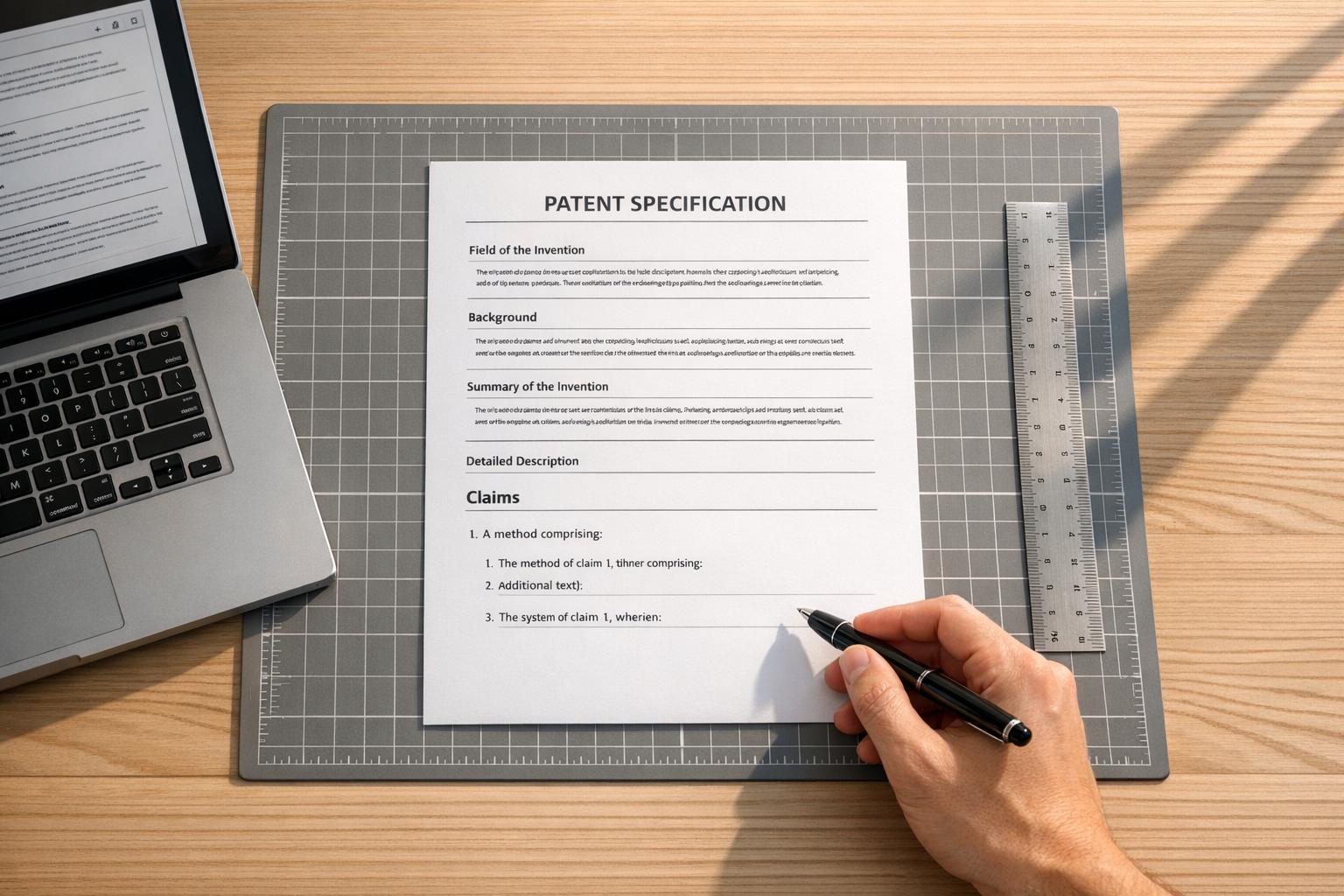
AI is transforming how patent applications are written, cutting costs and time while improving accuracy. Traditional drafting could take weeks and cost $8,000 to $20,000+. With AI, the process now takes days, automating tasks like formatting, terminology checks, and legal compliance. AI tools create structured drafts from technical inputs like source code and diagrams, allowing patent professionals to focus on strategy and claims.
Key Highlights:
Cost & Time Savings: AI reduces expenses and speeds up drafting timelines significantly.
Consistency & Accuracy: Ensures uniform terminology and catches errors before submission.
Broader Protection: Suggests alternative embodiments to strengthen claims.
Enhanced Workflows: AI tools like Patently streamline drafting, from text generation to drawing creation.
AI acts as a "co-pilot", not a replacement, requiring human oversight to ensure quality and alignment with business goals. Tools like Patently integrate drafting, collaboration, and semantic search, making patent writing more efficient and precise.
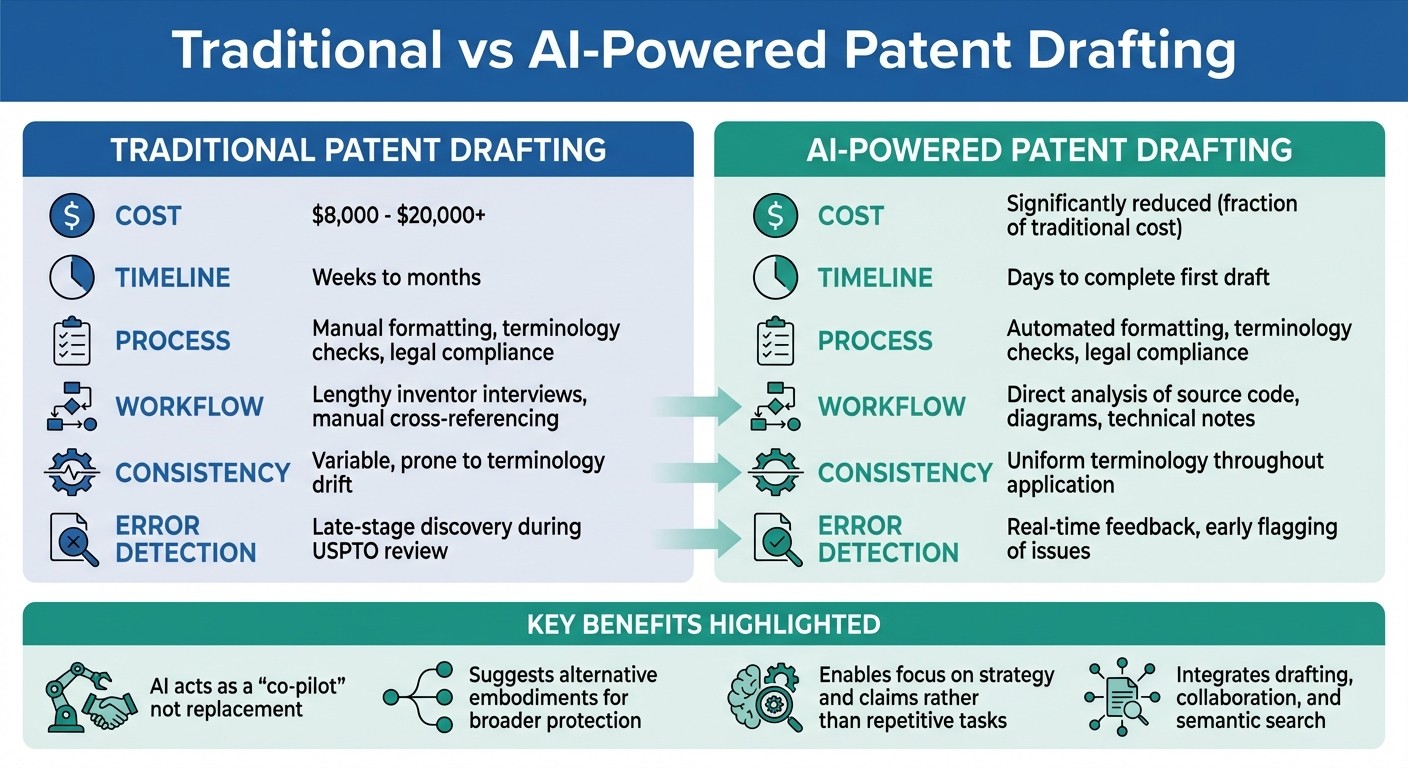
Traditional vs AI-Powered Patent Drafting: Cost, Time, and Process Comparison
AI-Assisted Patent Drafting Is Here (FULL DEMO)
Patent Specification Structure
A patent specification acts as the blueprint of your invention, defining its technical details and legal boundaries. Its structure is crucial for meeting USPTO requirements and ensuring the application can withstand scrutiny during both examination and enforcement.
"The patent specification is the face of an invention. It helps patent examiners to understand the innovation." - Sagacious IP
Each section has a specific role, from providing context to outlining the invention's legal scope. For instance, the Title should succinctly describe the invention in 10 to 15 words, avoiding abbreviations or the word "patent." A good example would be "Machine Learning System for Real-Time Fraud Detection in Financial Transactions", rather than something vague like "Computer System". The Technical Field pinpoints the invention's domain, assisting examiners in locating relevant prior art.
The Background section sets the stage by describing the current state of technology and highlighting problems your invention solves. The Summary of Invention offers a brief overview of the innovation and its solutions. The Detailed Description is the core technical section, providing enough information for someone skilled in the field to replicate the invention without excessive experimentation.
Claims are the legal backbone of the patent, defining the scope of protection through independent claims (broad coverage) and dependent claims (specific details). The Abstract serves as a technical summary, limited to 150-250 words, for quick reference by the patent office and the public. Lastly, Drawings visually illustrate the invention's components and operation, with numerical labels for clarity. Each of these sections forms a critical part of the patent's structure, ensuring both technical and legal clarity.
Main Patent Sections and Their Roles
Patent specifications follow a standardized structure that balances technical disclosure with legal precision. Each section builds on the others to present a complete picture of the invention.
The Technical Field narrows the focus by identifying the invention's general domain (e.g., computer science) and specific area (e.g., neural networks).
The Background outlines the context by discussing prior art and its limitations, emphasizing the technical problems your invention addresses. This section isn't just a summary of existing work - it strategically highlights gaps your invention fills.
The Summary provides a concise explanation of how your invention solves these problems, setting the stage for the technical details.
The Detailed Description is the most comprehensive section. It must include structural details, functional explanations, and operational instructions sufficient for a person skilled in the field to replicate the invention. This section should also describe multiple embodiments and disclose the "best mode", or the inventor's preferred way of implementing the invention at the time of filing.
The Claims section is where the legal boundaries are set. Independent claims provide broad protection, while dependent claims add specific details to create a layered defense. The Abstract offers a searchable summary, while the Brief Description of Drawings explains the purpose of each figure or diagram.
Section | Primary Purpose | Legal/Technical Requirement |
|---|---|---|
Detailed Description | Technical Disclosure | Enablement (35 U.S.C. § 112(a)) |
Claims | Legal Boundaries | Definiteness (35 U.S.C. § 112(b)) |
Background | Context/Motivation | Distinguish from Prior Art |
Abstract | Searchability | Technical Summary (<150-250 words) |
Drawings | Visualization | Support for Claims and Description |
A well-structured specification not only explains the invention but also ensures it meets legal standards with precision and clarity.
Writing for Enablement and Clarity
To ensure a patent specification is legally enforceable, it must meet the requirements of 35 U.S.C. § 112 by being clear and enabling replication without undue experimentation.
"The specification shall contain a written description of the invention... in such full, clear, concise, and exact terms as to enable any person skilled in the art... to make and use the same." - 35 U.S.C. § 112(a)
The enablement standard is evaluated using the Wands factors, which consider aspects like the nature of the invention, the state of prior art, and the predictability of the field. Fields like biotechnology and chemistry often face stricter enablement requirements compared to mechanical or electrical inventions.
The Supreme Court's May 2023 decision in Amgen Inc. v. Sanofi (598 U.S. 594) emphasized that if a claim covers an entire genus, the specification must enable the full scope of that genus. In this case, the Court invalidated claims for a genus of antibodies because the specification only provided 26 examples - insufficient for enabling the full scope without undue experimentation.
Consistency in terminology is essential. For example, a component called a "data transfer module" in one section shouldn't be referred to as a "file sender" elsewhere. Avoid vague terms like "approximately" or "substantially" by using precise metrics or ranges to prevent indefiniteness rejections under 35 U.S.C. § 112(b).
Drafting errors can lead to costly office actions, with USPTO extension fees ranging from $230 to $2,300 depending on entity size and delay length. Worse, amending claims during prosecution to fix clarity issues can limit the patent's scope later - a concept known as prosecution history estoppel.
"A grammatically flawless patent application can still contain fatal proofreading errors." - PatentSolve Team
For software and complex processes, include detailed algorithms, flowcharts, and technical specifications to ensure the invention can be replicated. Purely functional descriptions risk rejection; it's necessary to explain the "how", not just the "what". Including multiple embodiments not only strengthens enablement but also makes it harder for competitors to work around your patent.
Using AI for Automated Patent Drafting
Generative AI patent drafting tools are changing the game, cutting the process down from what used to take weeks or months to mere minutes or days. These advanced systems can take technical inputs - like source code, GitHub repositories, system architecture diagrams, and technical notes - and transform them directly into structured specifications. This eliminates the need for lengthy, non-technical interviews. Instead of relying solely on automation, AI now works as a "co-pilot", handling formatting and consistency while patent professionals focus on strategy and oversight.
In the United States, drafting a professionally prepared non-provisional patent application typically costs between $8,000 and $20,000+. By using AI-assisted drafting, both the cost and time required can be significantly reduced, all while maintaining consistent terminology throughout the application. Let’s explore the workflows that make this possible.
AI Workflows for Patent Drafting
The process starts with the AI analyzing technical documents and engineering notes to pinpoint novel aspects and structure the disclosure. This step often replaces traditional inventor interviews, as the AI extracts key technical details directly from the provided materials. From there, the system converts these raw inputs into a structured disclosure designed to align with the eventual patent claims.
During the claim generation phase, the AI suggests "claim seeds", offering multiple versions of independent claims (e.g., covering method, system, and storage media formats). It then builds layered dependent claims to add depth, helping to prevent design-arounds. The system also flags generic language or potential rejection triggers by comparing drafts to existing patent databases.
Practical techniques include leveraging pattern libraries - repositories of proven descriptions for common subsystems like inference engines or data pipelines. These libraries allow the AI to reuse descriptions across a portfolio, saving time and ensuring consistency. Additionally, the AI can propose alternative embodiments or configurations, broadening the scope of the patent before filing.
Using Patently for AI-Assisted Drafting
A standout example of AI in patent drafting is Patently, which showcases how integrated tools can make the process more efficient. Patently’s Onardo AI assistant simplifies drafting with tools for text generation, claim drafting, and diagram creation. It employs a claims-to-parts workflow: you input claims into the editor, and Onardo automatically generates a parts list for figure placement. This automation removes the need for manual cross-referencing between claims and drawings.
"Patently is the drafting robot with the best UI and Figure editor."
Martin Schweiger, AI Patent Drafting Expert & AI Keynote Speaker
The platform also features a built-in drawing editor, where you can create or import figures. Onardo labels parts and updates reference numbers across the entire specification whenever figures or parts are reordered. You can draft incrementally - creating specification text figure by figure - or produce a complete draft at the end, ensuring technical descriptions match the visuals.
"Onardo accelerates the entire patent drafting process without taking you out of the driver's seat."
Patently
Patently also integrates Vector AI for semantic search, helping users identify relevant prior art and refine claims. Collaboration features further streamline coordination between inventors, patent attorneys, and technical reviewers.
With drafting workflows and tools like Patently covered, the next step is refining outputs through effective prompt engineering.
Prompt Engineering for Better Drafts
The key to capturing your invention’s uniqueness lies in crafting effective prompts. Prompt engineering is about clearly communicating with the AI to achieve precise legal and technical outcomes. Think of prompts as creative briefs rather than simple instructions: provide context, explain the problem being solved, and outline any specifics to avoid.
"Treat prompts like creative briefs, not requests. You're not searching - you're delegating."
Starting with internal documentation - like engineering notes, whiteboard sketches, or Notion pages - gives the AI a strong foundation. This reduces the risk of generating "phantom features" (details that sound logical but don’t actually exist) and ensures consistent terminology throughout the specification.
Refinement is crucial. Review the initial AI output, identify gaps or inconsistencies, and adjust your prompt to address tone, structure, or missing technical details. For instance, instead of asking the AI to "describe the system", specify that it should "describe the logic, steps, and technical transformations", ensuring a focus on the process rather than just the outcome.
Advanced strategies include incorporating competitive intelligence - feeding the AI descriptions of rival products or industry trends to better position your claims - and emphasizing branch logic, which captures decision points where a system chooses between operational paths. These details often highlight the engineering choices that make an invention non-obvious.
"The real value usually sits in how the business uses the model inside a practical product flow. That is why patent claims often matter more than the model itself."
PowerPatent
Finally, ensure data privacy by using secure AI environments that don’t store your prompts, reducing the risk of public disclosure. Remember, the USPTO requires at least one human inventor to be listed for every invention, keeping your expertise and oversight essential to the process.
Best Practices for AI Patent Specification Writing
Automated workflows can speed up the patent drafting process, but they can't replace the need for clear, precise technical writing. A strong patent specification hinges on technical accuracy and legal compliance, and these are areas where human expertise is irreplaceable. The difference between approval and rejection often comes down to how well the invention is described and how closely it aligns with patent office requirements.
Writing Detailed Descriptions for AI Inventions
Patent examiners need more than vague descriptions of how an invention works. For example, simply stating that a system "optimizes data" is far too generic. Instead, break down the process step by step - describe data normalization, weighting algorithms, evaluation methods, and decision-making processes. This level of detail is essential to show the invention's functionality.
For AI-related patents, it’s crucial to explain the data pipeline. Where does the training data come from? How is it cleaned and preprocessed? What labeling techniques are used? Addressing these questions provides clarity. Additionally, describe how the model handles challenges like edge cases or bias. Include specifics about the model architecture (e.g., CNN or Transformer) and trace the flow of data from input to output. This kind of explanation helps demonstrate that your invention isn’t just an abstract idea, which is vital for avoiding Alice/101 rejections.
"The patent office wants to see function, not just outcome."
PowerPatent
Write your specification as if you’re explaining it to a smart friend who isn’t an AI expert. If they can follow the logic, chances are the examiner will too. Include details like the mechanics of the training loop, how the system responds to confidence scores, and any feedback mechanisms that improve the model. Don’t forget to include alternative embodiments - variations in deployment models, control paths, or data types - to keep your claims broad enough to protect your invention fully.
Once you’ve built a detailed and clear narrative, the next step is to avoid pitfalls that could weaken your application.
Avoiding Common Drafting Mistakes
AI-generated drafts can introduce errors that undermine the strength of your patent. One common issue is the inclusion of "phantom features" - filler text that doesn’t correspond to any actual component in your design. For instance, phrases like "the system operates on electronic devices" can dilute the technical value of your application and should be removed.
Consistency in terminology is another critical area. Inconsistent terms across your abstract, claims, and description can create ambiguity and weaken your application . A terminology audit is essential to ensure every technical term is used uniformly.
Over-specificity is another trap. Using overly narrow terms, like "rechargeable battery" instead of "power source", can make it easier for competitors to design around your patent . Broader terms often provide better protection. Additionally, AI tools can sometimes mismanage claim dependencies or improperly reference figures. Double-check that every figure mentioned (e.g., "Fig. 1A") exists and is labeled correctly .
"In the world of patents, formatting isn't about making your document look nice. It's about following very strict rules that determine whether your application even gets looked at."
PowerPatent
Another frequent mistake is failing to explain why your invention matters. Examiners need to understand the specific problem your invention solves to assess its novelty. Ensure that every claim aligns with the key differentiators of your business. Reviewing drafts from a competitor’s perspective can help identify potential weaknesses or design-arounds.
Issue | Impact | Solution |
|---|---|---|
Phantom Features | Generic text weakens credibility. | Remove filler and verify all components against actual design details. |
Language Drift | Inconsistent terminology creates legal ambiguity . | Conduct a terminology audit to ensure consistency across all sections. |
Over-Specificity | Narrow terms make it easier for competitors to bypass your claims . | Use broader terms where appropriate, like "power source" instead of "rechargeable battery." |
Missing Problem Context | Failing to explain the problem makes proving novelty harder. | Clearly state the problem and how the invention addresses it. |
Formatting Errors | Mistakes in formatting can lead to immediate rejection. | Verify compliance with USPTO formatting rules, including margins, fonts, and section headers . |
Reviewing and Refining AI-Generated Drafts
AI can churn out a draft in no time, but that doesn’t mean it’s ready to be filed. A polished format can create a false sense of confidence, tempting teams to skip the thorough review that makes the difference between a patent that holds up under scrutiny and one that falls apart. The trick is to see AI as one of the top patent tools for speeding up drafting, not as the ultimate decision-maker.
Verification Steps for Legal and Technical Accuracy
Start by ensuring the title, abstract, and summary clearly highlight your invention’s defining features. Dive into the technical description to confirm it accurately represents your system - be on the lookout for missing steps, incorrect technologies, or even made-up elements. AI has a knack for producing descriptions that sound professional but fail to capture the unique aspects of your design.
When reviewing the claims, focus on clarity and precision. Every term should be well-defined and backed up by the written description. The draft must detail how the system achieves results, not just list the outcomes. For example, claims that merely state goals like "improving performance" are likely to face rejection.
To streamline the review, try 45-minute sessions and use a "five-second rule" to quickly flag claims that seem overly complicated. During the first pass, avoid diving into edits right away. Instead, mark unclear sections and focus on identifying structural issues before tackling line-by-line corrections.
Put yourself in the shoes of a competitor trying to design around your patent. Look for loopholes or "escape routes" in the AI-generated language. Could someone tweak their design slightly to avoid infringement?. Make sure your terminology is consistent and deliberately reinforces your invention’s key features.
Once the technical details are verified, bring in human expertise to refine the draft and address strategic considerations.
Combining Automation with Expert Review
After completing the technical checks, expert review ensures the draft is both mechanically sound and strategically impactful. The most effective approach follows the "AI First, Human Second" workflow. Let AI handle tedious tasks like checking antecedent basis and numbering, then rely on human judgment to verify the findings and address more nuanced issues. While AI is great at spotting patterns in language, it often misses critical edge cases, fallback strategies, and competitive angles that only a skilled reviewer can catch.
"AI can draft, but it can't align with your vision unless someone is guiding it with those questions in mind."
PowerPatent
Human reviewers must challenge the AI draft, scrutinizing it for alignment with business goals and long-term strategies. AI doesn’t have the intuition to match a company’s vision or product roadmap. A draft might be technically flawless but strategically ineffective if it overemphasizes minor features while neglecting the core competitive edge. Trace the "heartbeat" of your invention - the problem it solves - and make sure it’s consistently reflected from the abstract to the claims.
This final step ties everything together. AI speeds up the drafting process by handling repetitive tasks, while human expertise ensures the patent protects what truly matters for your business. The result? A draft that’s both efficient and strategically robust.
Adding Patently to Your Patent Drafting Workflow
Once your review process is set, consider simplifying your workflow by using an all-in-one platform like Patently. This platform combines the benefits of AI-driven drafting with expert review tools in a single, cohesive system. Patently integrates AI drafting, semantic search, and collaboration features, allowing you to move seamlessly from initial disclosure to a complete specification - without the hassle of jumping between different tools. This unified approach not only saves time but also ensures that technical details align with legal precision.
Patently's Main Features
Onardo: This AI-assisted drafting tool generates both text and drawings while keeping you in control. Its drawing editor allows you to create figures directly or import images, with automatic updates to reference numbers when reordering.
Vector AI: A semantic search tool designed for concept-based searches, uncovering prior art across various terminologies. For more advanced prior art discovery, the FAB Browser is particularly helpful, especially during oppositions or complex disputes.
Y.js Integration: Enables real-time, conflict-free collaboration, allowing multiple users to edit simultaneously. The Pin Feature is another standout, letting you lock specific text segments to safeguard critical legal language during AI edits.
Patently's adoption can be phased for ease: start with a pilot phase and team selection, move to configuration and initial use, and then scale based on insights from the pilot.
Choosing the Right Patently Plan
Patently offers flexible pricing plans tailored to different needs:
Free Plan: Ideal for individuals, this includes basic search with filters, full patent details, and family browsing for one user.
Starter Plan ($125/month per user, up to 10 users): Adds features like semantic search, analytics, the FAB Browser, and team collaboration tools.
Business+ Plan: Designed for larger teams, it introduces AI patent drafting, custom fields, and fee tracking, with unlimited users at custom pricing.
Law Firm+ Plan: Builds on Business+ by adding matter-centric management and client access, making it ideal for firms managing multiple client matters.
Enterprise Plan: Fully customizable for large organizations with specific workflow needs, offering tailored integrations and support.
For solo practitioners or small teams trying out AI drafting, the Starter plan offers essential tools for collaboration and search. Firms managing multiple clients will appreciate the organization and accessibility provided by Law Firm+. Meanwhile, larger organizations with unique needs can benefit from the tailored solutions available in the Enterprise plan.
Conclusion and Key Takeaways
AI is reshaping how patent professionals handle specification writing. What once took weeks or months can now be done in just a few days. By directly analyzing source code and system diagrams, AI improves technical precision while speeding up the process. This not only enhances efficiency but also ensures greater consistency, strategic clarity, and catches errors early - well before the USPTO review process. Additionally, AI helps identify alternative embodiments, broadening patent protection and uncovering value in detailed optimizations.
The best results come when AI is used as a co-pilot rather than an auto-pilot. As PowerPatent explains, “AI handles the heavy lifting of formatting and drafting. Humans then step in where it matters most - reviewing for clarity, spotting weaknesses, and aligning the claims with business goals”. This partnership creates drafts that feel thoughtfully composed by a human while maintaining the structured rigor examiners expect. Platforms like Patently demonstrate how AI enhances every stage of patent drafting, from initial disclosure to the final review.
Final Thoughts on AI in Patent Drafting
AI-powered workflows can now generate a first draft in just days and at a fraction of the cost of traditional methods. Real-time feedback ensures missing details or vague descriptions are flagged early, reducing the chances of rejections. However, as of 2026, only 8% of legal professionals actively use industry-specific AI tools, even though 95% anticipate AI becoming central to their workflows by 2031.
This gap between expectation and adoption presents a major opportunity. Professionals who embrace AI today can immediately benefit from improved accuracy and efficiency while gaining valuable experience that positions them as leaders in the evolving patent landscape. With these advantages in mind, here are practical steps for integrating AI into your workflow.
Next Steps for Patent Professionals
Leverage AI as a strategic partner: Experiment with your descriptions to see how AI refines claims and improves structure.
Align patent filings with product development timelines: File at critical stages like alpha or beta releases to secure innovations before public disclosure.
Utilize existing internal resources: Feed AI tools with your documentation - GitHub repositories, engineering notes, and meeting transcripts - to ensure drafts are grounded in technical accuracy rather than starting from scratch.
For those ready to adopt a full-fledged platform, Patently offers flexible plans to fit different needs. The Starter plan ($125 per user per month for up to 10 users) includes semantic search, analytics, and collaboration tools. Larger firms can opt for the Law Firm+ plan, which supports matter-centric management, while organizations with unique workflows can explore fully customizable Enterprise solutions. Begin small - pilot AI with one team on live cases, measure time savings, identify challenges, and scale based on actual results.
FAQs
What technical details must I include to meet USPTO enablement for an AI invention?
When filing for a patent with the USPTO, ensuring your application meets enablement requirements is crucial. This means providing enough technical detail so that someone skilled in the field can reproduce your invention without excessive trial and error. For an AI system, this involves a thorough breakdown of its components and functionality.
Start by clearly outlining the system's architecture. Describe the structure of your AI, including how various components interact. Is it a neural network? If so, detail the type (e.g., convolutional, recurrent) and its layers.
Next, dive into the algorithms and processes. Explain the specific methods or techniques your AI uses to achieve its goals. For example, does it rely on supervised learning, unsupervised learning, or reinforcement learning? Be explicit about the steps involved in its decision-making.
Don't forget to include data inputs and training details. What kind of data does your AI require? Is it image data, text, or something else? Discuss how the data is preprocessed and used for training. Mention the size and diversity of the dataset, as well as how you address potential biases.
Provide specifics about model parameters and configurations. For instance, share details such as the number of layers, activation functions, learning rates, and optimization techniques. These parameters are key to understanding how the system works.
Finally, cover hardware interactions and implementation. Highlight how the AI integrates with hardware or other systems. This might include describing the computing environment, such as GPUs, cloud infrastructure, or edge devices, and how these components support the AI's functionality.
Make sure to emphasize any unique or novel aspects of your invention. What sets it apart from existing technologies? Whether it's a groundbreaking algorithm, a new way of processing data, or an innovative application, clearly articulate these points to demonstrate enablement and originality during the USPTO review process.
By providing this level of detail, you ensure that your application not only meets legal requirements but also effectively communicates the value and functionality of your invention.
How do I stop AI drafts from adding “phantom features” or incorrect details?
Carefully reviewing and editing AI-generated drafts is crucial to prevent the inclusion of "phantom features" or incorrect details that don't align with your invention. Make sure the claims and descriptions accurately represent the actual structure and functionality of your creation. Taking the time for a detailed review - potentially with input from experts - can help identify and fix any inaccuracies. This ensures your final patent application is both precise and relevant.
How can Patently fit into my current patent drafting and review workflow?
Patently fits effortlessly into your patent drafting and review process, offering AI-driven tools designed to simplify and speed up your workflow. Its AI-assisted patent creation helps you craft well-structured specifications that align with your invention, saving time while boosting precision.
With features like semantic search, SEP analytics, and project management, Patently enhances collaboration and organization. These tools also aid in prior art analysis, ensuring your work remains clear and compliant with USPTO standards.